15
®
®
Trueprep AUTO v2
E4
Cartridge Errors
Error
Code
Display message
Error
Type Description
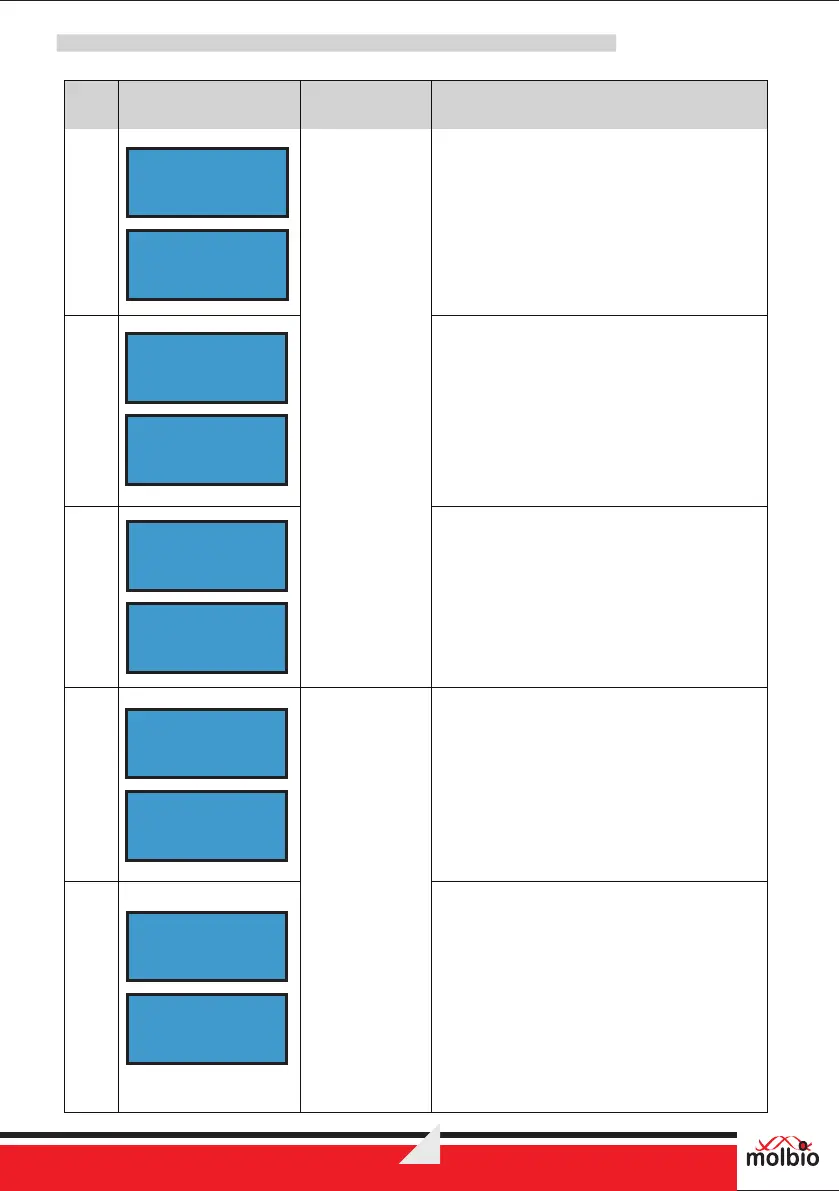
The Screen displays the error message
“E4:USED CARTRIDGE” and instruction
“Press Eject to exit” alternatively.
Solution:
Use new cartridge
E4: USED
CARTRIDGE
Press Eject
to exit
E5
E6
E5:EXPIRED
CARTRIDGE
The Screen displays the error message
“E 5 : E X P IR E D CA R T R ID G E ” a n d
instruction “Press Eject to exit” alternatively.
Solution:
Check the Expiry Date of cartridge
The Screen displays the error message
“E6:CARTRIDGE NOT LOADED” and
instruction “Press Eject to exit” alternatively.
Solution:
Contact Molbio’s support team
Press Eject
to exit
E6:CARTRIDGE
NOT LOADED
Press Eject
to exit
Reagent Pack
Errors and
Warnings
E7
E8
E7:EXPIRED
RESET CARD
The Screen displays the error message
“E7:EXPIRED RESET CARD” and
instruction “Press Eject to exit” alternatively.
Solution:
Check the Expiry Date
The Screen displays the error message
“E8:USED RESET CARD” and instruction
“Press Eject to exit” alternatively.
Solution:
Use new Reset card
Press Eject
to exit
E8: USED
RESET CARD
Press Eject
to exit


 To Next Page