16
®
®
Trueprep AUTO v2
E9
Error
Code
Display message
Error
Type Description
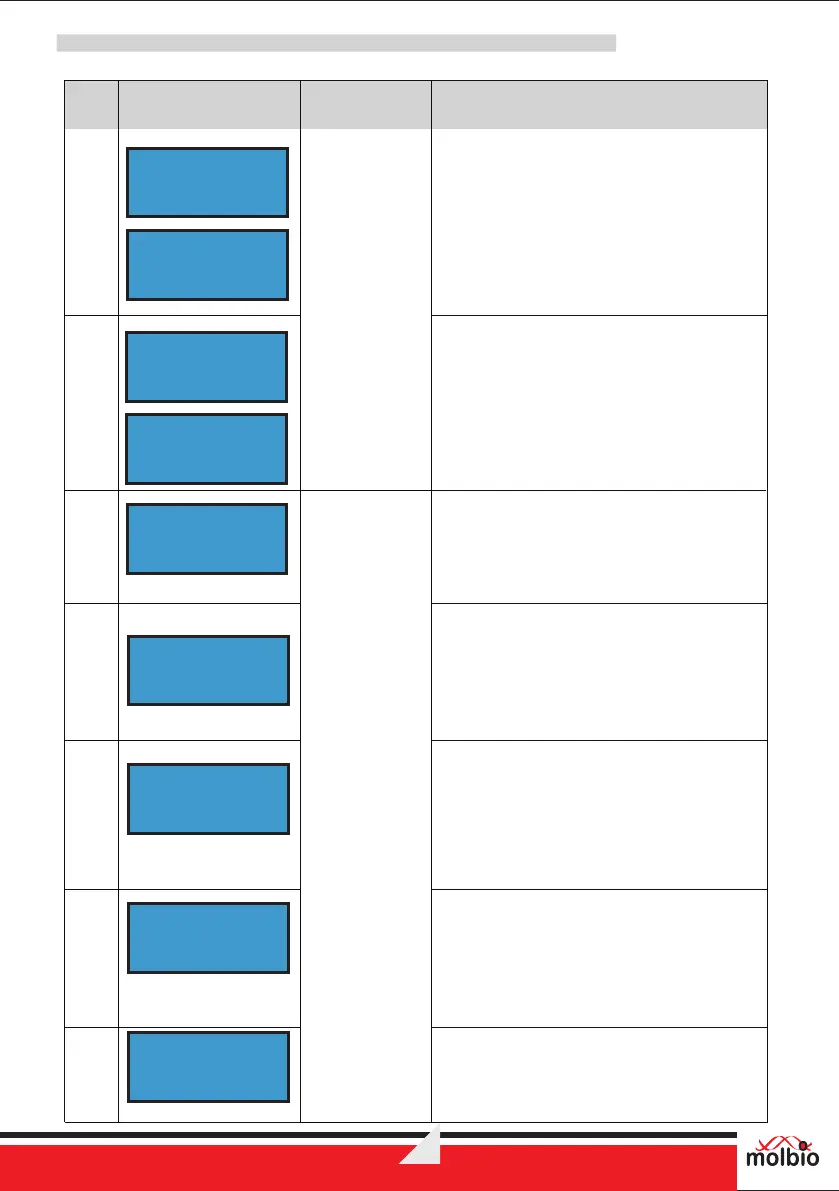
The Screen displays the error message
“E9: RESET CARD READ ERROR” and
instruction “Press Eject to exit” alternatively.
Solution:
Contact Molbio’s support team
RESET CARD
READ ERROR
Press Eject
to exit
E10
W1
E10: INVALID
RESET CARD
The Screen displays the error message
“E10:INVALID RESET CARD” and
instruction “Press Eject to exit” alternatively.
Solution:
Contact Molbio’s support team
The Screen displays the alert message
“W1:SBC NOT RESPONDING” for 2
seconds.
Solution: Contact Molbio’s support team
Press Eject
to exit
W1:SBC
NOT Responding
Reagent Pack
Errors and
Warnings
E11
E11:RTD-
L ERROR
E12
The Screen displays the error message
“E12:RTD- E ERROR”
Note: This is for Elution Heater
E11:RTD-
E ERROR
Device
Errors and
warnings
E11
The Screen displays the error message
“E11:RTD-L ERROR”
Note: This is for Lysis Heater
Solution:
Contact Molbio’s support team
E11:RTD-
L ERROR
E12
The Screen displays the error message
“E12:RTD- E ERROR”
Note: This is for Elution Heater
Solution:
Contact Molbio’s support team
E12:RTD-
E ERROR
W2
The Screen displays the alert message
“W2:UNABLE TO READ CARTRIDGE” for
2 seconds
Solution:
Contact Molbio’s support team
W2:UNABLE TO
READ CARTRIDGE
W3
The Screen displays the alert message
“W3:BATTERY LOW! CONNECT
CHARGER” until charger is connected.
W3:BATTERY LOW !
CONNECT CHARGER


 To Next Page