11
BRAKE BELT CONTACT SURFACE AND BRAKE BELT
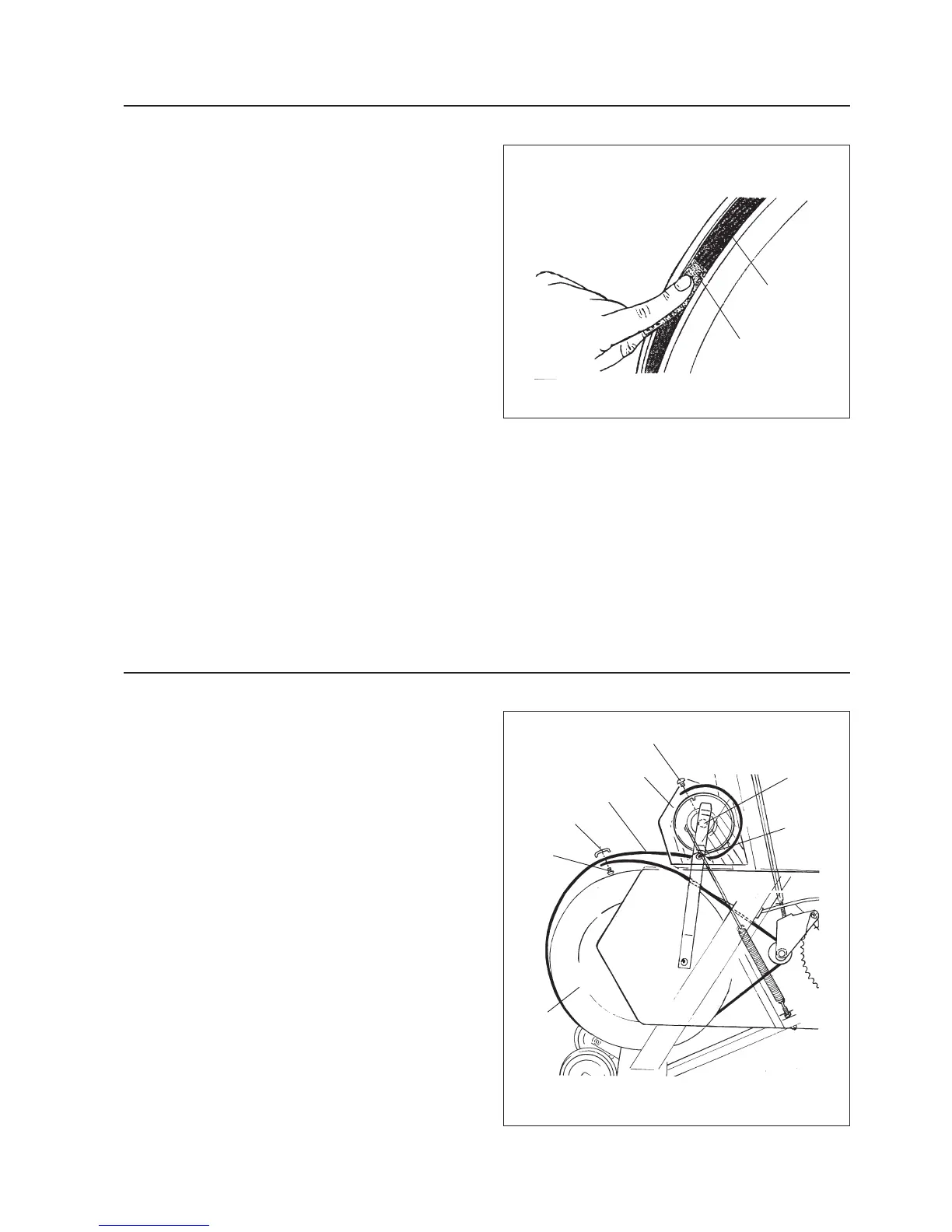
Deposit of dirt on the brake belt and on the contact
surface may cause the unit to operate unevenly. The
brake belt contact of the flywheel surface should then
be ground off with a fine abrasive cloth, see fig 13, and
any dust be removed with a clean dry cloth
Remove the brake belt before the grinding. Grinding
off any build up of dust etc is easier if a second indivi-
dual cautiously pedals the cycle
Irregularities on the brake belt contact surface are also
removed by means of a fine abrasive paper or an abra-
sive cloth. Otherwise unnecessary wear on the brake
belt may occur and the unit can become noisy.
We recommend you to replace the brake belt when
cleaning the contact surface. See fig 14.
Always keep the brake belt contact surface clean and
dry.
REPLACEMENT OF BRAKE BELT
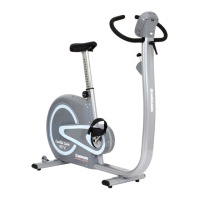
Loosen the screws (2 pcs) of the cover. See fig 14.
Remove the left chain cover as described on page 12.
Adjust the handwheel so that there is no tension in the
brake belt.
Loosen the screw underneath of the joint clamp. See
fig 14.
Loosen the screw for the fastening of the brake belt.
Replace the brake belt and assemble the other parts in
the reversed order according to the above.
Note! Too big a play in the bearing of the watt scale may
cause an uneven operation of the load device, The nut for
the bearing bolt should then be tightened. See fig 14. Make
sure that it is not tightened too much as it may then ope-
rate slowly.
Fig 13
Fig 14
Brake belt
contact
surface
Abrasive
cloth
Nut
Screw for
cover
Screw
Cover
Brake belt
Joint clamp
Screw
Flywheel


 To Next Page