One-Net/DASDEC User Manual 2-5v3.0 | r0616
GENERAL PURPOSE INPUT/OUTPUT (GPIO)
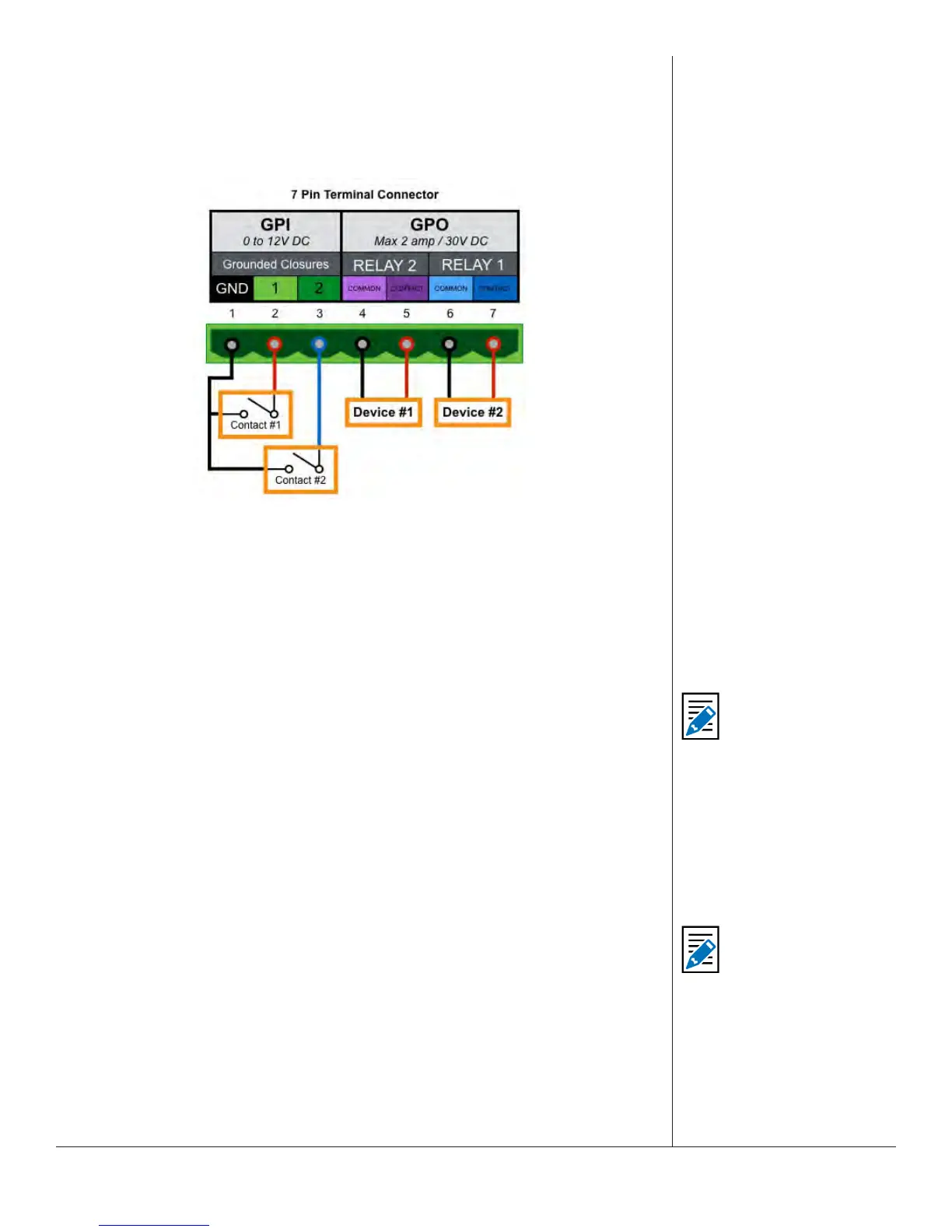
The EAS plaorm comes standard with two General Purpose Input (GPI) contact
closures and two General Purpose Output (GPO) relays. They are located in the upper
middle of the back panel (3) via a 7-pin pluggable terminal connector.
GPIO Terminal Connector
GPO relay outputs are programmable. Triggering can be ltered against specic alert
FIPS Groups and EAS Group codes. Events that can trigger a GPO relay include:
• Remain closed during EAS audio playout
• Momentarily closed at start of EAS audio playout
• Momentarily closed at start of an alert that has been decoded but not forwarded,
• Remain closed if an alert is held or delayed pending a GPI acon.
The EAS device comes with two General Purpose Input (GPI) contact closures. They can
be programmed to trigger a variety of acons, such as:
• Issue a Required Weekly test
• Trigger originaon of an alert header/aenon signal, pausing for voice dub of the
audio message, followed by trigger of the EOM audio
• Review of audio poron of an acve alert
• Acve alert acknowledgment
• Re-enabling of acve alert forwarding capability
• Forwarding of a monthly test with original audio
Addional Expansion GPIO Opons
For installaons that require addional GPIs and GPOs, there are several opons
available that will expand the standard capabilies. An internal GPIO card may
be installed in the PCI expansion slot (6) to enable eight addional GPIs and eight
addional GPOs. If the PCI expansion slot is not available, there are several network
connected GPIO devices, such as the R190a Remote LAN Hub Controller / Net GPIO.
The One-Net and DASDEC plaorms can mix and match any combinaon of internal
and network connected GPIO devices.
Note
See Chapter 5 - GPIO
Setup for more
informaon and
available funcons.
Note
See Chapter 5 - Net
Alerts Setup > Hub
Controller/Net GPIO.


 To Next Page