One-Net/DASDEC User Manual 2-6v3.0 | r0616
SERIAL PORT WIRING
Each EAS device is equipped with one RS232 serial port on the back panel. The serial
ports connect to and drive a variety of external video character generators and
BetaBrite LED signs. The soware supports a wide variety of serial protocols, including
the most commonly used protocols in legacy EAS equipment, such as TFT Standard and
Sage Generic.
An oponal USB/serial port expander can provide up to four addional RS232 serial
ports. This opon is useful when addional character generators and LED signs are
needed.
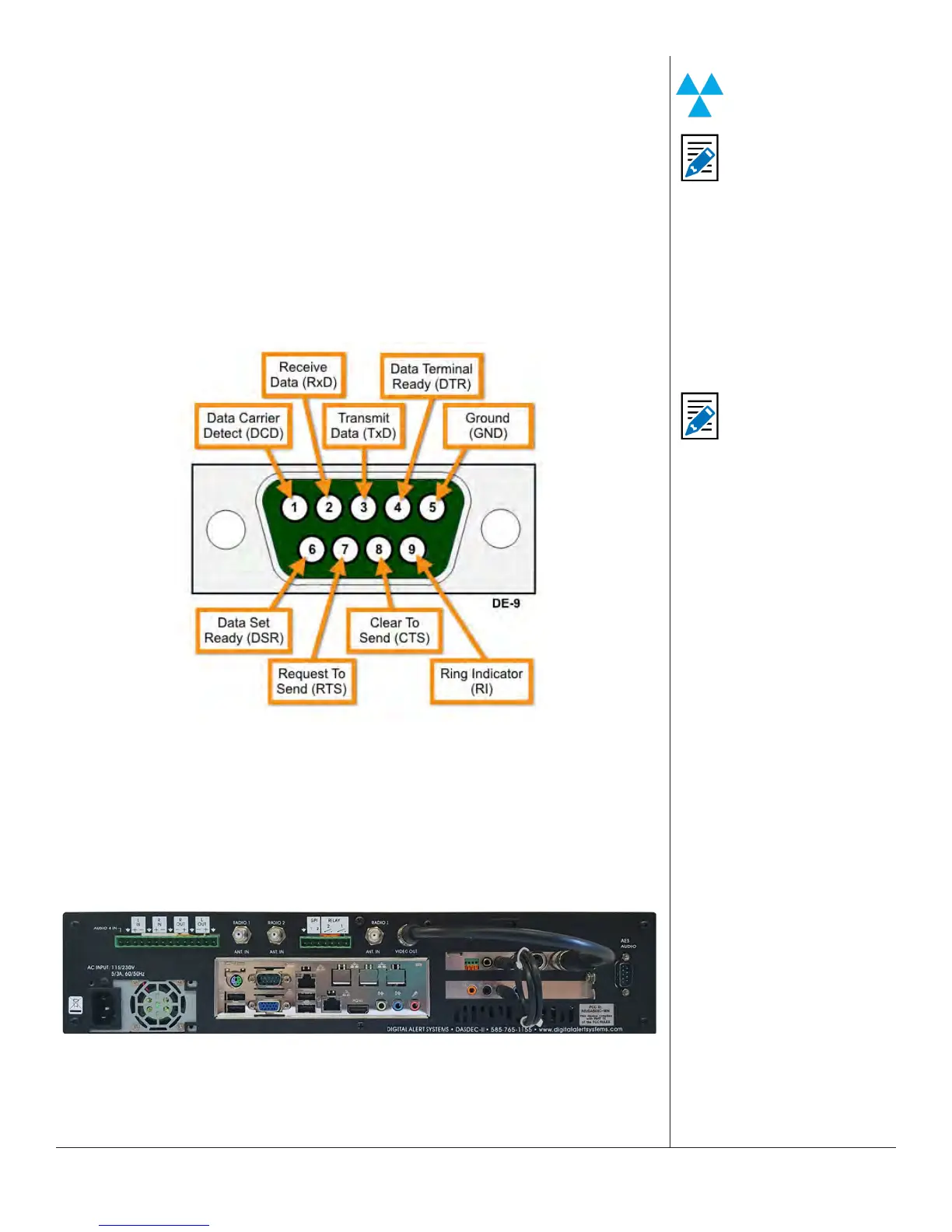
Each serial port has the same pin-out, as shown below.
Serial Port Connecons (Chassis Side)
MPEG ENCODER CARD WIRING
For units equipped with an oponal MPEG2 Encoder card, see the image below for wir-
ing the MPEG2. The video output needs to be loop cabled back into the video input of
the Encoder card. In addion, one audio output needs to be cabled to the MPEG audio
input port.
Oponal MPEG2 Encoder Card Audio/Video Connecons
This feature is specic to
the DASDEC II.
Note
For conguraon of
serial port protocols,
see Chapter 5 - Video/
CG.
Note
Pins 2, 3, and 5 are
the transmit/receive
and ground pins, and
are the minimum
connecons needed
for a serial interface.
Make sure to swap the
transmit and receive
pins (2 and 3) when
making your own
cables.


 To Next Page