Notes:
A.Beforetheactualrecording,itisrecommendedtotryforseveraltimesbyadjustingtheTHRESHOLD,sothatyoucan
getapropervalueintheactualrecording.
B.WhatisthepropervalueofTHRESHOLD?AvaluethatcanallowyoutoactivatetheAUTORECvianormaplaying,and
itcannotbeaffectedbyanyotherunexpectednoise.
C.ltisrecommendedtosetuptheTHRESHOLDeverytimeyouswitchtoanotherinstrument,asdifferentinstruments
havedifferentoutputsignallevel.
D.AUTORECfunctionisforrecordingthefirstlayeronlyandcannotworkwithPLAY/DUB
15
Footswitch:
LOOPERX2allowsvoutosaveaudiofilesinslotsandbanksforuse.suitableformarkingvourcreativesparksor
recordingdifferentpartsofyoursongs.Youcanswitchbetweendifferenttracksseamlesslywhileplaying
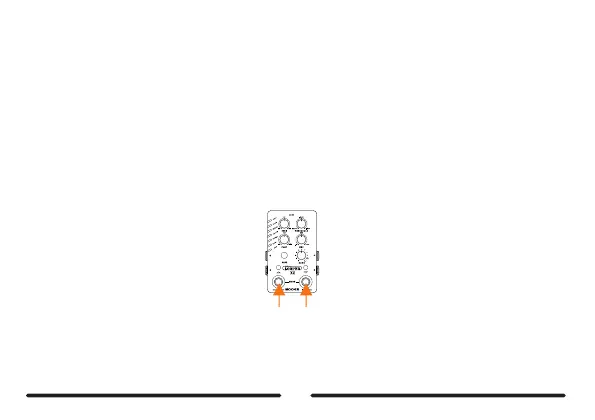
Press2footswitches
Duringplavback,pressthetwofootswitchessimultaneouslytoenterthesavingslotswitchingmode,bothfootswitchLEDs
willblinkinRED.Nowvoucanscrollthroughthesavingslotsvialeft/rightfootswitch,leftfootswitchforscrollingupwhileright
footswitchforscrollingdown.Thefootswitchmodewillbebacktonormalmodeafterbeingidlefor3seconds:oryourcan
presstwofootswitchessimultaneouslyagaintoswitchfootswitchmode.



 To Next Page