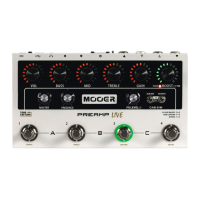
Your PREAMP LIVE may need a firmware update to operate
correctly with the software. If a firmware update is required then boot
PREAMP LIVE into update mode to receive the firmware update from
the computer software.
Ensure PREAMP LIVE is NOT powered on
Connect PREAMP LIVE to a computer via USB
Press and hold footswitches 1 + 2
Connect power to PREAMP LIVE
After PREAMP LIVE has finished booting up, release the footswitches
Open the software to install the latest firmware on your PREAMP LIVE
FIRMWARE UPDATE
Windows and MAC software can be downloaded from
www.mooeraudio.com
Mobile apps are available from and GooglePlay Apple AppStore
26


 To Next Page