www.miinet.comMoore Industries-International, Inc.
- 91 -
User’s Manual
238-741-00K
May 2019
Programmable Smart HART Temperature Transmitter
THZ
3
/ TDZ
3
SECTION 5
THZ
3
/TDZ
3
DTM Parameter in Basic Setup Configuration
Once you have added and connected the DTM’s within PACTware, you are now ready to make
the conguration changes to device parameters that best t your needs. There are 2 views of
the conguration, Basic and Advanced. By default you will be shown the Basic Setup which will
provide conguration for most applications.
If you need to congure the advanced features, then you will need to select the Advanced
Setup menu by clicking on the Advanced Setup icon on the bottom left of the window. To view
Advanced Setup features and functions see the TDZ
3/
THZ
3
DTM Parameter Advanced Setup
Conguration later in this Section.
Note: The Advanced Setup menu contains all the Basic Setup plus the advanced features so
the following Basic Setup description is applicable to Advanced Setup also.
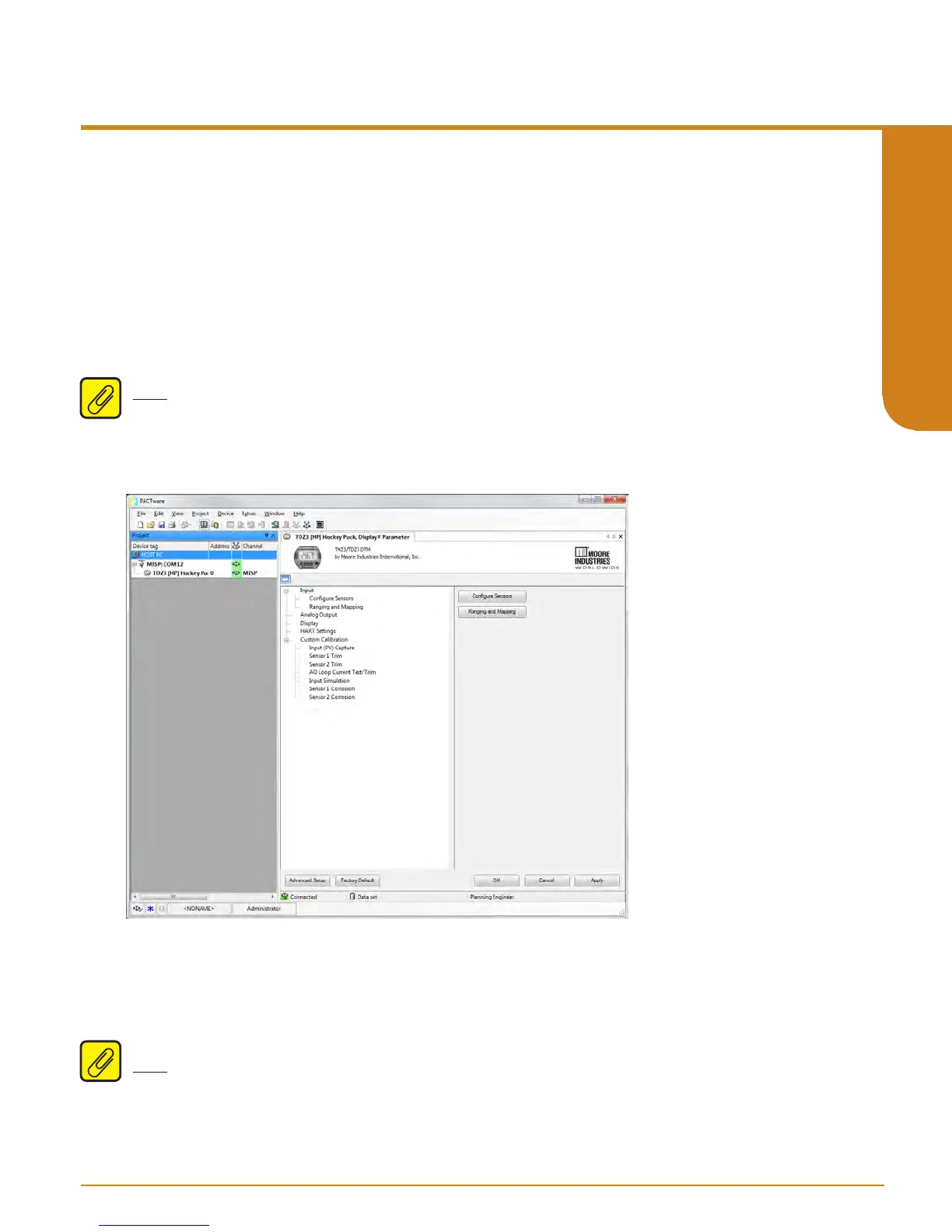
Parameter Menu Configuration
The Parameter Menu page consists of ve main Menu options Input, Analog Output, Display,
HART Settings, and Custom Calibration.
Figure 5.25. THZ
3
/ TDZ
3
Parameters Page Menu for Basic Setup
Note: The Display option will only be active for the TDZ
3
. It will be grayed out for the THZ
3



 To Next Page