Operator’s Manual, Morbark Integrated Control System—Model 20 Chipper
11
Display Module Display Pages
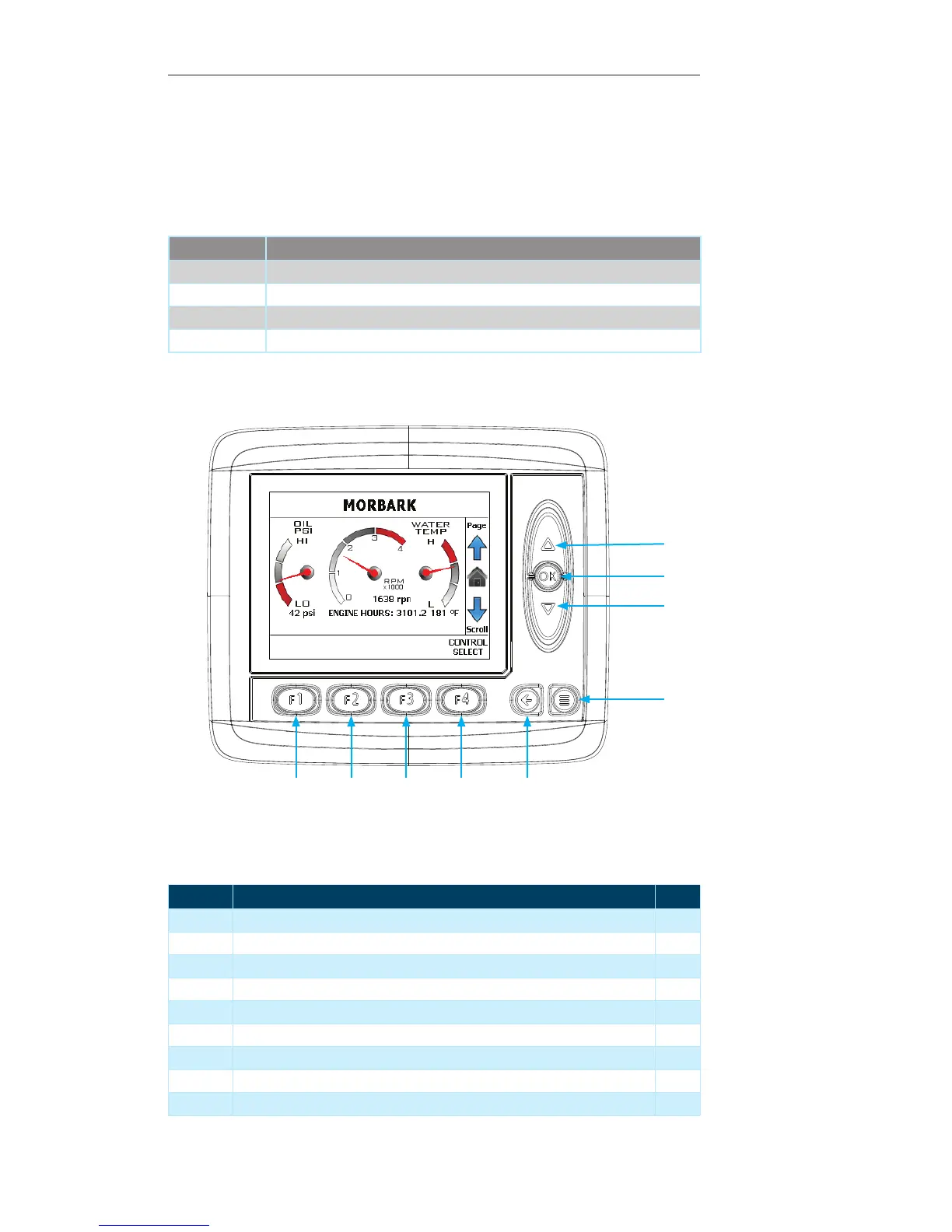
Main Page
This is the first page to be displayed when the panel is powered up. While in the main
“Display Pages” of the system, this page can be reached by pressing the “OK” button,
the “Escape” button or scrolling through the pages using the “UP/Down” arrows.
Contained within this page:
Parameter Unit of Measure
Engine speed RPM
Oil pressure PSI
Water temp ° Fahrenheit
Engine hours Hours
Display Module Navigation
Number Description Page
1 Up Arrow — Press to navigate to the “Engine Info” Page 12
2 OK Button — Not used on the current screen --
3 Down Arrow — Press to navigate to the “Control Devices” Page 14
4 Menu Button — Press to navigate to the “System Menu” 21
5 Escape Button — Not used on the current screen --
6 F4 Button — Press to navigate to the “Control Select” Page* 18
7 F3 Button — Not used on the current screen --
8 F2 Button — Not used on the current screen --
9 F1 Button — Not used on the current screen --
1
3
2
4
56789


 To Next Page