Operator’s Manual, Morbark Integrated Control System—Model 20 Chipper
17
Performance Adjustment Pages
Note: Setting the “AutoFeed
Low Setting” to a value above
the “AutoFeed High Setting” will
cause the Machine to not func-
tion properly.
Caution: Turning the AutoFeed
off could result in plugging the
mill and stalling the Engine. DO
SO AT YOUR OWN RISK.
AutoFeed Settings Page
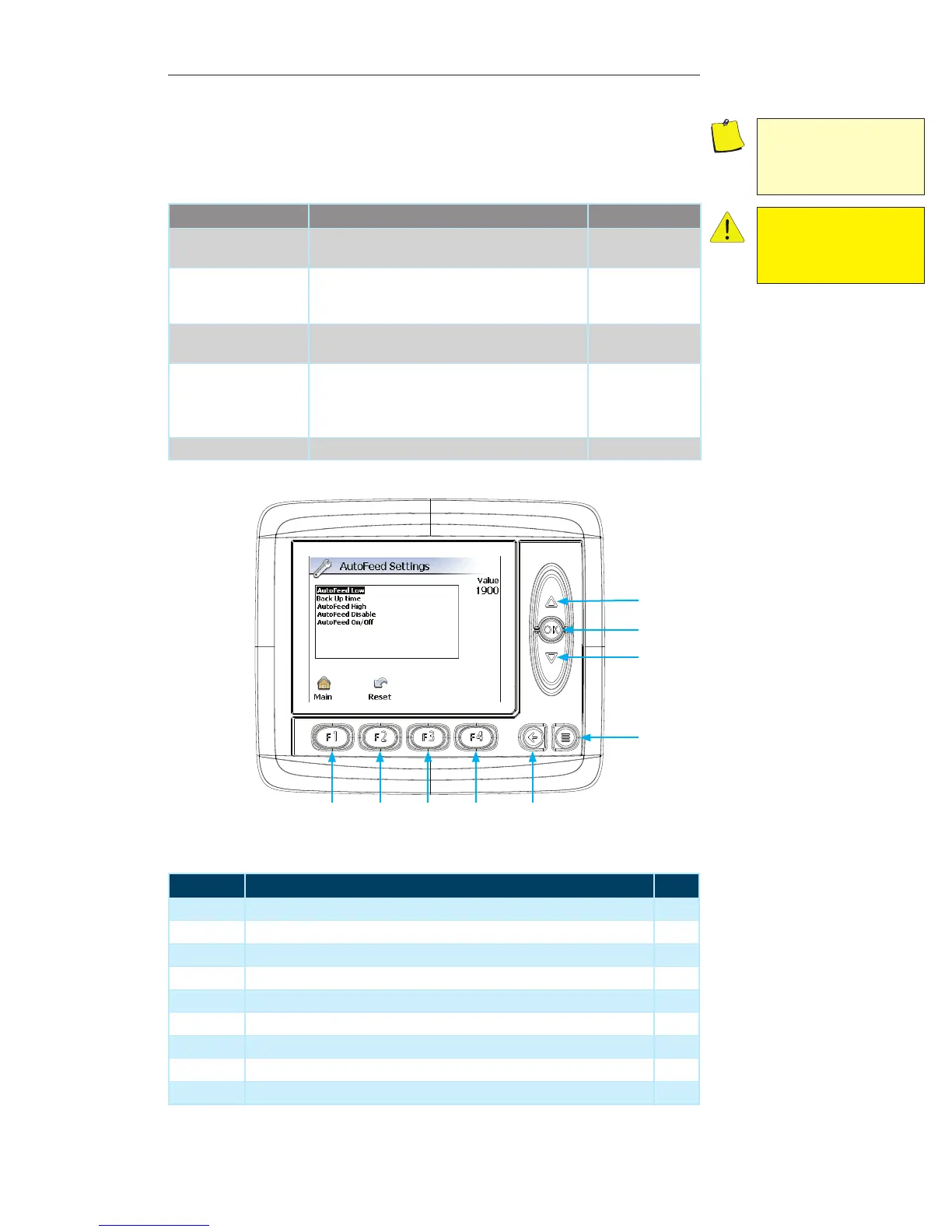
The settings on this page allow performance modification of the Machine’s feed system.
Contained within this page:
Parameter Description Unit of Measure
AutoFeed Low Setting The value that will cause the Machine to stop/
reverse feeding material into the mill.
RPMs
Backup Time The length of time that the feed will reverse, allow-
ing the Engine to recover to performance level and
maintain consistent material output.
Seconds (0-20)
AutoFeed High Setting The value that will allow the Machine to start feed-
ing material into the mill.
RPMs
AutoFeed Disable Setting at which the Machine AutoFeed will inhibit
the Feed System from reversing until the Engine
reaches the AutoFeed High Setting. This setting is
set below the AutoFeed Low Setting.
RPMs
AutoFeed On/Off Toggle the AutoFeed option on and off On / Off
Display Module Navigation
Number Description Page
1 Up Arrow — Press to navigate through the list of options --
2 OK Button — Press to select the desired option --
3 Down Arrow — Press to navigate through the list of options --
4 Menu Button — Press to navigate to the previous “Display Page” --
5 Escape Button — Press to return to the “Main” menu screen 21
6 F4 Button — Not used on the current screen --
7 F3 Button — Not used on the current screen --
8 F2 Button — Press to reset all values to “Factory Default” --
9 F1 Button — Press to return to the “Main” menu screen 21
1
3
2
4
56789


 To Next Page