Display Module Display Pages
Operator’s Manual, Morbark Integrated Control System—Model 20 Chipper
14
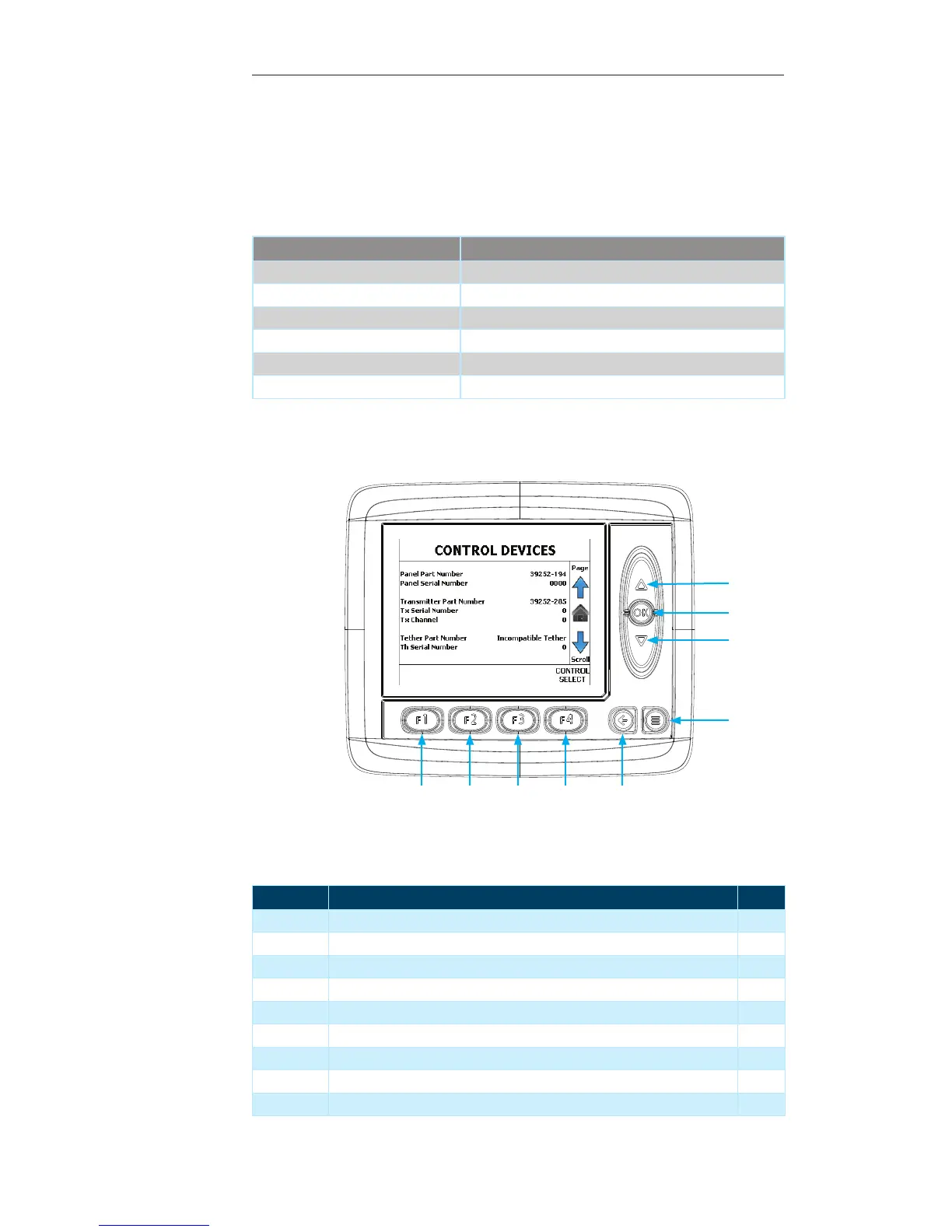
Control Devices Page
This page displays the Part Number, Serial Number and, if applicable, the Channel of
the various Control Devices for the Machine (Control Panel, Radio Transmitter, Tether
Remote.
Contained within this page:
Parameter Information Displayed
Panel Part Number Part Number of the Machine Control Panel
Panel Serial Number Serial number of the Machine Control Panel
Transmitter Part Number Part Number of the Radio Transmitter
Tx Serial Number Serial Number of the Radio Transmitter
Tether Part Number Part Number of the Tether Remote
Tether Serial Number Serial Number of the Tether Remote
Display Module Navigation
Number Description Page
1 Up Arrow — Press to navigate to the “Main” Page 11
2 OK Button — Press to return to the “Main” Page 11
3 Down Arrow — Press to return to the “Feed Control” Page 13
4 Menu Button — Press to navigate to the “System Menu” 21
5 Escape Button — Press to return to the “Main Page” 11
6 F4 Button — Press to navigate to the “Control Select” Page 18
7 F3 Button — Not used on the current screen --
8 F2 Button — Not used on the current screen --
9 F1 Button — Not used on the current screen --
1
3
2
4
56789


 To Next Page