Performance Adjustment Pages
Operator’s Manual, Morbark Integrated Control System—Model 20 Chipper
28
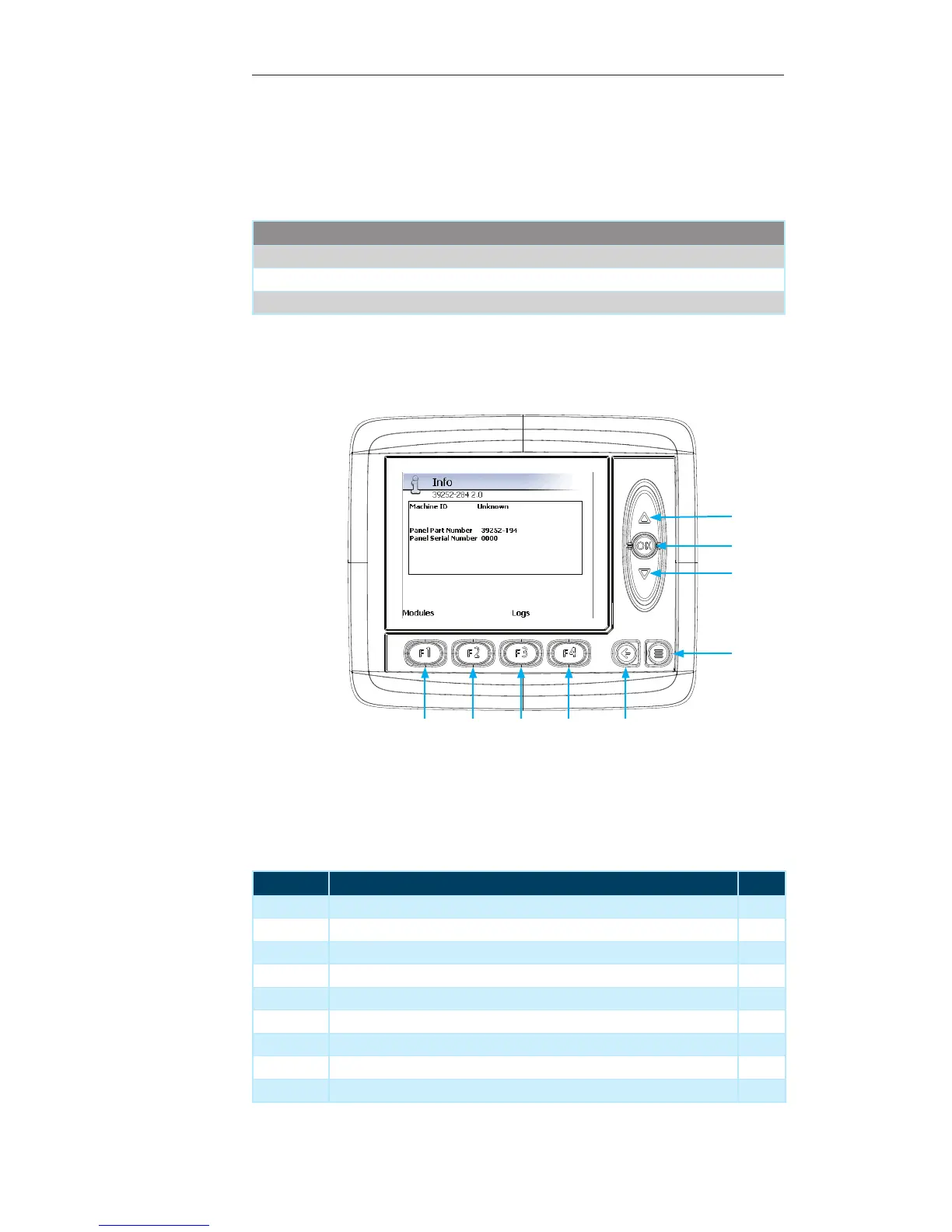
Display Module Navigation
Number Description Page
1 Up Arrow — Not used on the current screen --
2 OK Button — Not used on the current screen --
3 Down Arrow — Not used on the current screen --
4 Menu Button — Press to return to previous “Display Page” --
5 Escape Button — Press to return to the “Main” menu page 21
6 F4 Button — Not used on the current screen --
7 F3 Button — Press to view the “Logs” for the Machine 29
8 F2 Button — Not used on the current screen --
9 F1 Button — Press to display the “Module Info” page 29
Info
The “Info” menu provides quick access to information about the Machine. It also pro-
vides access to the status of all modules connected to the Machine.
Contained within this page:
Parameter
Machine ID
Machine Serial Number
Engine Serial Number
1
3
2
4
56789


 To Next Page