Operator’s Manual, Morbark Integrated Control System—Model 20 Chipper
25
Performance Adjustment Pages
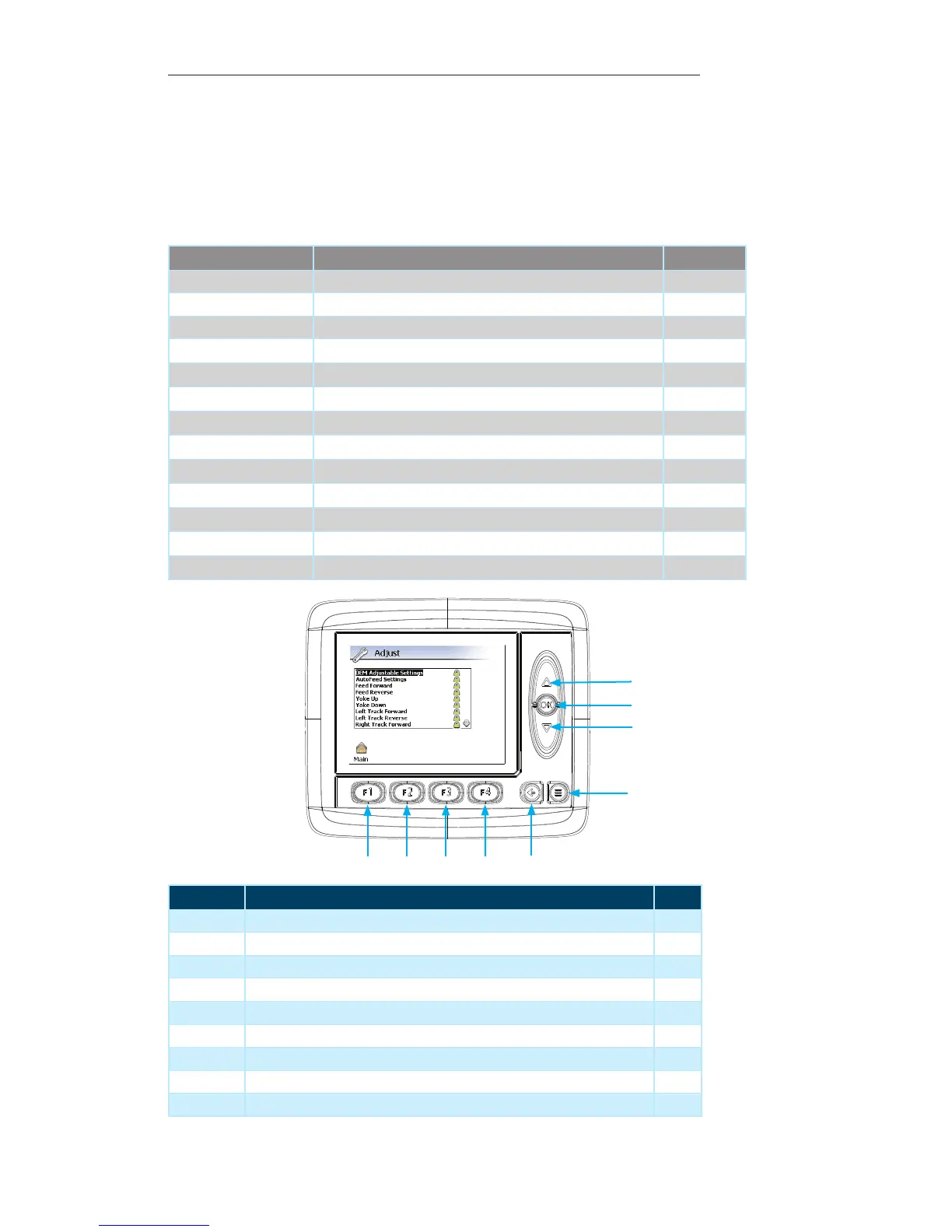
Display Module Navigation
Number Description Page
1 Up Arrow — Press to navigate parameters / increase parameter value --
2 OK Button — Press to select desired parameter / set new parameter value --
3 Down Arrow — Press to navigate parameters / decrease parameter value --
4 Menu Button — Press to return to previous “Display Page” --
5 Escape Button — Press to return to the “Main” menu page 21
6 F4 Button — Not used on the current screen --
7 F3 Button — Not used on the current screen --
8 F2 Button — Not used on the current screen --
9 F1 Button — Press to return to the “Main” menu page 21
Adjust Menu
This page provides access to the various adjustable settings on the Machine. To access
the “Adjust” menu:
Press the “F1” button while on the “Main” menu page. 1.
Contained within this page:
Option Description Page No.
OEM Adjustable Settings These settings are pre-set from the factory.
AutoFeed Settings Settings related to the AutoFeed functionality of the Machine Page 17
Feed Forward These settings are pre-set from the factory.
Feed Reverse
These settings are pre-set from the factory.
Yoke Up
These settings are pre-set from the factory.
Yoke Down
These settings are pre-set from the factory.
Left Track Forward
These settings are pre-set from the factory.
Left Track Reverse
These settings are pre-set from the factory.
Right Track Forward
These settings are pre-set from the factory.
Right Track Reverse
These settings are pre-set from the factory.
Tx Joystick Deadband
These settings are pre-set from the factory.
Th Joystick Deadband
These settings are pre-set from the factory.
Control Select Settings Related to the Control Device(s) for the Machine Page 18
1
3
2
4
5
6
7
8
9


 To Next Page