Operator’s Manual, Morbark Integrated Control System—Model 20 Chipper
21
Performance Adjustment Pages
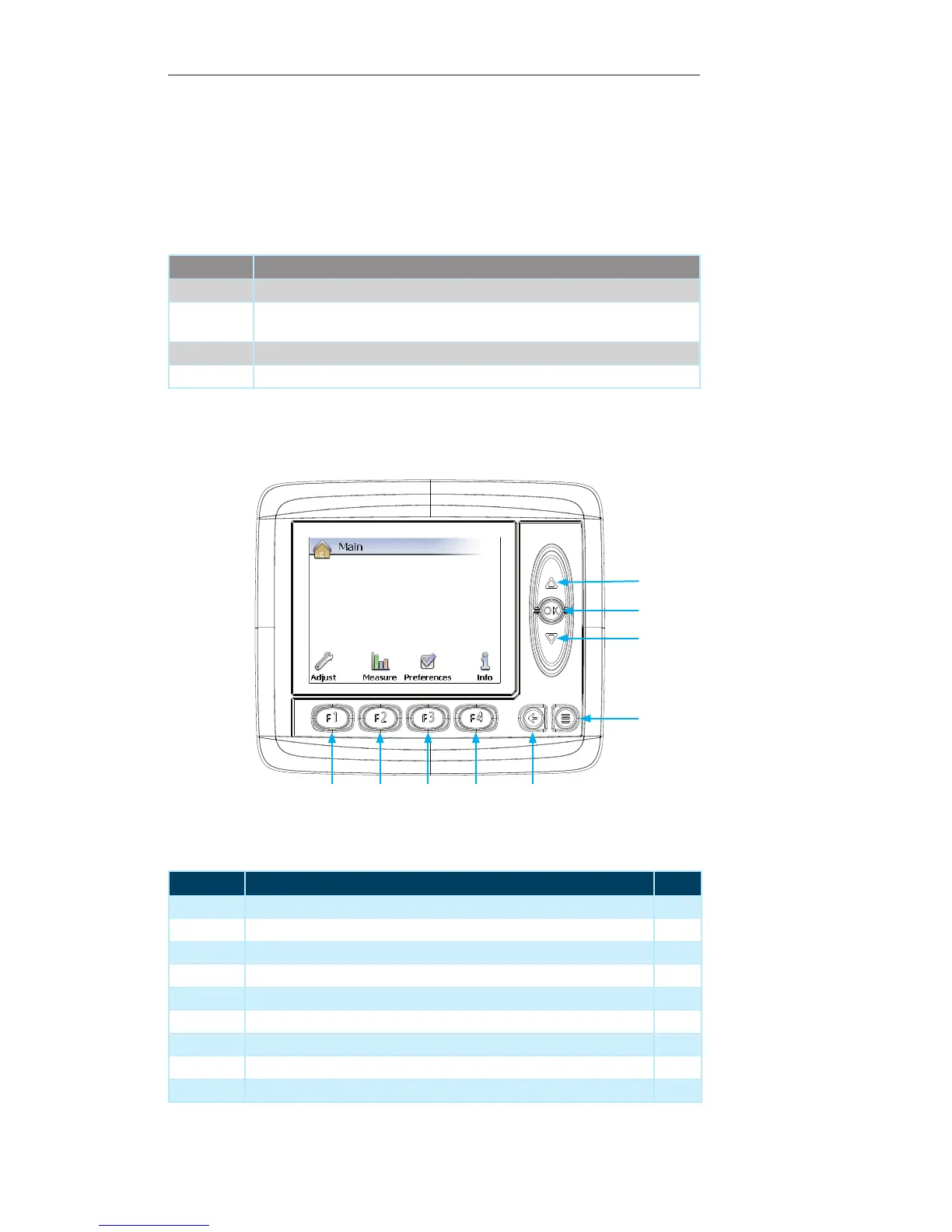
Display Module Navigation
Number Description Page
1 Up Arrow — Not used on the current screen --
2 OK Button —Not used on the current screen --
3 Down Arrow — Not used on the current screen --
4 Menu Button — Press to return to previous “Display Page” --
5 Escape Button — Press to return to previous “Display Page” --
6 F4 Button — Press to navigate to the “Info” sub-menu 28
7 F3 Button — Press to navigate to the “Preferences” sub-menu 27
8 F2 Button — Press to navigate to the “Measure” sub-menu 26
9 F1 Button — Press to navigate to the “Adjust” sub-menu 25
Accessing the Menu
The menu system can be accessed at any time by simply pressing the “Menu” button
located in the lower right corner of the module. Once in the “Main” menu page the
“Function” buttons can be used to access the different sub-menus. These sub-menus
will be discussed in detail later in this section.
Contained within this page:
Menu Description
Adjust This menu provides access to the adjustable parameters for the Machine.
Measure This menu provides access the Machine’s “Measure Groups”. These allow measure-
ments of performance for certain aspects of the Machine.
Preferences This menu allows adjustment of the settings for the Display Module itself
Info This menu provides information related directly to the Machine
1
3
2
4
56789


 To Next Page