Operator’s Manual, Morbark Integrated Control System—Model 20 Chipper
13
Display Module Display Pages
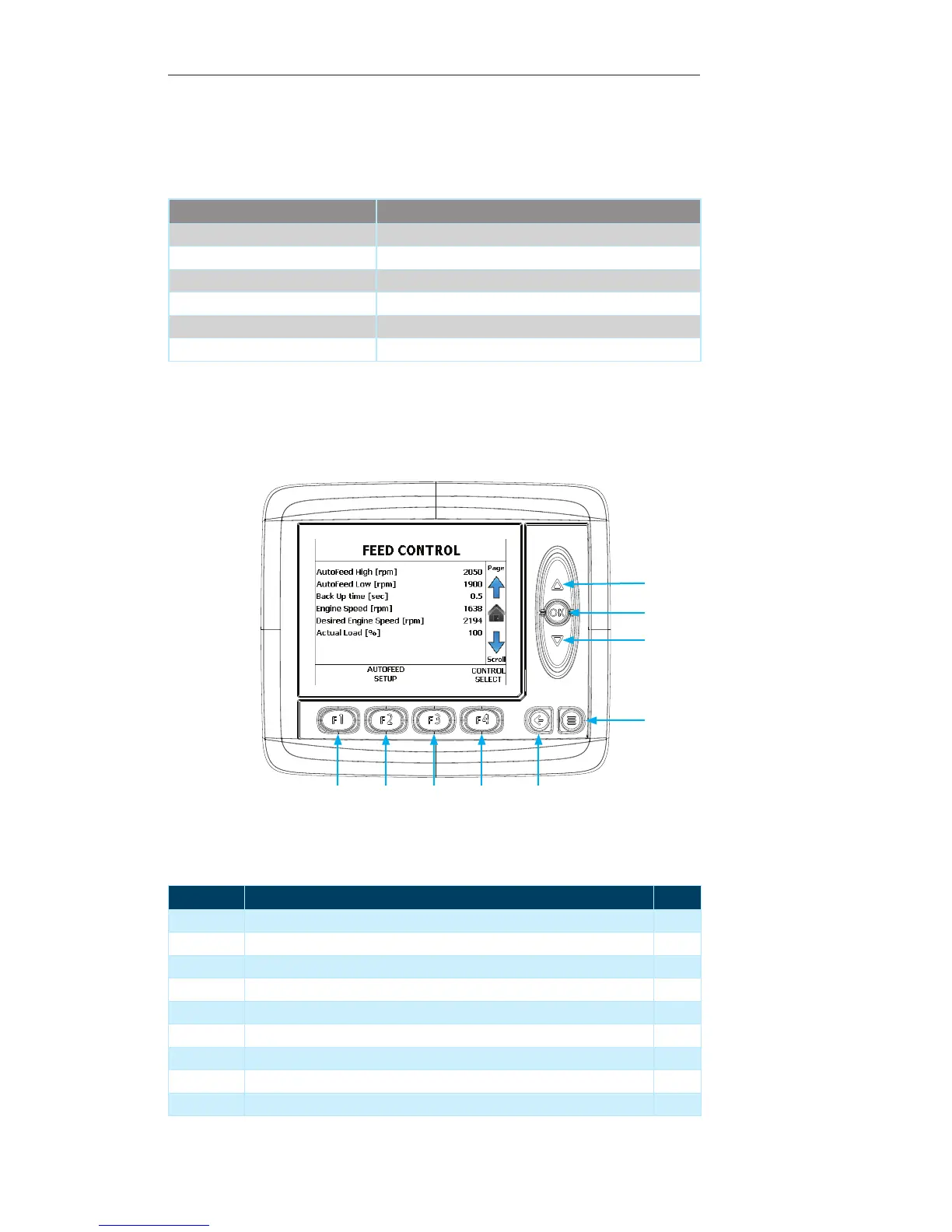
Feed Control Page
This page displays the parameters used to control the Machine’s feed system.
Contained within this page:
Parameter Unit of Measure
AutoFeed high setting RPM
AutoFeed low setting RPM
Backup time Seconds
Engine Speed RPM
Desired Engine Speed RPM
Actual Load Percent
Display Module Navigation
Number Description Page
1 Up Arrow — Press to navigate to the “Control Information” Page 14
2 OK Button — Press to return to the “Main Page” 11
3 Down Arrow — Press to return to the “Engine Information” Page 12
4 Menu Button — Press to navigate to the “System Menu” 21
5 Escape Button — Press to return to the “Main Page” 11
6 F4 Button — Press to navigate to the “Control Select” Page 18
7 F3 Button — Not used on the current screen --
8 F2 Button — Press to navigate to the “Autofeed Setup“ option 17
9 F1 Button — Not used on the current screen --
1
3
2
4
56789


 To Next Page