Performance Adjustment Pages
Operator’s Manual, Morbark Integrated Control System—Model 20 Chipper
18
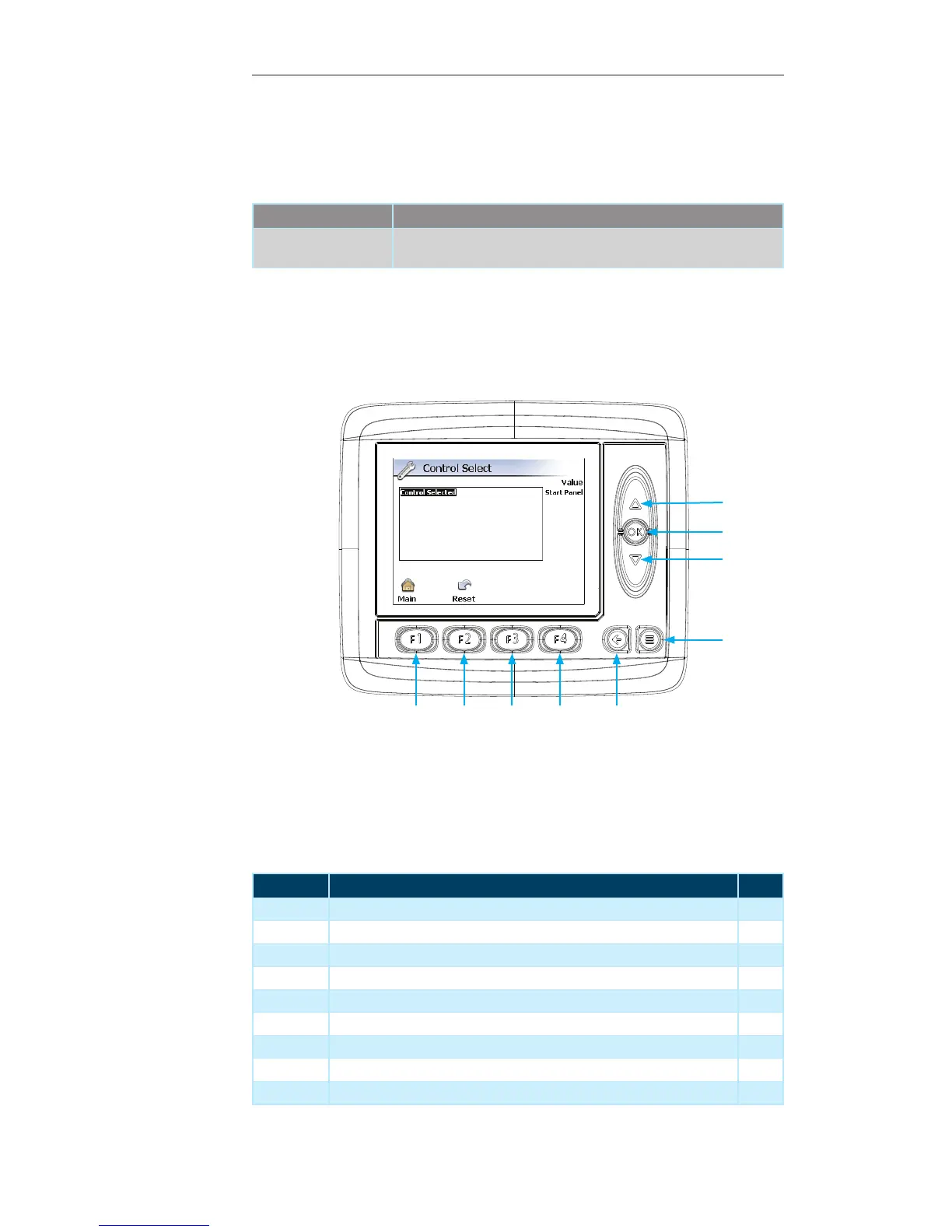
Control Select Page
This page provides the ability to select the desired Control Device for the Machine.
Contained within this page:
Parameter Description
Control Selected This value specifies whether the system will run from the Control Panel,
Radio Remote or Tether Remote.
Display Module Navigation
Number Description Page
1 Up Arrow — Press to navigate through the list of options --
2 OK Button — Press to select the desired option --
3 Down Arrow — Press to navigate through the list of options --
4 Menu Button — Press to navigate to the previous “Display Page” --
5 Escape Button — Press to return to the “Main” menu screen 21
6 F4 Button — Not used on the current screen --
7 F3 Button — Not used on the current screen --
8 F2 Button — Press to reset all values to “Factory Default” --
9 F1 Button — Press to return to the “Main” menu screen 21
1
3
2
4
56789


 To Next Page