Morton
®
System Saver
®
Installation & Operation Manual 13
FIG. 16
When the transformer is plugged into the electrical
outlet, a model code and a test number (example:
J2.0), begin to flash in the faceplate display. Then,
“12:00 PM” and the words “PRESENT TIME" begin to
flash.
NOTE: If “- - - -” shows in the display, press the
p
UP
or
q
DOWN button until the model code
(“Sr19” for Model MSD20F, “Sr22” for Model
MSD27B, “LE31” for Model MSD30D or
“Sr28” for Model MSD34C) shows in the dis-
play. Then, press the SELECT / MENU button
to set, and change to the flashing “PRESENT
TIME" display.
Step 1. Set Time of Day
If the words “PRESENT TIME" do not show in the dis-
play, press the SELECT / MENU button until they do.
1. Press the
p
UP or
q
DOWN buttons to set the
present time. Up moves the display ahead; down
sets the time back. Be sure AM or PM is correct.
NOTE: Press buttons and quickly release to slowly
advance the display. Hold the buttons down
for fast advance.
FIG. 18
Step 2. Set Water Hardness Number
1. Press the SELECT / MENU button once again to
display a flashing “25” and the word “HARDNESS”.
2. Press the
p
UP or
q
DOWN buttons to set your
water’s hardness number.
NOTE: If your water supply contains iron, compen-
sate for it by adding to the water hardness
number. For example, assume your water is
20 gpg hard and contains 2 ppm iron. Add 5
to the hardness number for each 1 ppm of
iron. In this example, you would use 30 for
your hardness number.
20 gpg hardness
2 ppm iron x 5 = 10 +10
(times) 30 HARDNESS NUMBER
Programming the Water Softener
(Models MSD20F, MSD27B & MSD30D)
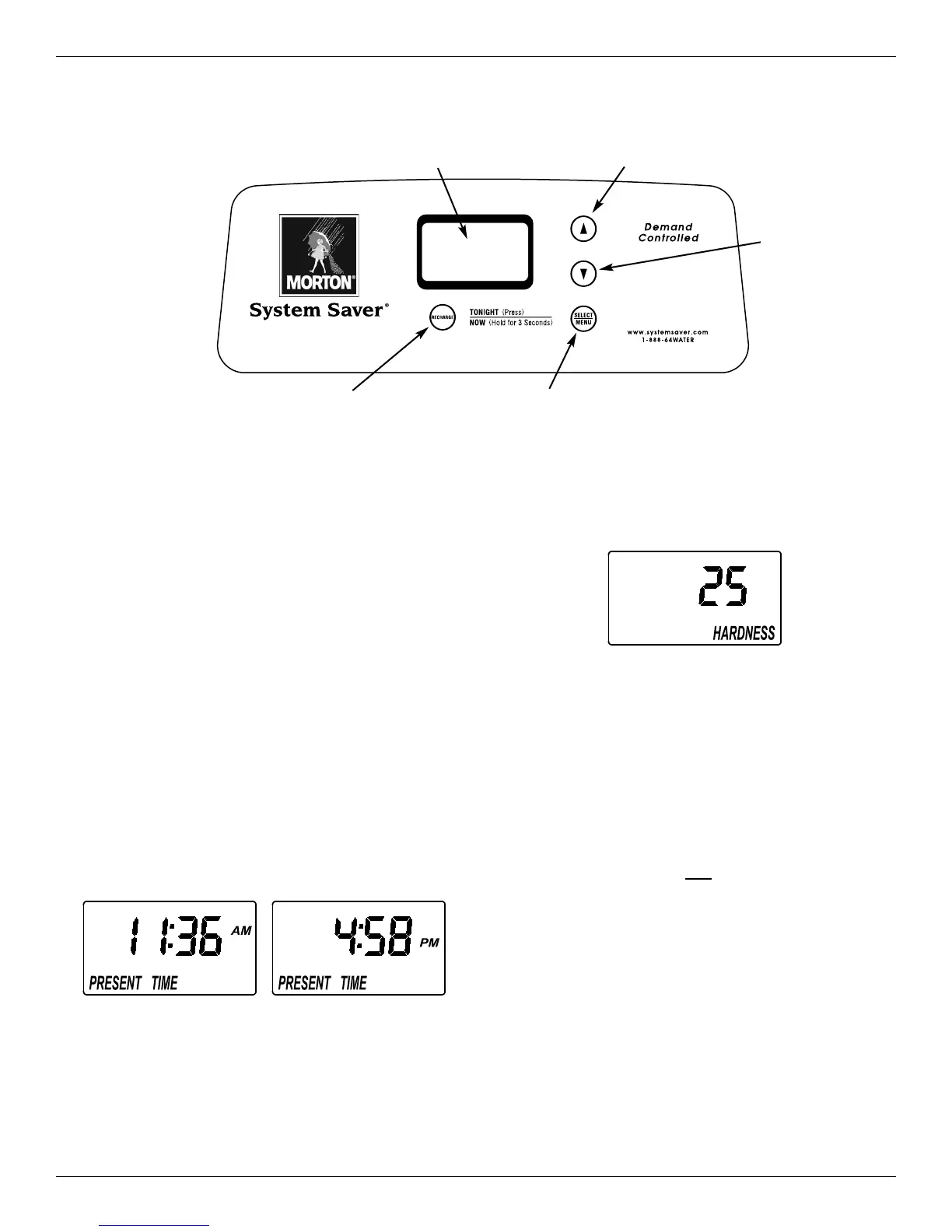
FIG. 17
UP button
Display
RECHARGE button
DOWN button
SELECT/MENU button


 To Next Page