2. If you want to change the recharge start time,
press the p UP or q DOWN buttons until the
desired time shows. Be sure AM or PM is correct.
Step 3. Set Recharge (Regeneration)
Time
FIG. 31
16 Morton
®
System Saver
®
Installation & Operation Manual
Programming the Water Softener
(Model MSD34C)
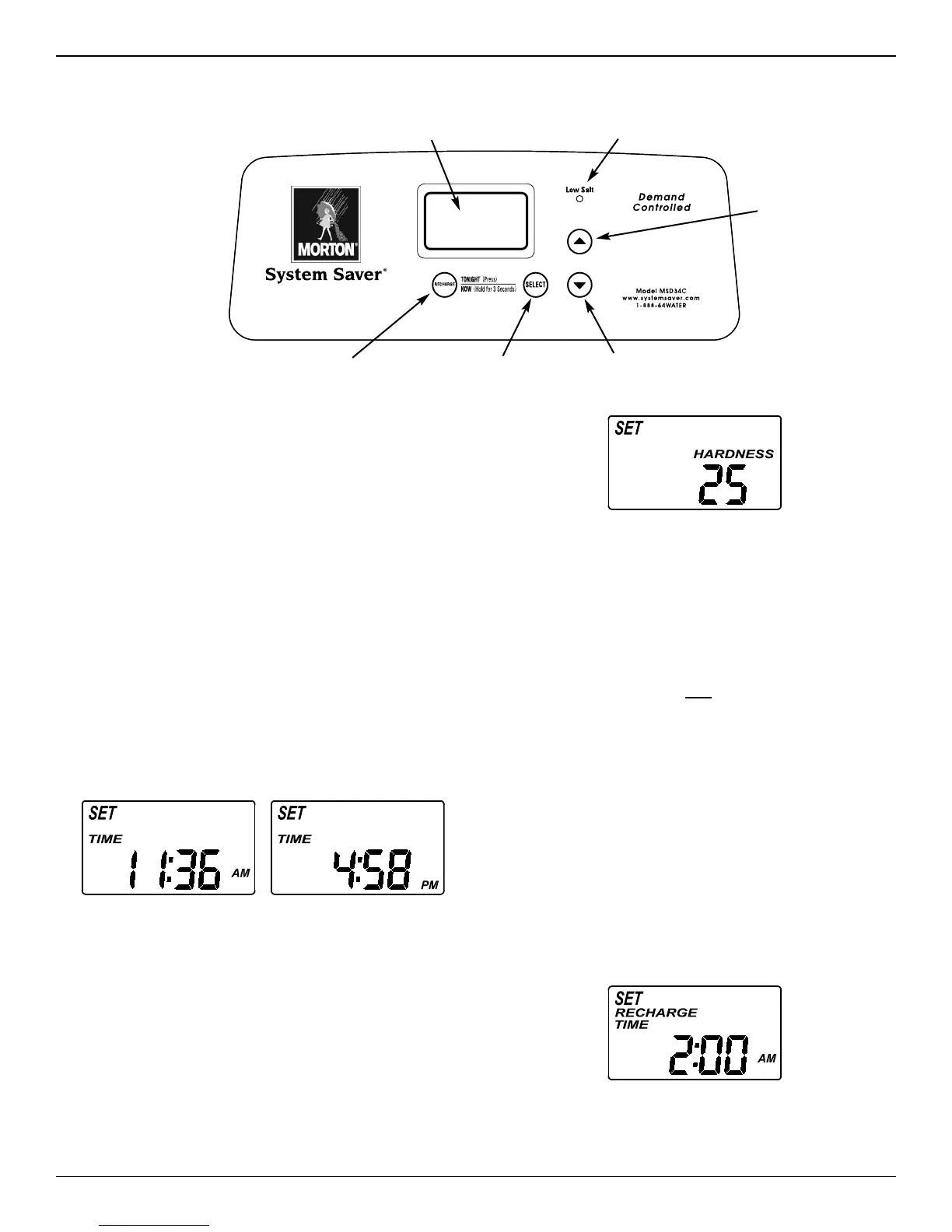
FIG. 29
Low Salt LED Indicator
Display
SELECT button
DOWN button
RECHARGE button
When the transformer is plugged into the electrical
outlet, a model code and a test number (example:
J2.0), begin to flash in the faceplate display. Then,
“12:00 PM” and the words “SET TIME" begin to flash.
NOTE: If “- - - -” shows in the display, press the
p
UP or q DOWN button until the model code
(“Sr19” for Model MSD20F, “Sr22” for Model
MSD27B, “LE31” for Model MSD30D or
“Sr28” for Model MSD34C) shows in the dis-
play. Then, press the SELECT button to set,
and change to the flashing “SET TIME" display.
Step 1. Set Time of Day
If the words “SET TIME" do not show in the display,
press the SELECT button until they do.
1. Press the
p UP or q DOWN buttons to set the
present time. Up moves the display ahead; down
sets the time back. Be sure AM or PM is correct.
FIG. 28
NOTE: Press buttons and quickly release to slowly
advance the display. Hold the buttons down
for fast advance.
Step 2. Set Water Hardness Number
1. Press the SELECT button once again to display a
flashing “25” and the words “SET HARDNESS”.
2. Press the
p UP or q DOWN buttons to set your
water’s hardness number.
NOTE: If your water supply contains iron, compen-
sate for it by adding to the water hardness
number. For example, assume your water is
20 gpg hard and contains 2 ppm iron. Add 5
to the hardness number for each 1 ppm of
iron. In this example, you would use 30 for
your hardness number.
20 gpg hardness
2 ppm iron x 5 = 10 +10
(times) 30 HARDNESS NUMBER
FIG. 30
UP button
Your demand water softener will automatically regener-
ate when it needs to, based on water usage. The time
of day that the automatic recharge cycle begins may
be changed as follows:
1. Press the SELECT button once again to display a
flashing “2:00AM” and the words “SET RECHARGE
TIME”. This is a good time for the recharge to start
in most households, because water is not in use.


 To Next Page