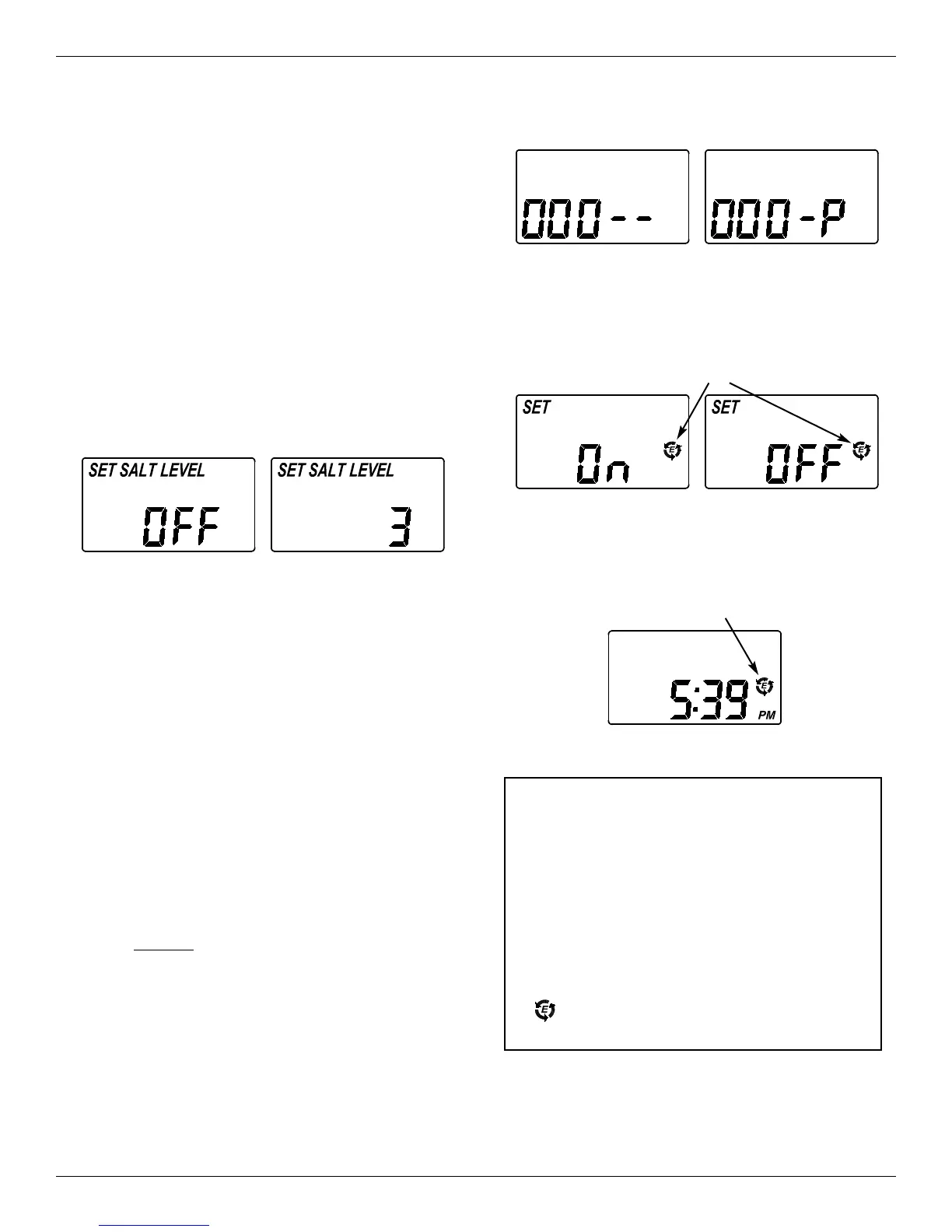
FIG. 33
2. Press the p UP or q DOWN buttons to set ON or
OFF. When set to ON, the efficiency icon will be
displayed on the right hand side of the normal run
display.
FIG. 34
Efficiency Icon
3. Press the SELECT button three times, to return to
the normal run display (See Figure 35).
FIG. 35
Displayed when efficiency
is set to “ON”
Your Morton Water Softener has a “High
Efficiency” feature with an ON or OFF setting.
This softener setting is shipped in the OFF posi-
tion, which utilizes the maximum rated capacity
while most often achieving maximum salt effi-
ciencies. When installing this unit in the State of
California, you MUST turn this setting to the ON
position, which may initiate more frequent
recharges. However it will operate at 4000
grains per pound of salt or higher.
If you wish to turn the Salt Efficiency feature ON
( icon will show in the display), follow the
instructions on this page.
California Efficiency Requirement
Questions? Call Toll Free 1-888-64 WATER (1-888-649-2837)
Monday- Friday, 8 AM - 7 PM EST
or visit www.systemsaver.com
When you call, please be prepared to provide the model and serial number,
found on the rating decal, typically located inside the faceplate cover, near the back.
Morton
®
System Saver
®
Installation & Operation Manual 17
Programming the Water Softener
(Model MSD34C)
Step 4. Set Salt Level
The water softener has a low salt indicator light to
remind you to refill the storage tank with salt.
NOTE: You must set salt level each time salt is added
to the water softener.
To set this monitor system:
1. Lift the salt hole cover and level the salt in the stor-
age tank.
2. The yellow salt level decal, on the brinewell inside
the tank, has numbers from 0 to 8. Observe the
highest number the leveled salt is at, or closest to.
3. Press the SELECT button to display a flashing
“OFF” and the words “SET SALT LEVEL”.
FIG. 32
4. Press the p UP button until the number on the
screen corresponds to the salt level. At level 2 or
below, the “Low Salt" LED indicator will flash. If
you wish to turn this feature off, press the
q
DOWN button past 0, and the word “OFF” flashes
in the display.
5. Press the SELECT button once more to complete
the initial programming. The current time of day
will show in the display.
Step 5. Set Salt Efficiency
When this feature is ON, the water softener will oper-
ate at salt efficiencies of 4000 grains of hardness per
pound of salt or higher (May recharge more often
using smaller salt dosage and less water). The sof-
tener is shipped with this feature set OFF.
1. Press and hold the SELECT button until one of the
screens in Figure 33 is displayed. Once in this dis-
play, press the SELECT button once and one of
the two displays in Figure 34 is shown.


 To Next Page