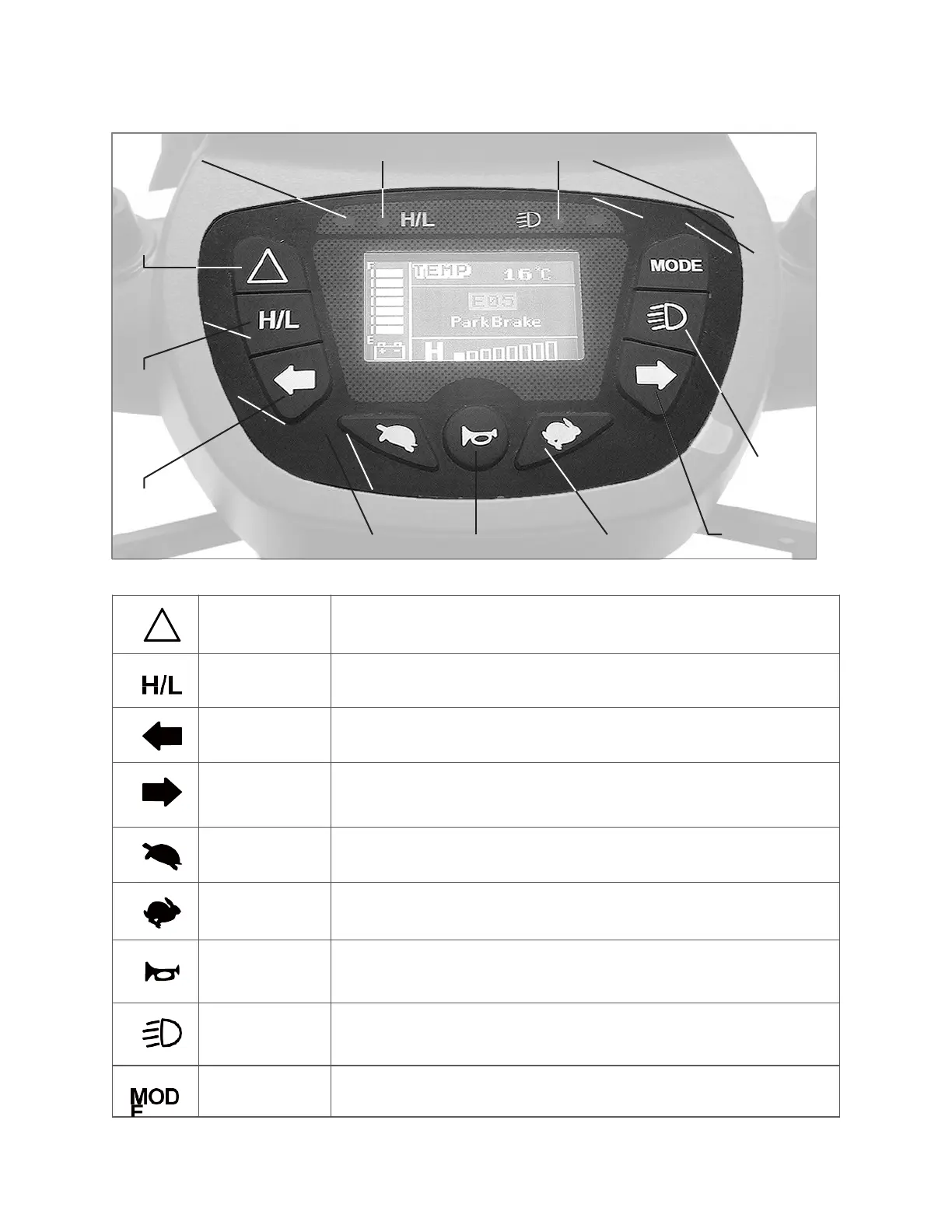
2. IDENTIFICATION OF CONTROL PANEL
Press the Hazard lights button once to switch on, press again to
switch off
High / Low mode, see section 4-2
Press the turn signal button once to switch on, press again to switch
off (switches itself off automatically after 30 seconds)
Press the turn signal button once to switch on, press again to switch
off (switches itself off automatically after 30 seconds)
Press low speed button once to decrease speed, the minimum
speed is 1
Press acceleration button once to increase speed, the maximum
speed is 8
Press horn button once to sound warning tone when necessary.
Press headlight switch to turn on headlight and taillight.
Press mode setting button to set different mode.
Left Turn Indicator H/L Speed Indicator
Headlight Indicator Right Turn Indicator
Figure 5 - Sutton Control


 To Next Page