
 Need help?
Do you have a question about the Movo SUTTON and is the answer not in the manual?
Familiarize with operation, follow traffic rules, and drive safely.
Observe slope limits, manage weight, and avoid climbing hazards.
Adhere to load limits, avoid water, and understand EMI risks.
Identifies various parts of the mobility scooter using diagrams.
Explains control panel functions and basic setup procedures.
Operate power, lights, and turn signals for safe mobility.
Understand sleep mode entry and horn operation.
Control speed, tiller, seat, and armrest positions.
Using the N-D lever for manual movement or driving.
Secure the scooter for transport and understand disassembly steps.
Monitor battery status and follow charging procedures.
Perform regular checks for safe and proper scooter operation.
Inspect seat, electronics, and clean the scooter regularly.
Maintain scooter for good running order and proper storage.
Guidelines for recycling and estimated product service life.
Steps to resolve issues when the scooter fails to move.
Interpreting error codes for diagnosis and resolution.
Addressing common problems like tire pressure and charger issues.
The Movo Mobility Scooter is designed to provide transportation both indoors and outdoors, emphasizing safety and comfort. This user guide outlines its operation, maintenance, and important precautions to ensure a satisfactory experience.
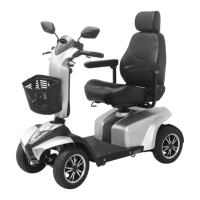
The Movo Mobility Scooter is a motorized personal mobility device. It is designed for a single occupant and provides a means of transport for individuals who may have difficulty walking long distances. The scooter is equipped with a control panel that allows the user to manage speed, lighting, and other functions. It features a key switch for turning the scooter on and off, and a throttle lever for acceleration and braking. The scooter can be operated in both high and low-speed modes, with indicators on the control panel to show the current speed setting and battery level. For safety, it includes hazard lights, turn signals, headlights, and a horn. The scooter also has an emergency hand brake and an electro-mechanical braking system that engages automatically when the throttle is released.
General Operation: To start the scooter, turn the key to the right. To turn it off, turn the key to the left. The scooter should always be turned off before getting on or off to prevent accidental activation. The speed control dial allows users to adjust the maximum speed, with a recommendation to start at the lowest speed and gradually increase it as familiarity grows. The throttle lever controls movement: pulling the right throttle moves the scooter forward, and pulling the left throttle moves it backward. Releasing both throttles activates the brakes, slowing the scooter to a stop, and the brake light will illuminate for 5 seconds.
Control Panel: The control panel features indicators for left and right turn signals, H/L speed mode, headlight, and hazard light. It also displays temperature, error codes, and park brake status. Buttons are provided for activating hazard lights, switching between high and low-speed modes, engaging turn signals, adjusting acceleration and deceleration, sounding the horn, and controlling the headlight. A "Mode Setting" button allows users to cycle through display modes such as TIME, TEMP, ODO (odometer), and TRIP (trip meter).
Adjustments for Comfort: The scooter offers several adjustable features for user comfort. The tiller angle can be adjusted by pulling the tiller adjustment lever downwards and releasing it at the desired position. The seat can be swiveled left or right by pulling the swivel lever upwards. For fore-aft adjustment, a lever allows the seat to be moved to a comfortable position. The armrests are also adjustable for angle, height, and width, using screws and thumbscrews. Armrests can be pulled up to facilitate getting on and off the scooter.
Freewheeling Mode: The scooter has an N-D (Neutral-Drive) lever. When in the Neutral (N) position, the scooter can be moved manually without power. In the Drive (D) position, the scooter is ready to be driven. Freewheeling is only recommended on flat surfaces, and the scooter should never be left on a gradient with its motors disengaged. When adjusting the N-D lever, the user should not be seated on the scooter, and the scooter must be turned off before switching to D and restarting.
Lighting: The scooter has four light modes: On (default), Off, Head Light, and 3-Stage. These can be set via the control panel. If any headlight or taillight faults occur, the panel indicator will flash for 5 seconds when the headlight switch is pressed, indicating a need for dealer assistance.
Sleep Mode: The scooter will enter Sleep Mode with a long beep warning sound if no throttle activity is detected for a programmable period (default is 30 minutes). In Sleep Mode, the power/self-diagnostic warning light on the control panel will be off, and the scooter will not respond to commands. To reactivate the scooter, turn the power (key) off and then on again.
Safety Precautions: Users are advised to familiarize themselves with the scooter's operation before driving, evaluate their personal condition, and read the entire instruction booklet. It is crucial to observe all pedestrian and road rules. The scooter should not be operated under the influence of alcohol or medication, and driving at night should be avoided if possible. When turning, reduce speed and maintain a stable center of gravity to prevent tipping. The scooter is designed for a single occupant; carrying passengers is not permitted. When driving on inclines, adjust body weight for stability and use the slowest speed possible when descending. Avoid driving on slopes exceeding the rated limit or over obstacles that are too high. Do not use the scooter on escalators or make sharp turns. The scooter should never be in freewheel mode on an incline or decline, and the N-D lever must be locked firmly in the "DRIVE" position when parked.
Electromagnetic Interference (EMI): Mobility scooters can be susceptible to EMI from sources like radio stations, TV stations, and mobile phones, which can cause unintended movements or brake releases. Users are warned not to operate hand-held transceivers or turn on personal communication devices while the scooter is on. Awareness of nearby transmitters and avoiding close proximity to them is also advised. If unintended movement or brake release occurs, the scooter should be turned off immediately. Adding accessories or modifying the scooter may increase its susceptibility to EMI.
Daily Checks: Before each journey, users should perform a daily check. This includes verifying the correct function of the N-D lever, horn, and throttles. The electro-mechanical brake and emergency hand brake should be tested. The battery gauge should be checked, and if the power is low or the red light is flashing (indicating less than 3km of buffering power), the battery should be recharged immediately. Rear mirrors should be clean and firmly tightened. All lights (headlights, rear lights, turn signals) must be functioning correctly.
Weekly Checks: Weekly maintenance involves checking the speed dial knob for correct function. Armrests should be clean, firmly tightened, and not wobble. Tires need to be inflated to the correct pressure (35-40 psi), drive wheels should rotate without wobbling, tire tread depth must be at least 0.5mm, and there should be no foreign objects in the tires. The motor should be checked for correct function, and the battery charger should be verified to be working correctly and charging the batteries.
Monthly Checks: Monthly inspections include checking the seat and upholstery for movement or wear. All battery cables and connectors should be firmly tightened to the scooter.
Cleaning: The scooter should be cleaned with a damp cloth and gentle detergent. Abrasive or scouring liquids should not be used. Avoid using a hose pipe or splashing water directly onto the scooter, as this can damage the electronics. For seat upholstery, only a damp cloth and a little soap should be used; abrasive cleaners will damage the seat.
Battery and Charger Information: The scooter uses 12V lead-acid batteries, which must be fully charged before first use and recharged after each day's use. The key should not be on while charging. Batteries should be charged after each trip using the supplied charger (under 5Amps). If the scooter is not used for some time, batteries must be recharged at least once every three months. For optimal performance, batteries need to be used and recharged up to 10 times. The charging cycle should not be interrupted until complete (charger indicator turns green). Charging time can vary up to 15 hours. Charging should occur between 0°C and 40°C. Regular recharging helps prolong battery life. The charger should be unplugged after the battery is fully charged to prevent slow discharge. Both ends of the charger must be clean and dry, and extension cords should not be used. The charger may become hot during charging, so direct skin contact should be avoided. If the cooling fan on the charger is not working, turn off the charger immediately and contact an authorized dealer. Charging should be done in a well-ventilated area, and smoking should be avoided due to the generation of explosive gases.
Disassembly: For transportation or maintenance, the scooter can be partially disassembled. This involves removing the seat by lifting its lever, opening the rear compartment cover upwards, and lifting the front basket upwards. When disassembling or assembling, the scooter should be turned off and the N-D lever in the D position. Modifications with non-authorized parts or accessories are not recommended.
Tire Replacement: To replace a tire, turn off the scooter, remove the key, and ensure the N-D lever is in the D position. Use a ratchet and socket to remove the drive wheel screw from the center hub, then pull the wheel off the axle. Separate the tire from the rim, replace the old tire with a new one, slide the wheel back onto the shaft, and reinstall the drive wheel nut, ensuring the key is lined up with the axle and wheel, then tighten to secure it in place (Torque 300±30kgf-cm).
Storage: Store the scooter in a dry location. If storing for a long time, disconnect the battery terminals. Avoid storing the scooter near sources of direct heat, dampness, oil, acid, alkaline, or areas where ozone could be generated, as these conditions can minimize the scooter/tire cycle and shorten its lifetime.
Troubleshooting: The scooter has a self-diagnostic warning light on the control panel. Users can count the number of blinks on this light to identify problems. Common issues include the scooter not moving when turned on (check power, N-D lever, battery power, charger connection), error codes (E02 for low battery, E03 for high battery, E04 for controller overheat, E05 for park brake, E06 for drive inhibit, E07 for speed pot, E08 for motor voltage, E09 for other errors), and other problems like low tire pressure or charger light not changing to green. For any issues, users are advised to contact their authorized dealer. All maintenance and repair should be carried out by an authorized dealer.
 General
| Front Wheels | 330 mm / 13" |
|---|---|
| Rear Wheels | 330 mm / 13" |
| Suspension | Front & Rear |
| Brake | Hand Brake & Electro-Mechanical |
| Seat Type | Swivel Captain Seat With Seat Sliding Mechanism & Back Angle Adjustment |
| Max. Speed | 15 kmph / 9.3 mph |
| Weight Capacity | 160 kg / 352.7 Ibs |
| Grade Climbable | 10 degree |
| Curb Climbable | 100 mm / 3.9" |
| Turning Radius | 1660 mm / 65.4" |
| Travel Range | 50 km / 31 Miles |
| Motor Size | 850W, 5000 r.p.m. |
| Battery Size | (2) 12V. 75Ah |
| Weight of Battery | 50 kg / 110 lbs |
| Battery Charger | 8A Off Board |
 Weight and Dimensions
| Overall Length | 1400 mm / 55.1" |
|---|---|
| Overall Width | 680 mm / 26.8" |
| Overall Height | 1325 mm / 52.2" |
| Weight W/ Batteries | 142 kg / 313 Ibs |
| Ground Clearance | 90 mm / 3.5" |
| Seat Width | 515 mm / 20.3" |

 To Next Page