- 12 -
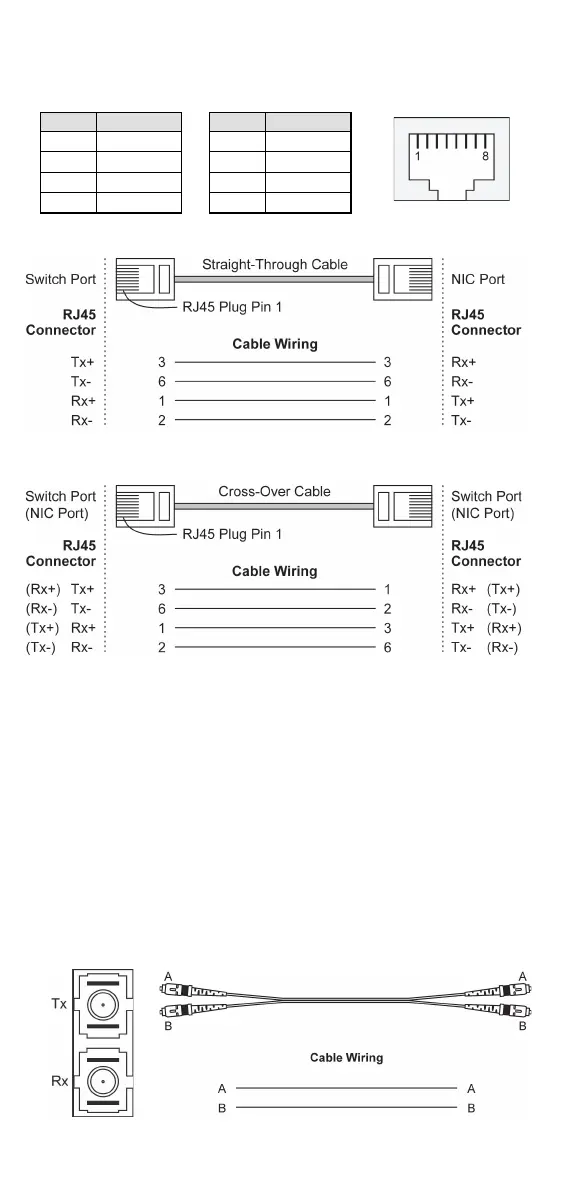
10/100Base T(x) RJ45 Pinouts
RJ45 (8-pin) to RJ45 (8-pin) Straight-Through Cable Wiring
RJ45 (8-pin) to RJ45 (8-pin) Cross-Over Cable Wiring
100BaseFX Ethernet Port Connection
The concept behind the SC/ST port and cable is quite straightforward.
Suppose you are connecting devices I and II; contrary to electrical
signals, optical signals do not require a circuit in order to transmit data.
Consequently, one of the optical lines is used to transmit data from
device I to device II, and the other optical line is used transmit data
from device II to device I, for full-duplex transmission.
Remember to connect the Tx (transmit) port of device I to the Rx
(receive) port of device II, and the Rx (receive) port of device I to the
Tx (transmit) port of device II. If you make your own cable, we suggest
labeling the two sides of the same line with the same letter (A-to-A and
B-to-B, as shown below, or A1-to-A2 and B1-to-B2).
SC-Port to SC-Port Cable Wiring



 To Next Page
 Loading...