CONTROL BUTTONS AND TERMINALS
REAR PANEL
REAR PANEL
CONTROL BUTTONS AND TERMINALS
REAR PANEL
REQUIREMENT OF WIRE HARNESS(cable not supplied)
AV IN
YPbPr IN
CVBS
Audio L
Audio R
GND
Y
Pb/Cb
Pr/Cr
GND
CVBS (Yellow)
Audio L(White)
Audio R (Red)
Y (Green)
Pb/Cb (Blue)
Pr/Cr (Red)
9
10
8
11
7
12
1
6
4
5
66
11
1
2
3
4
5
6
7
8
9
10
12
2
3
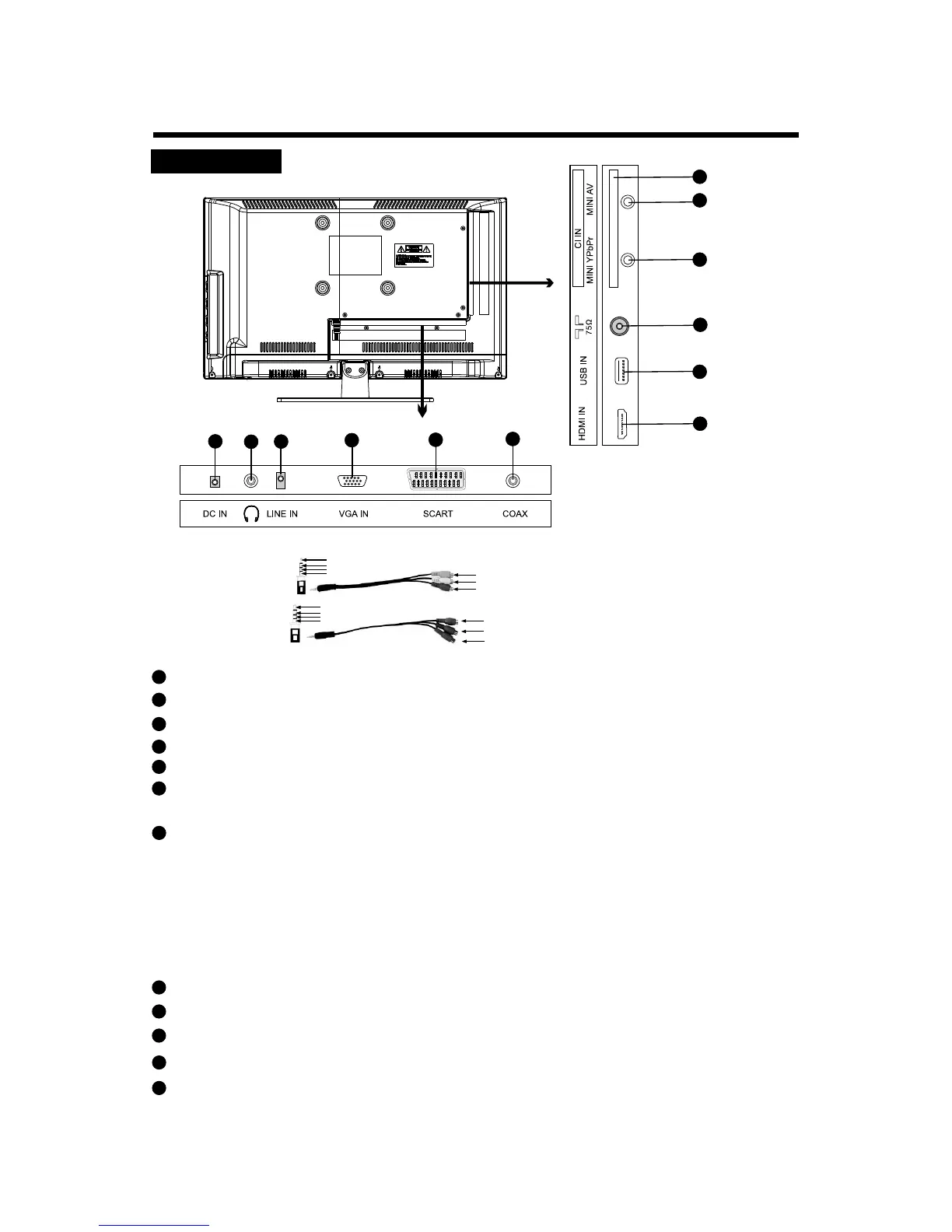
MINI AV Input Connector: Connect it to the AV output of a DVD player or other equipment.
MINI YPbPr Input Terminal: Connect to the video output terminal of DVD.
USB Input Connector: Connect it to the USB.
LINE IN (VGA Audio) Terminal: Connect it to the audio output terminal of PC.
VGA IN: Connect to 15-pin analog output connector of the PC using a VGA cable.
Coaxial Output Terminal: Connect to the coaxial input terminal of DVD or other external
equipment.
PCMCIA CARD SLOT: This function allows you to watch some pay services. If you remove
the CI (common interface) module, you can't watch the pay services. When you insert the
module into the card slot, you can access the module menu. To buy a module and smart
card, contact your dealer. Avoid regularly removing and inserting the CI module. When the
LED TV is turned on after inserting the CI module, you often won't be able to hear the sound
and there may be problems with the picture. This function may not be available, depending
on the country you are in. Contact your dealer for further advice.
Headphone Out Terminal: Connect the headphone.
HDMI Input Connectors: Connect it to the HDMI of DVD or other external equipment.
SCART Connector: Connect your AV system using a SCART lead.
RF Input Socket: Connect antenna or cable 75 ohm coaxial to receive TV signal.
DC Input Connector: Connect it to the adaptor 12V.


 To Next Page