23
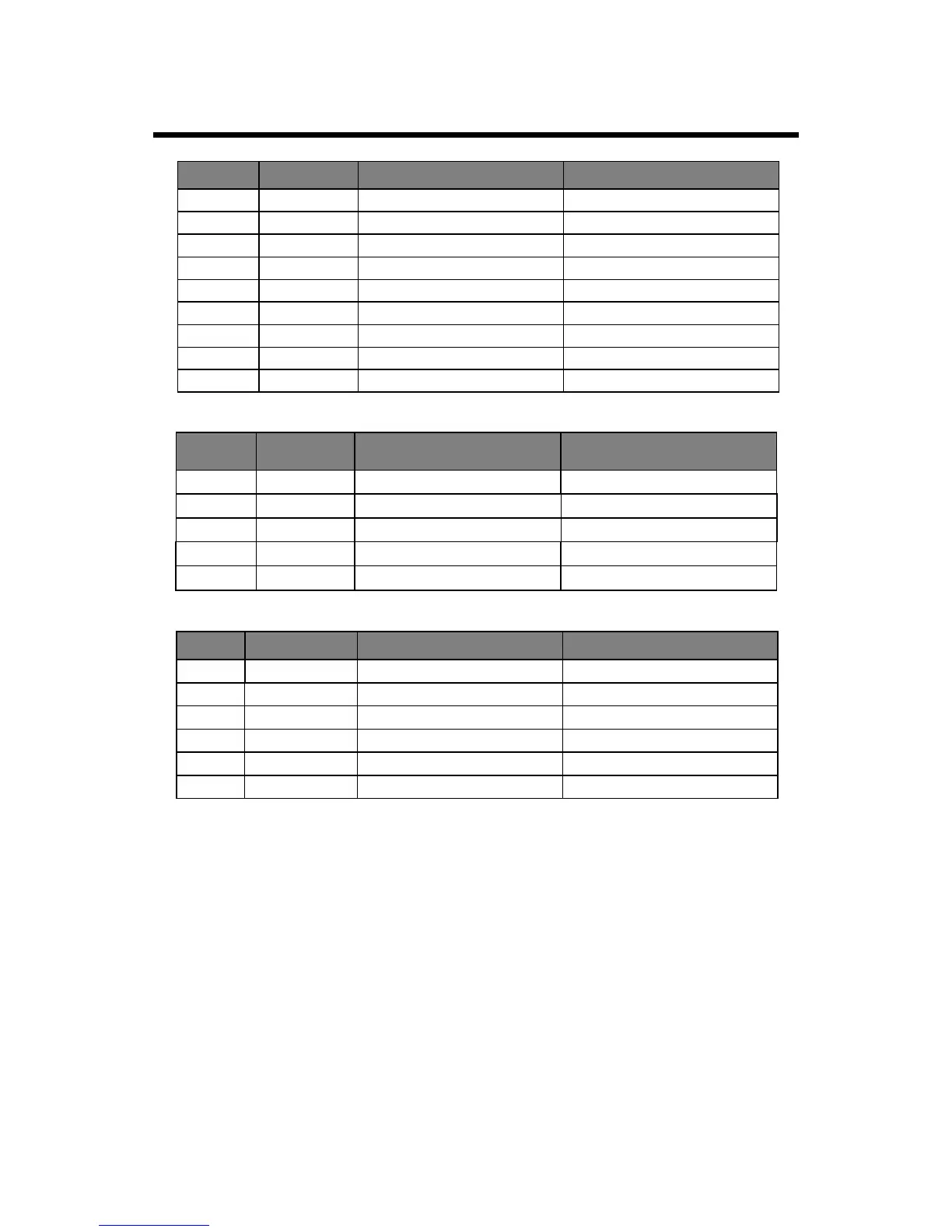
SUPPORTED OPERATING MODES
● It is possible that modes which are not listed in the above table above may not be supported.
For an optimal picture, it is recommended to choose a mode listed in the table.
● The incoming display modes that are compatible with WINDOWS are shown in the table above.
● Sometimes, the image may be disrupted due to the frequency standard from the VGA card.
However, this is not an error. You may improve this situation by activating the automatic
adjustment or by manually changing the phase and the clock settings in the menu.
● To extend the service life of the product, we recommend that you use your computer’s power
management function.
1080i/60
1920X1080
33.75
60.00
60.00
576p
720X576
31.25
50.00
50.00
1080i/50
1920X1080
28.13
Mode Resolution
Horizontal Frequency (K Hz) Vertical Frequency (Hz)
1280X720
720p/60
45.00
HDMI INPUT
1080p/60
1920X1080
67.50
60.00
50.00
1080p/50
1920X1080
56.25
COMPONENT VIDEO (YPbPr) INPUT
RGB INPUT
720p/60
720 44.96
60.00
576i 576
15.63
50.00
480i 480
15.73
60.00
576p
576
31.26
50.00
480p
480
31.47
60.00
1080i/50
1080
28.13
50.00
1080i/60
1080
33.75
60.00
Mode Resolution
Horizontal Frequency (K Hz) Vertical Frequency (Hz)
640X480
VGA
31.5
60
800X600
SVGA
37.9
60
XGA
48.4 601024X768
Mode Resolution
Horizontal Frequency (K Hz) Vertical Frequency (Hz)
1080p/50
1080
56.25
50.00
1080p/60
1080
67.50
60.00
WXGA
47.7
60
1360X768
WXGA++
60
60
1600X900


 To Next Page