7
REMOTE CONTROLLER
CONTROL BUTTONS AND TERMINALS
2
3
4
6
9
11
13
12
15
16
1
14
8
5
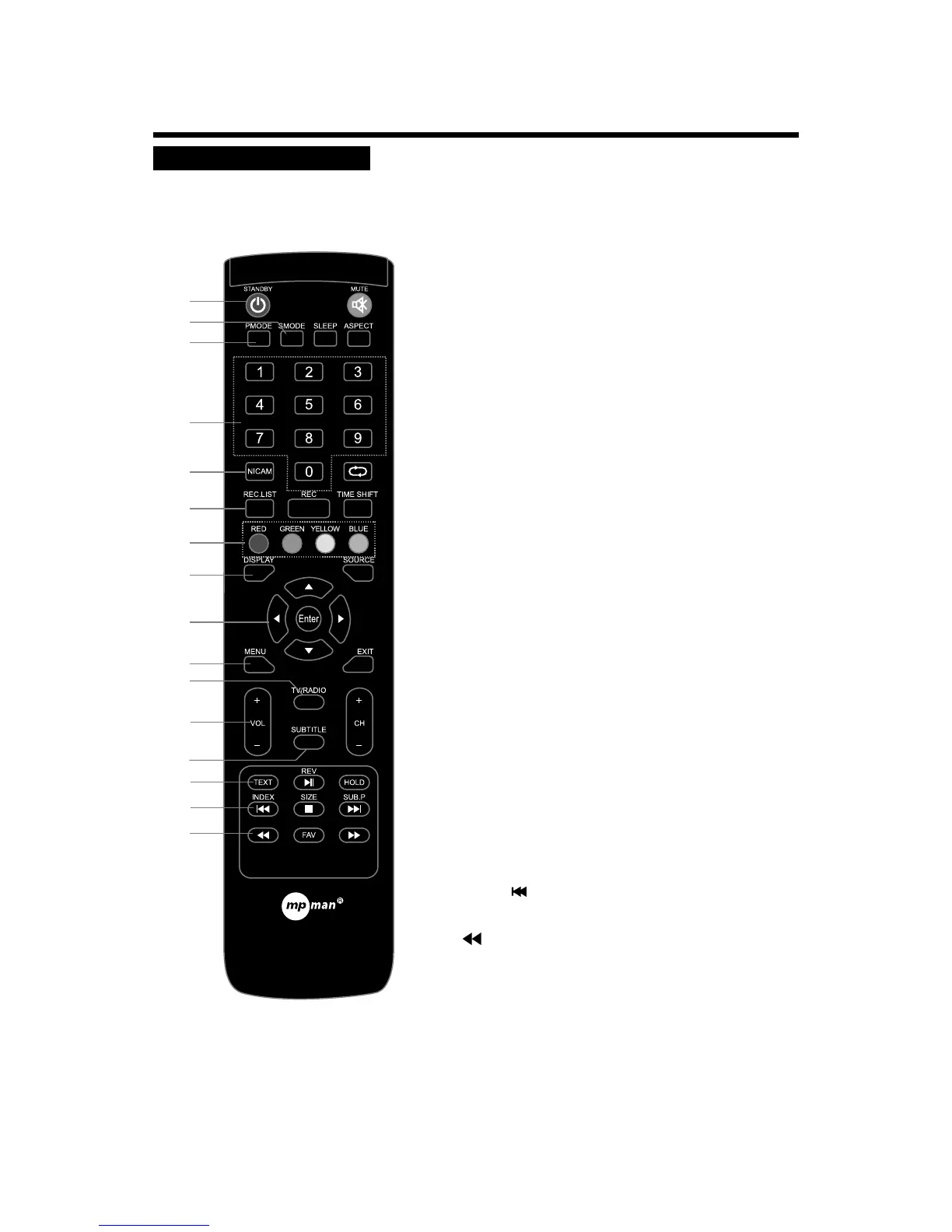
1. STANDBY
To switch on the LED TV/monitor when at standby
mode and vice versa.
2. SMODE
To select a sound mode.
3. PMODE
To select the picture mode.
4. NUMBER BUTTONS
To directly select program number.
8. DISPLAY
To display setup information of channel.
9. t/u
To adjust menu settings.
p/q
To select a menu item.
ENTER
Confirm the selection.
10. MENU
To enter the TV menu, or exit from the TV menu .
11. TV/RADIO
In DTV mode, press to select TV or Radio mode.
12. VOL-/+ (VOLUME UP/DOWN)
To increase or decrease the volume.
13. SUBTITLE
In DTV mode, press to display the caption.
14. TEXT
Teletext text. TV/Teletext select.
In USB mode, press to select backwards play.
16.
5. NICAM
To select nicam mode.
In DTV mode, press button to select Language.
6. REC.LIST (FEATURE NOT AVAILABLE)
15. INDEX /
Teletext index button. Go to index.
In USB mode, press to select the anterior chapter or song.
7
10
7. COLOUR BUTTONS
In ATV/DTV mode, used for program edit.


 To Next Page