USB FUNCTION
19
Press the SOURCE button on the remote control to display the input source menu, select the Media source
with the buttons and press the ENTER button to enter the multimedia menu.p/q
1. Photo
Photo viewing
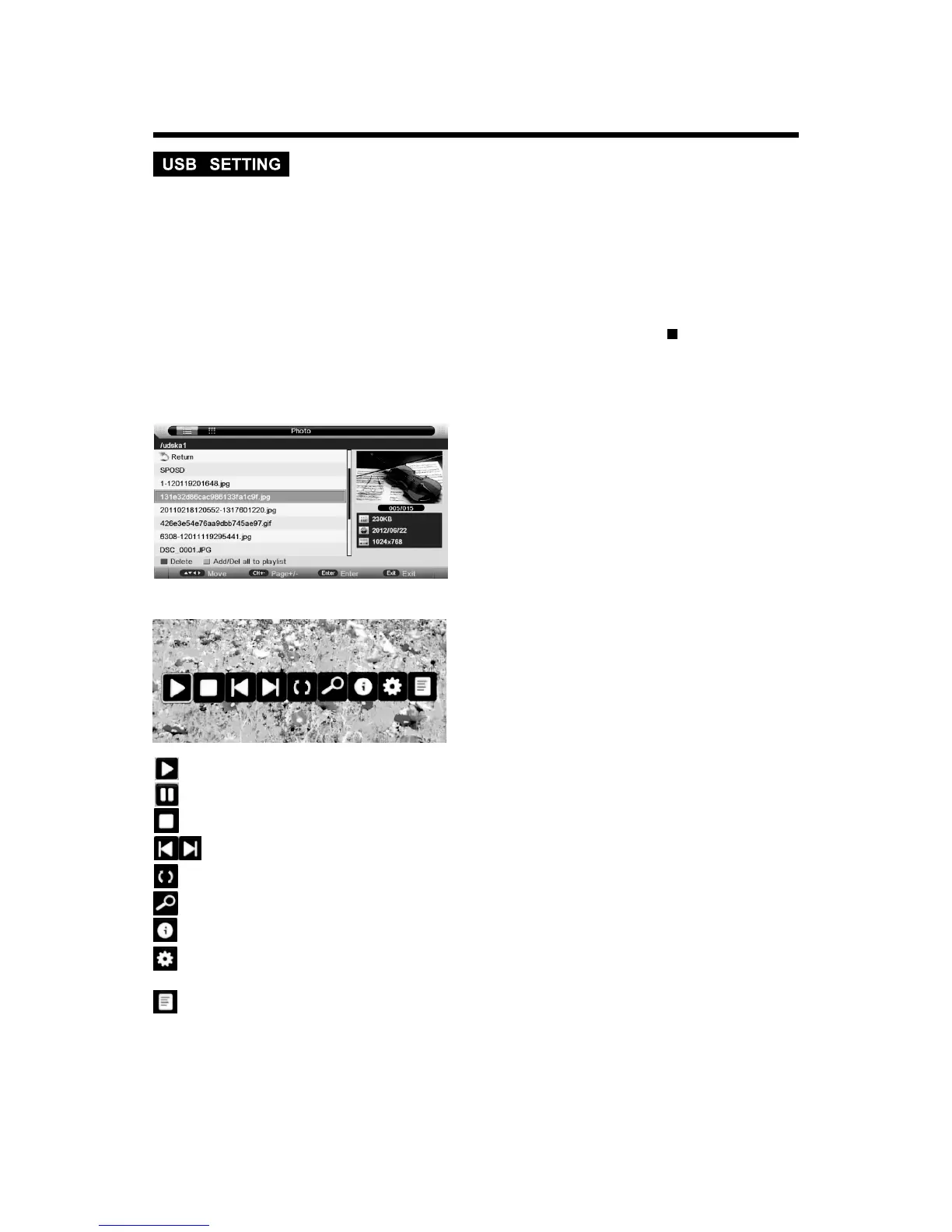
Press button to select the files on the USB device (photo/Music/Movie/e-Book) to view or play.
Press p/qbutton to select and the ENTER button to activate the file or open folder. Press the
PLAY button to play the files in full screen mode. When in full screen mode press the stop button or
EXIT button to return to files.
t/u
Press red button to delete the focused folder/file.
Press green button to add/Del all photo files to play list.
Press “PLAY” button to start playback.
: to play the previous or next file directly.
: to start playing picture in slide show mode.
: to pause the playing file.
: to stop sliding show, and return to the file browser.
: to rotate the playing picture.
: to zoom the playing picture.
: to display the information of the current file.
: to enter “Photo Setup” menu, including “Repeat Mode”, “Background Music”, “Music Source”,
”Slide Time”, “Effect”..
: to enter the play list menu.
2. Music
Listen to music
USB file systems supported: FAT, FAT32. 2.0 USB version is supported, maximum capacity is 320
Gb; max. load: DC5V, 500 mA.


 To Next Page