23BA3431002/04 RU-EN
3 Basic operation
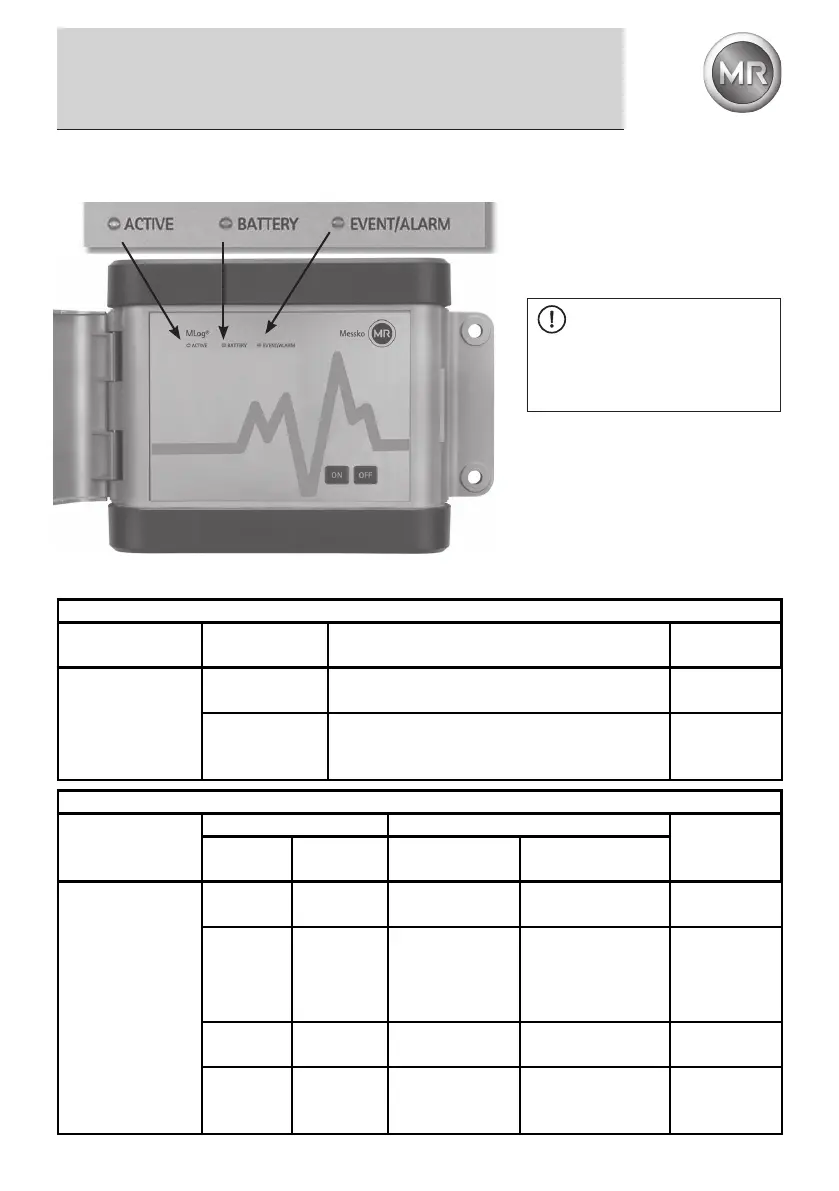
3.4 MLog IM50 operating elements and status LED
3.5 MLog IM50 status check via LED
Funktion: Check battery status
Action
LED BATTERY
(yellow)
Result Suggestion
Press „ON“ button
longer than
2 seconds;
then briey press
„ON“ button
5 seconds
ashing
Battery status is „Low“
Renew
batteries
off
Battery status is sufcient.
A prognosis of the remaining recording duration can
be called up via MLog Analyser.
Function: Check operation mode and memory status
Aktion
LED Result
Suggestion
ACTIVE
(green)
EVENT/
ALARM(red)
Operation mode Memory status
Press „ON“ button
longer than
2 seconds;
then briey press
„ON“ button
lights
3 seconds
off ready for recording Memory empty
lights
3 seconds
lights
3 seconds
no recording Log book in memory
Read out
Log Book via
MLog Analyser
and possibly
delete it
3 seconds
ashing
off
recording in
progress
no alarm in Log book
3 seconds
ashing
5 seconds
ashing
recording in
progress
minimum one alarm
in Log book
Check Log
Book via MLog
or Analyser
Status LED
NOTE
The start of a recording is
prevented when the battery status
is weak, but the timer recording is
started (without GPS).


 To Next Page
 Loading...