mrcool.com11
Lock Function
When the unit is powered on or o, press the up and down arrow buttons simultaneously for 5 seconds to turn
on the Lock function. The screen will display a lock icon. Pressing the up and down arrow buttons at the same
time for 5 seconds again will turn o this function.
When the Lock function is turned on, other buttons will become unresponsive. The function will remain active
after power is restored after a power failure.
Memory Function
Press the Mode and up arrow buttons simultaneously for 5 seconds when the unit is powered o to turn on or
cancel the Memory function. If the Memory function is set, the MEMORY icon is displayed.
If the Memory function is set, the indoor unit will resume its original settings after power is restored after a
power failure.
NOTE
If power failure occurs within 5 seconds of the memorized content being changed, the memorized content
may be abnormal after power recovery. Do not cut o power to the unit within 5 seconds of changing
memorized content.
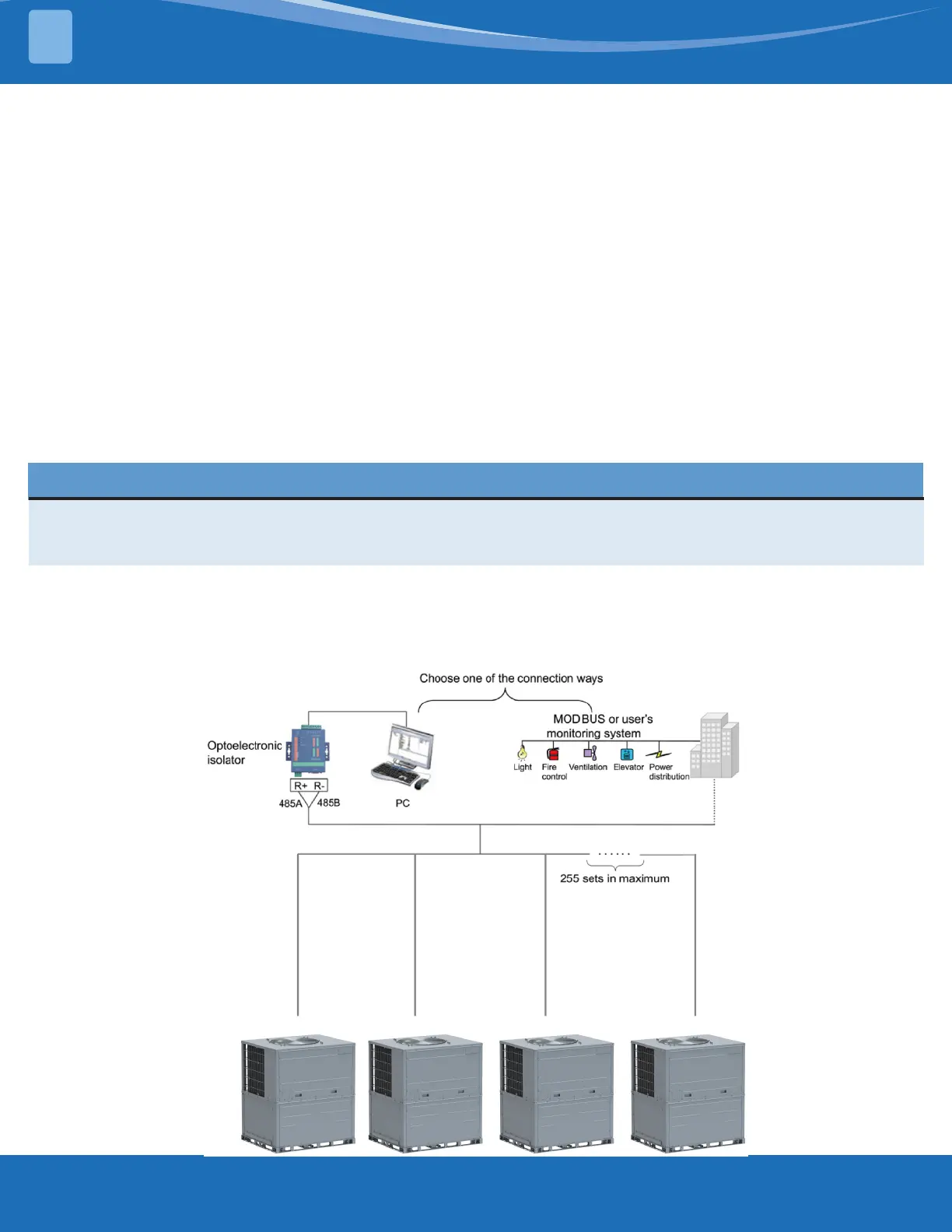
Modbus Interface
The unit features MODBUS interface. If the user needs to connect the unit to the management system of the
building, contact MRCOOL Tech Support for the MODBUS protocol.
WIRED CONTROLLER
2


 To Next Page
 Loading...