DESCRIPTION MSA
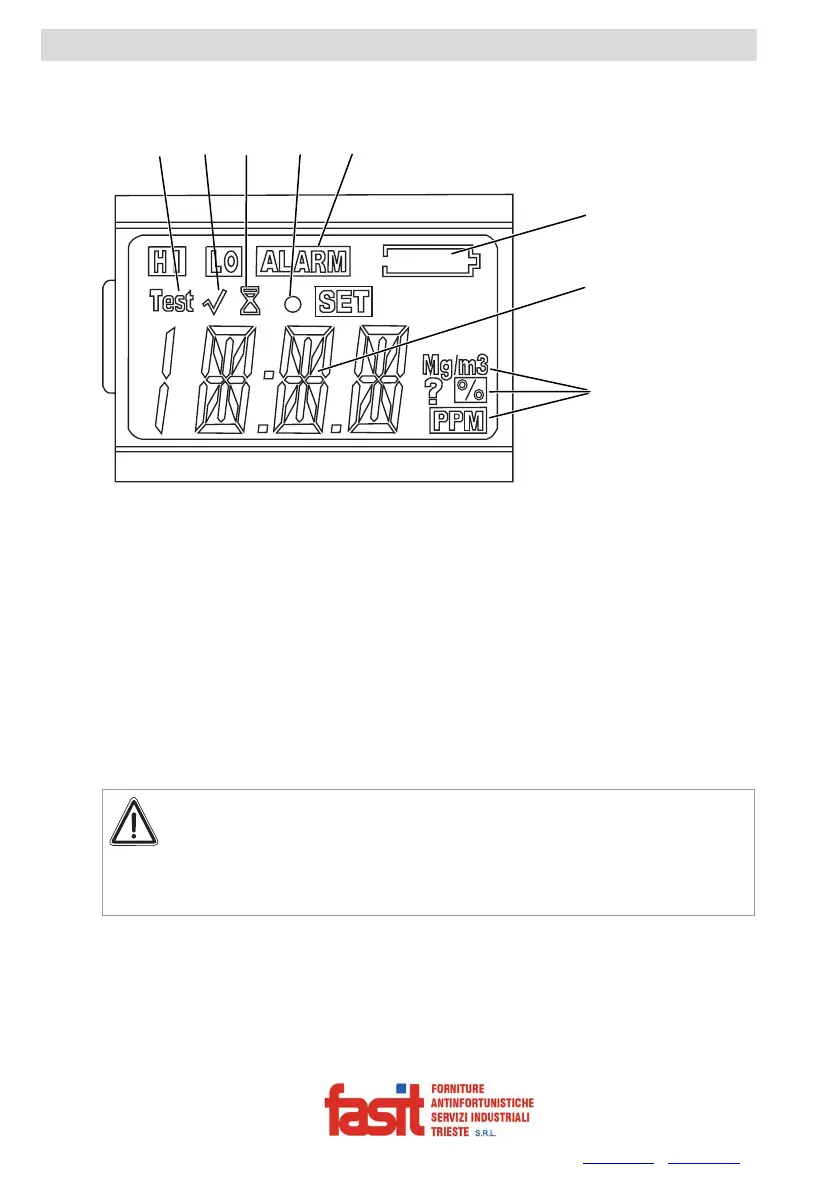
2.2. On-Screen Indicators
Fig. 2 Display
1 Self-test in progress
2 Bump check indicator
3 Hour glass
4 Confidence indicator
5 Alarm indicator
6 Battery life indicator
7 Numeric indicator
8 Gas concentration units
Battery Life Indicator
Attention!
If an alarm is triggered while using the instrument as a monitor, leave
the area immediately.
Remaining on site under such circumstances can cause serious
damage to health or can even lead to death.
The battery condition icon continuously displays in the upper right-hand corner of
the display. As the battery is depleted, battery icon segments go blank until only
the outline of the battery icon remains.
Each battery indicator segment represents approximately 1/4 of the total battery
capacity.
1
6
7
3
4
5
8
2
FASIT Srl - Via Orsera 13/b - 34145 TRIESTE - ITALY - Tel +39 040 825604 - www.fasit.it - info@fasit.it



 To Next Page