8
8. Fn Press to enter FM function (optional function).
During playing, press it to enable the section
repeat function.
9. REC Press to start or stop voice recording.
10. MIC Internal Microphone.
11. Earphone Jack Plug the supplied earphone here.
12. Line-in Jack Plug an audio cable here to connect MEGA
STICK 511 and external audio device to record
external audio signal.
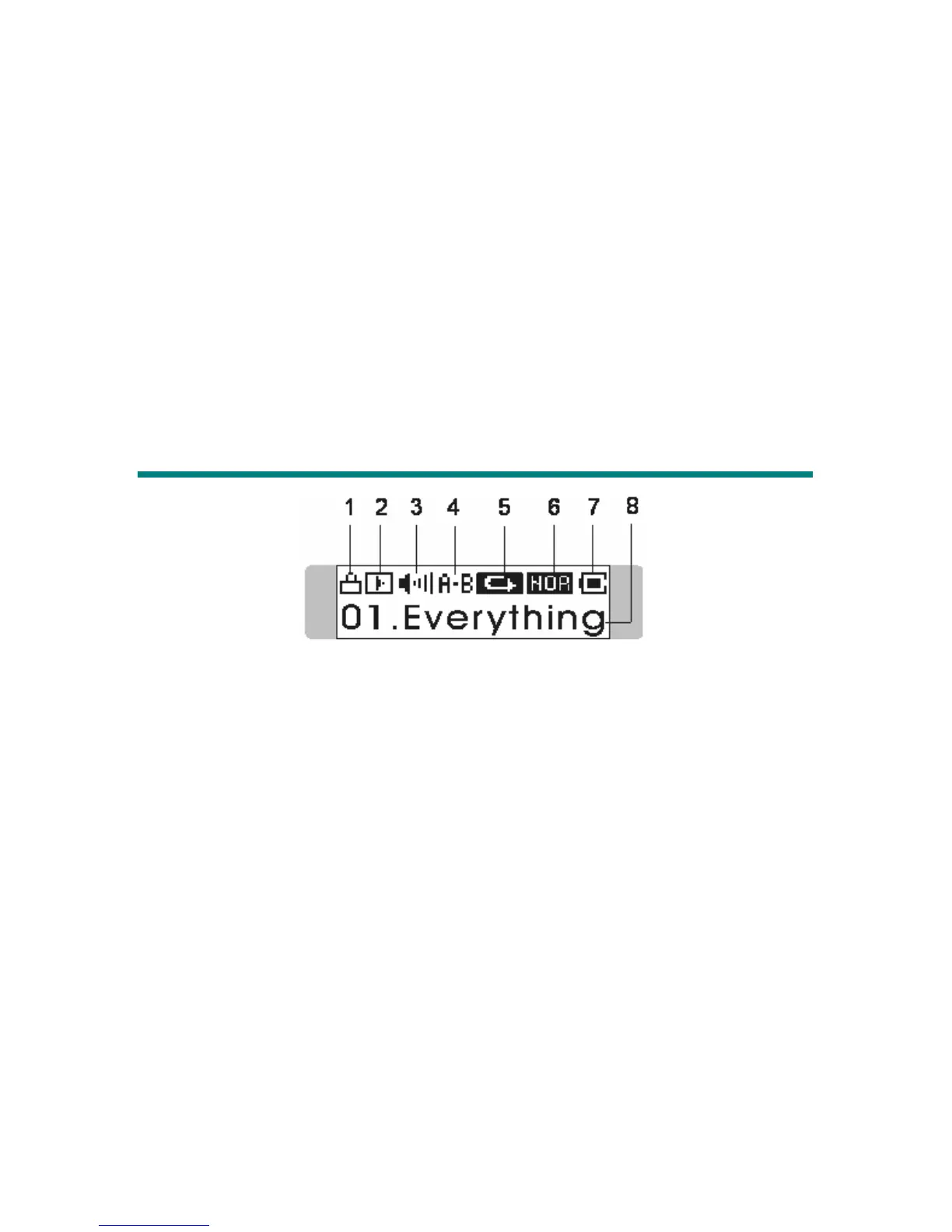
LCD Display
1. Hold Switch Status Indicates when the Hold function is enabled.
2. Playback Status Displays the music or voice files playback
status.
3. Volume Displays the volume status.
4. A to B Repeat Indicates when A to B section repeat function
is enabled.
5. Repeat Mode Indicates the repeat mode that includes
Normal, Repeat One, Repeat All, Shuffle, and
Shuffle Repeat.
6. Equalizer Indicates the EQ mode settings that include
Normal, Classical, POP, Rock, and Jazz.
7. Battery Status Indicates the Battery Status.
8. File Name Displays current playing file name.



 To Next Page