A-14
MS-7520 Mainboard
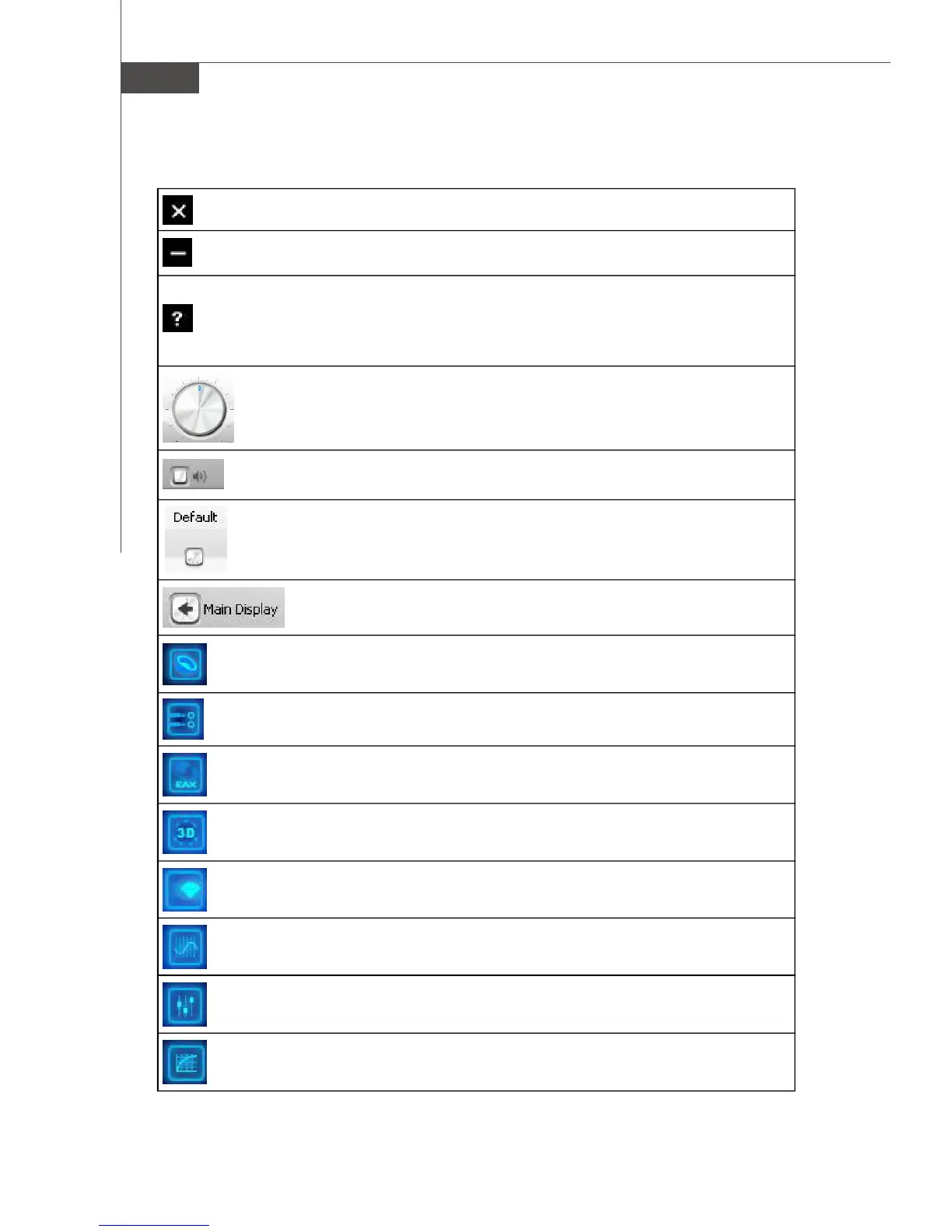
The following table lists the function of each control on the main interface.
Close button - Click on this button to close the Entertainment Mode console.
Minimize button - Click on this button to minimize the Entertainment Mode
window to the task bar.
Help button - Click on this button to read information about the Entertainment
Mode console. Select Help Contents to display the online Help. Click the
Contents tab and select a topic, or click on the Search tab and search for a
specific topic by entering a keyword.
Volume control - Turn this knob to adjust master volume or speaker
volume.
Mute button - Click on this button to mute the master volume or speaker
volume.
Default button - Click on this button to revert all the settings in Entertain-
ment Mode to the default.
Main Display button - Click on this button to revert to the main
display. This button disappears when you are in the main display.
Speaker button - Click on this button to show speaker settings.
EAX Effects button - Click on this button to display EAX Effects settings.
X-Fi CMSS-3D button - Click on this button to show X-Fi CMSS-3D settings.
X-Fi Crystalizer button - Click on this button to show X-Fi Crystalizer settings.
EQ button - Click on this button to show EQ settings.
Mixer button - Click on this button to show volume mixer settings.
Performance button - Click on this button to show sampling rate and bit
depth settings. (Available in Windows XP and Windows 2000.)
Jack Sensing button - Click on this button to show the jacks connected.
(Available only in Windows Vista.)



 To Next Page