En-20
MS-7760 Manboard
Internal Connectors
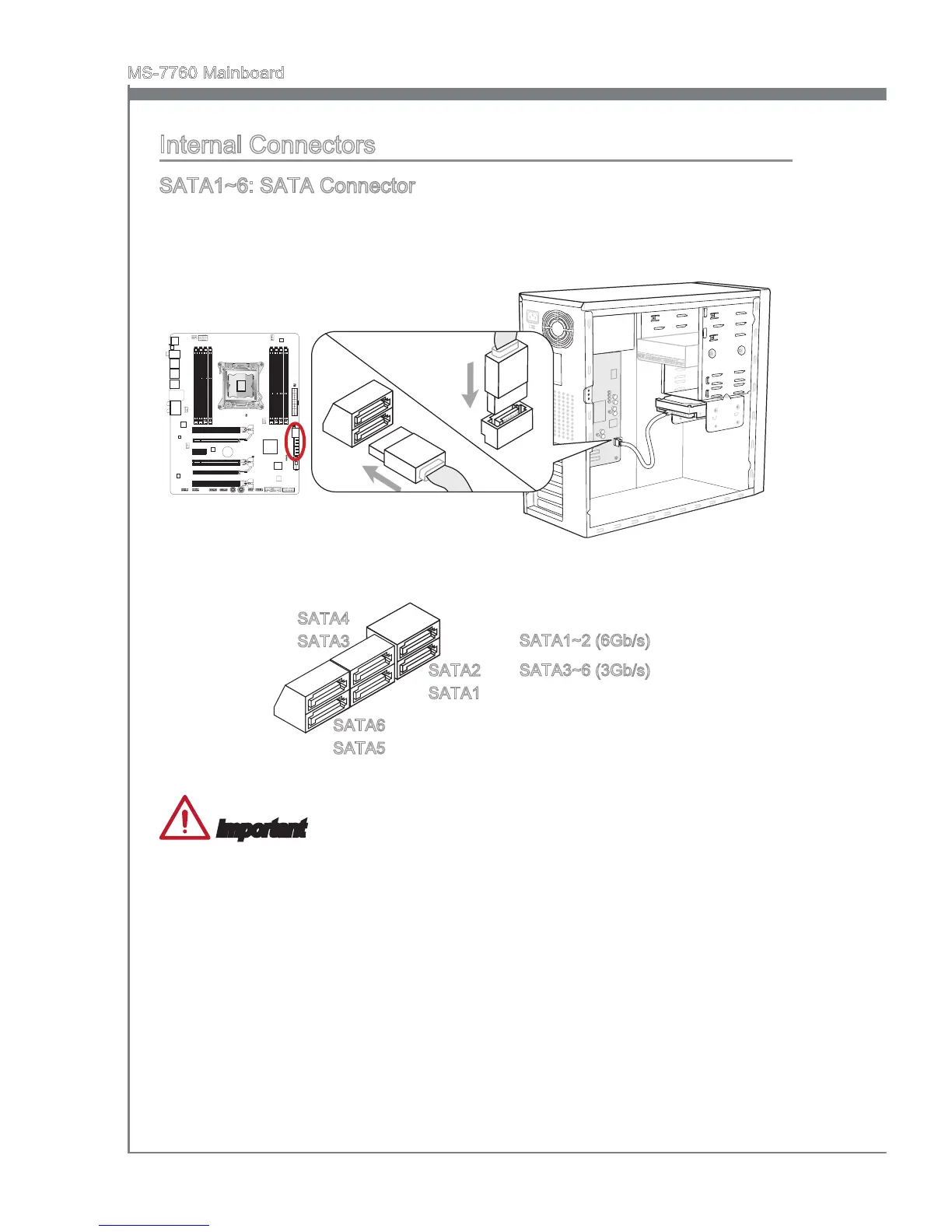
SATA1~6: SATA Connector
Ths connector s a hgh-speed SATA nterface port. Each connector can connect to one
SATA devce. SATA devces nclude dsk drves (HDD), sold state drves (SSD), and
optcal drves (CD/ DVD/ Blu-Ray).
* The MB layout n ths gure s for reference only.
SATA1~2 (6Gb/s)
SATA3~6 (3Gb/s)
SATA4
SATA3
SATA6
SATA5
SATA2
SATA1
Important
Many SATA devces also need a power cable from the power supply. Such devces
nclude dsk drves (HDD), sold state drves (SSD), and optcal drves (CD / DVD /
Blu-Ray). Please refer to the devce’s manual for further nformaton.
Many computer cases also requre that large SATA devces, such as HDDs, SSDs,
and optcal drves, be screwed down nto the case. Refer to the manual that came
wth your computer case or your SATA devce for further nstallaton nstructons.
Please do not fold the SATA cable at a 90-degree angle. Data loss may result durng
transmsson otherwse.
SATA cables have dentcal plugs on ether sdes of the cable. However, t s
recommended that the at connector be connected to the manboard for space
savng purposes.
•
•
•
•


 To Next Page
 Loading...