Page 35 MTI Part Number 7001-0040
Revision 3.1 August 7, 2014
TOOLS Menu – Calibration Wizard Continued
Single Ended charge calibration –
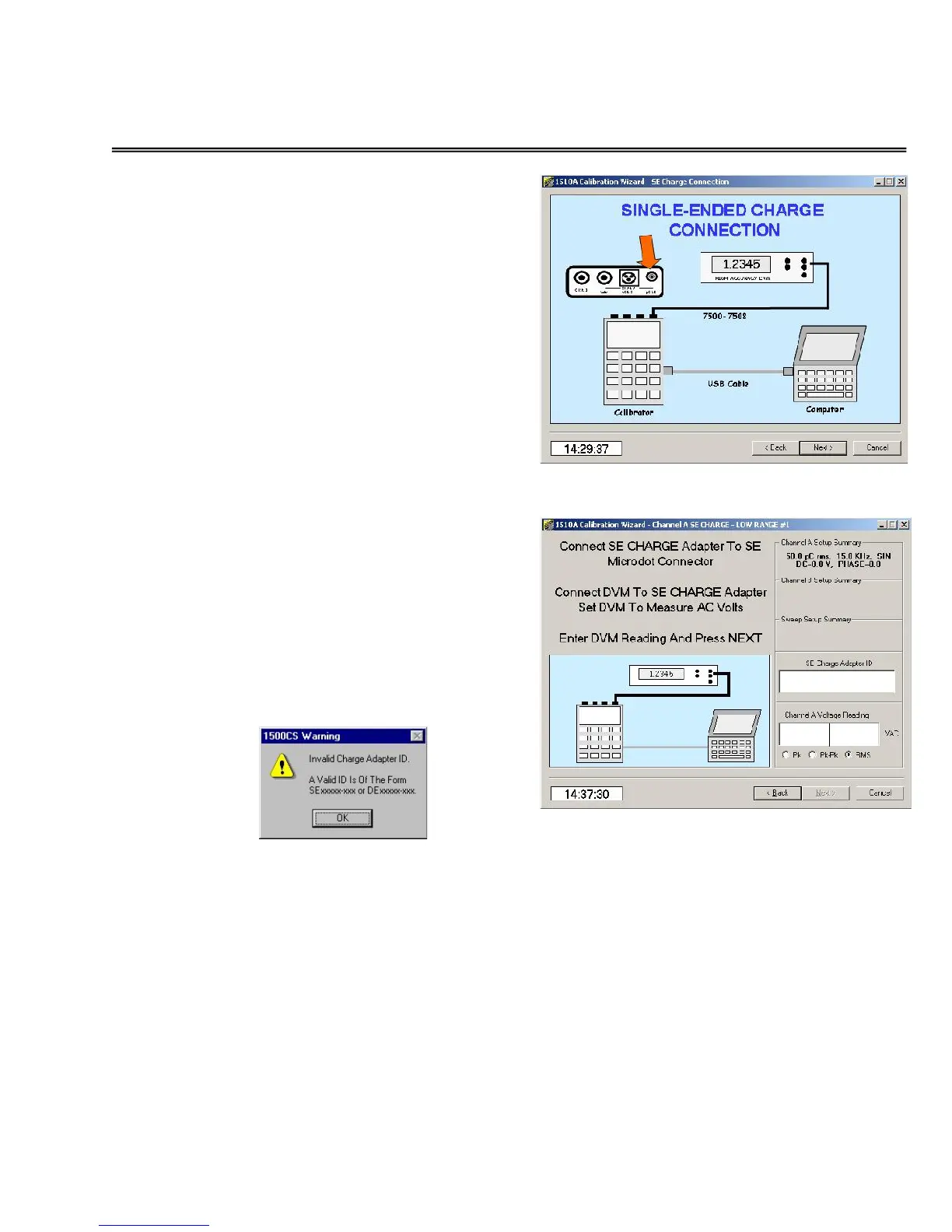
Next, connect the 1500CS/1510A to the
voltmeter as illustrated using the
special SE charge calibration cable.
Set the voltmeter for AC RMS readings.
Be sure to note the cable ID number.
NOTE
To ensure accuracy, do not allow
the cable to move during this
series of tests. Even small motion
of the cable can induce
measurement errors.
Low Range Single Ended charge
calibration
Next, click in the SE Charge Adapter ID
window and enter the ID number of
the cable. Use caution to enter the ID
number in the correct format.
If the ID is entered incorrectly, the
following message will be displayed.
Next, click in the Voltage Reading
window and enter the reading of the
voltmeter. Verify that the correct units
(Pk, Pk-Pk, or RMS) are selected for the
type of voltmeter you are using.
This screen is repeated for the three low
range charge outputs (50, 60, 70 pC
rms) used.


 To Next Page