Page 36 MTI Part Number 7001-0040
Revision 3.1 August 7, 2014
TOOLS Menu – Calibration Wizard Continued
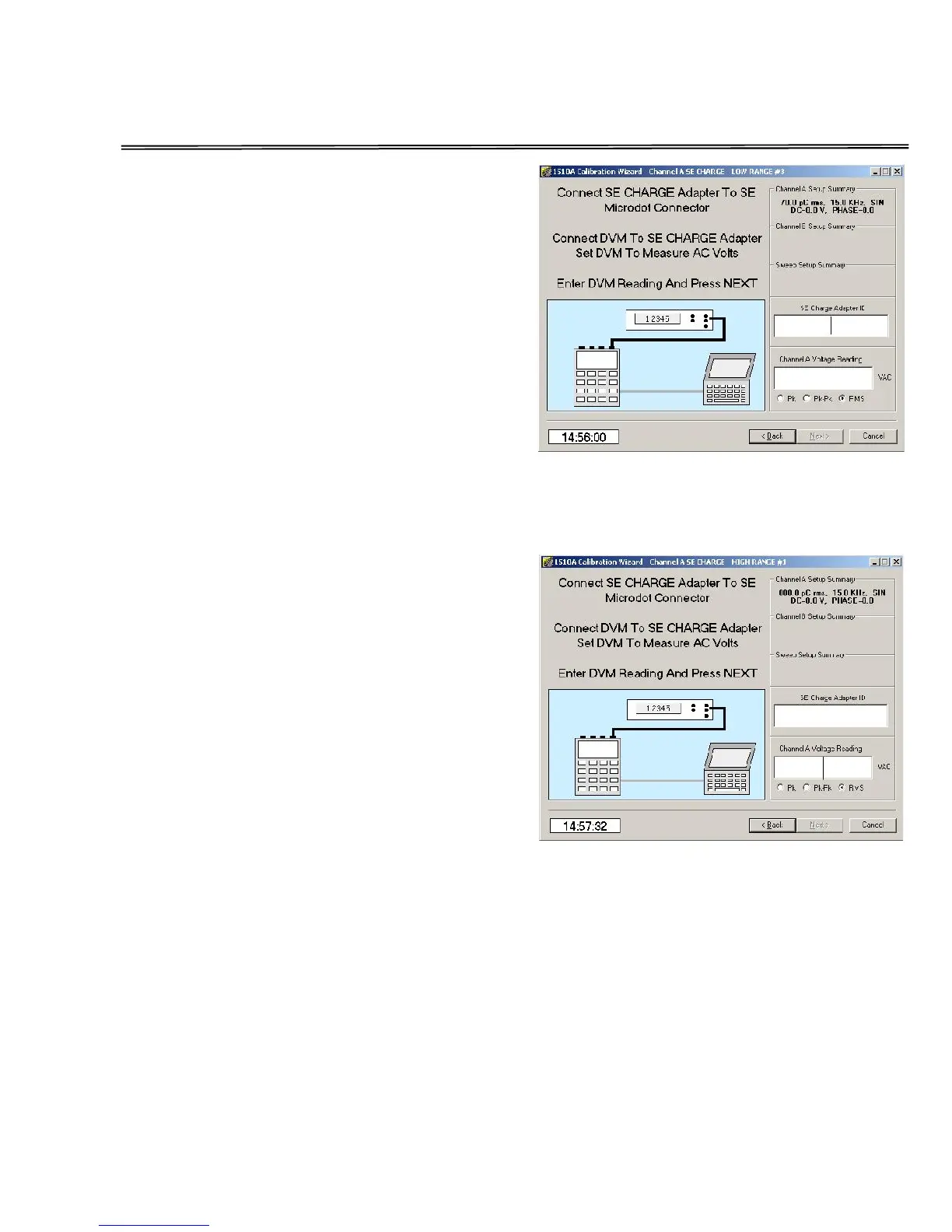
Mid Range Single Ended charge
calibration
Click in the SE Charge Adapter ID
window and enter the ID number of
the cable. Use caution to enter the ID
number in the correct format.
Now, click in the Voltage Reading
window and enter the reading of the
voltmeter. Verify that the correct units
(Pk, Pk-Pk, or RMS) are selected for the
type of voltmeter you are using.
This screen is repeated for the three
low range charge outputs (80, 350, 700
pC rms) used.
High Range Single Ended charge
calibration
Next, click in the SE Charge Adapter ID
window and enter the ID number of
the cable. Use caution to enter the ID
number in the correct format.
Now, click in the Voltage Reading
window and enter the reading of the
voltmeter. Verify that the correct units
(Pk, Pk-Pk, or RMS) are selected for
the type of voltmeter you are using.
This screen is repeated for the three
low range charge outputs (800, 35000,
7000 pC rms) used.


 To Next Page