37
2. By pressing the program button „PRG” you can choose from the programs 01 – 12
(pre-programmed).
3. This is followed by pressing the buttons „+/-” below the channel used.
Now the selected program runs automatically and the LCD-screen changes.
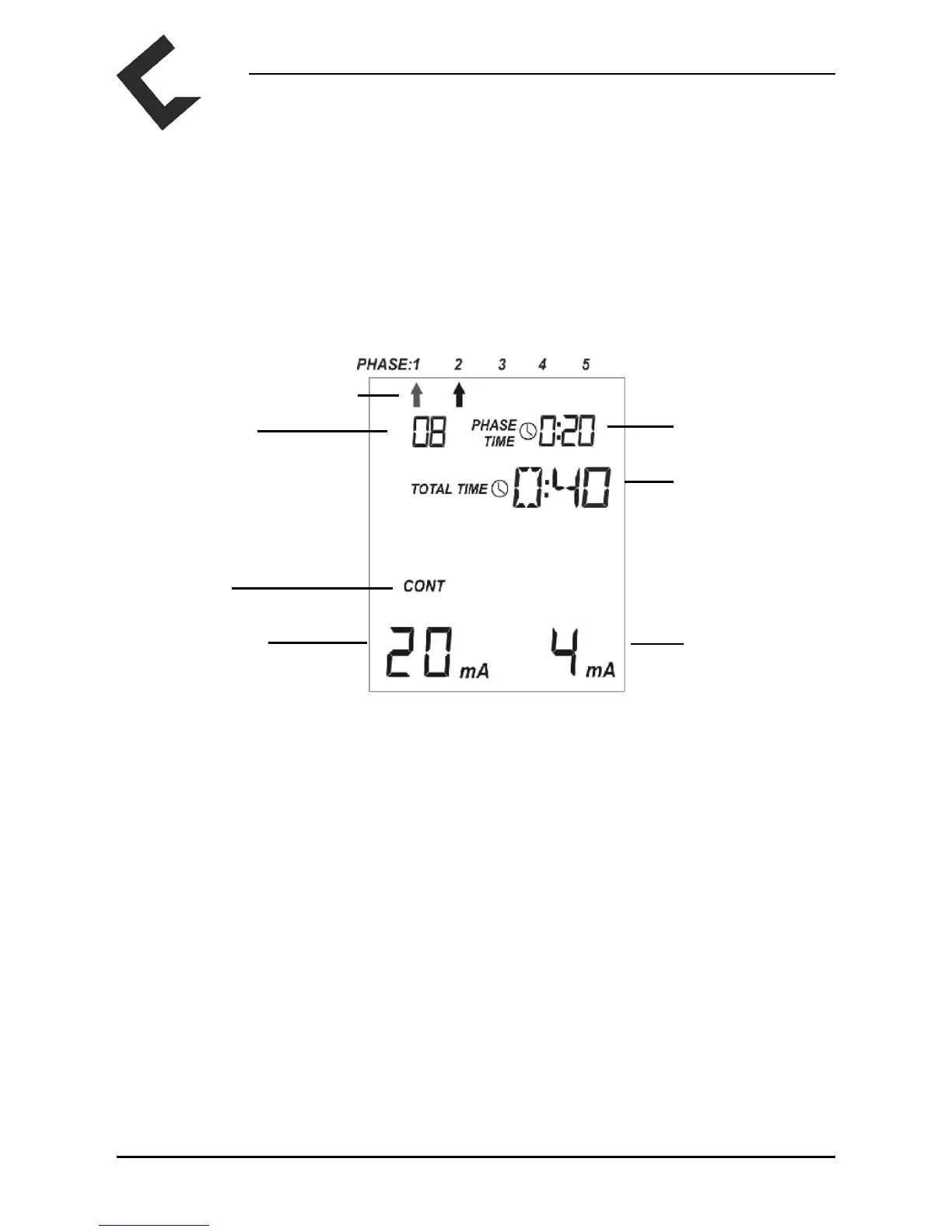
The current phase will be indicated by an ashing arrow and in the upper right corner you can
see the remaining phase time. In the bottom line the intensity used in each channel appears. If
the button „+” is pressed repeatedly the intensity of stimulation increases. If the button „-” is
pressed repeatedly the intensity of stimulation is reduced. For the setting of the intensity it is
vital that one feels the electric current but that discomfort is never incurred.
Please take into account that for safety reasons the intensity falls back to 8 mA at the
beginning of each new phase and must be increased again.
Each phase end is indicated by 5 peeptones.
4. If you wish to interrupt the program, then press the button „PRG” once. The program will
run again for the remaining program time when pressing the button „+”. In this case, the
intensity must be reset to the desired level.
5. By pressing the „SET“ button you end the current phase and move to the next. Programs with
one single phase will be nished.
6. DoloBravo is switched off when pressing the button „On/Off“ or automatically four minutes
after the program is nished.
Preset Programs 01–12
Current Phase Flashing
Remaining
Phase Time
Program
Remaining
Program Time
Mode
Intensity Intensity
Channel A Channel B



 To Next Page