45
The data stored in memory is retained after viewing, so that therapy-control is possible anytime.
A maximum of 60 days of data can be stored with 5 sessions per day. When 60 days of data
are reached, consecutive days will overwrite the earliest days. The day number will continue
increasing (61, 62, ...) and will be displayed when the unit is unlocked until the DoloBravo is
reset.
If you press the PRG button for three seconds, you return to the home screen of the selected
program. The device will not be locked. If the therapy shall continue with only one program
available, the LOCK-function must be reactivated after reading (s. p. 43).
The memory should be emptied completely before a new person is using the device. After
pressing the UNLOCK-button you have to press SET twice for 5 seconds each. All individual
settings in programs 13-15 will be reset as well. The DoloBravo is set to it’s default state and all
statistics are deleted.
Reading the Statistics
The next sessions of the selected day are displayed - one after the other - by pressing the „SET”-
button. Each next day can be obtained by pressing the + button of channel A again.
If this button is held for at least 3 seconds, the device returns to global statistics.
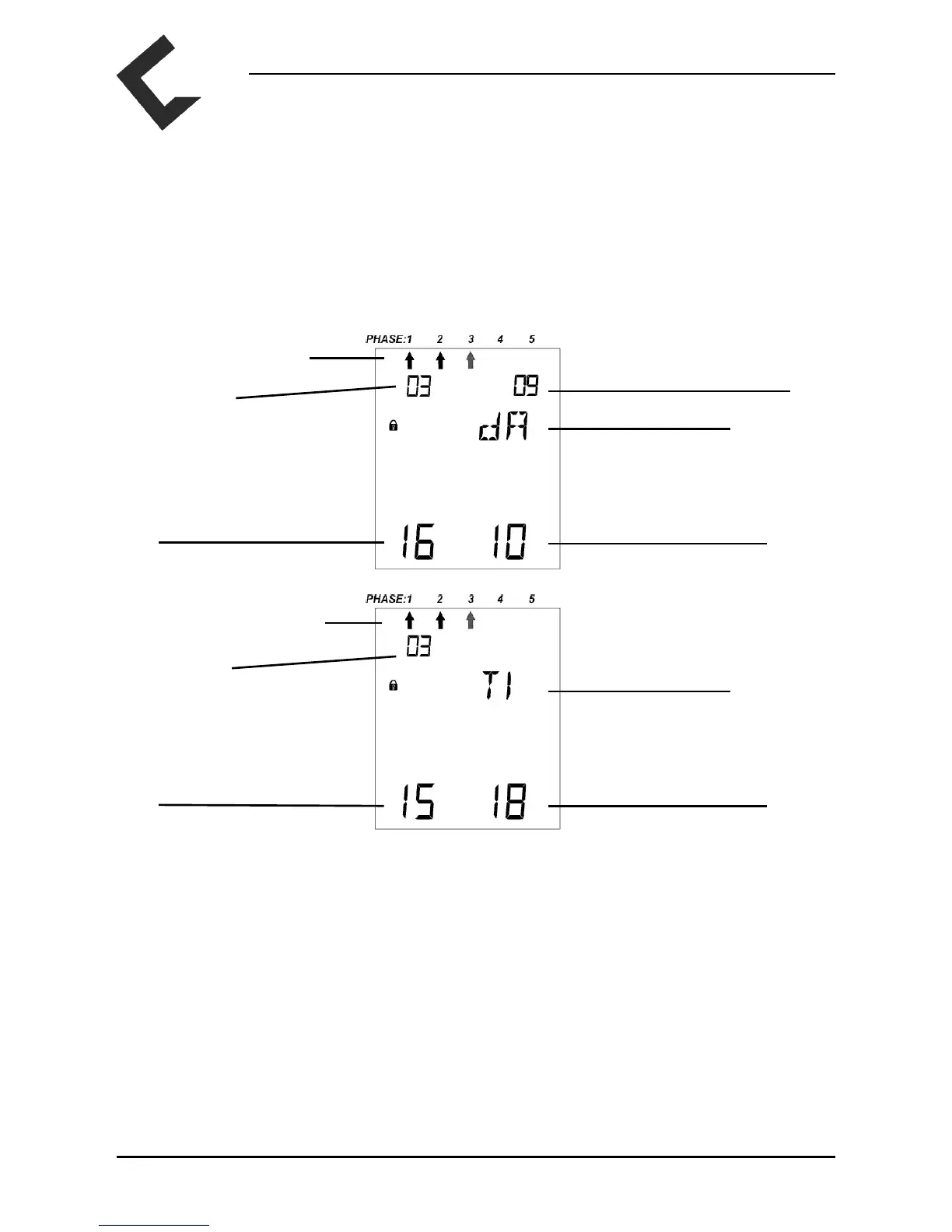
If you require information about time and date of one single session please press any of the right
+/-buttons (channel B). With these buttons you can scroll between session data, date and time.
Number of chosen session
ashes
Treatment day
Day
Year
dA for Date
Month
Hour Minute
TI for Time
Number of chosen session
ashes
Treatment day



 To Next Page