SineBravo Operators Manual
14
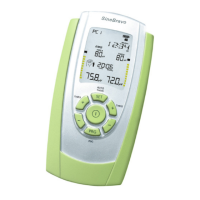
The Info-Line
The info line in the upper part of the screen shows always the remaining time of the entire
program during treatment.
Outside a treatment session, it provides more additional information:
- While setting the clock or when chosing the language, it shows values to be set in plain text.
The info line displays all custom settings for conguring the device. In the following you nd
all expressions and abbreviations that are used in the programming-loop in alphabetical order:
CH.B. ON / CH.B. OFF: Channel B is switched on or o
FB.ABOVE / FB.BELOW: Feedback above or below the threshold
FB. CONT: Continuous acoustic feedback
FB. OFF: No acoustic feedback
INHIB.OF: Inhibition switched o
INHIB.ON: Inhibition of feedback on channel B
NARROW: Narrow bandpass lter
PC SWC: Connection to PC by secured wireless connection
PC OFF: Connection to PC is switched o
REST: Duration of rest-sequences in seconds
THRESH: Threshold-adjustment during treatment automatically (AUTO) or manually (MAN)
TRIALS: Number of repetitions
VOLUME: Sound volume of beeps and spoken instructions
WIDE: Wide bandpass lter
WORK: Duration of work-sequences in seconds


 To Next Page