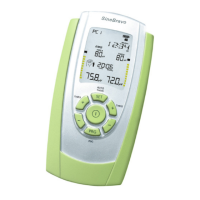
SineBravo Operators Manual
15
In all programs, even in the preset programs, individual settings can be made as follows.
After you have put in four batteries type AA (s.p. 38) and you have turned on the device with
the ON/OFF-button, you enter the conguration mode by pressing the SET button in the bat-
tery compartment for three seconds. Now you can adjust the settings of the selected program.
The parameter that can be changed is shown in the info line and can be altered by pressing the
+ button of channel B. Pressing the + button of channel A will conrm the choice and the next
variable parameter is displayed. This system - changing settings with B / storage and stepping
forward with A - remains the same during the entire process.
Please note that the following settings you make here, are automatically stored for all other
programs as well. Of course you can change any setting at any time in the same way again.
The following functions can be inuenced:
- Sound-volume
- Automatic threshold-adjustment on or o
- Wide- or narrow-lter for channel A
- Channel B switched on or o
- Filter for channel B if it is in use
- PC - Select o or SWC (wireless)
In the customizable programs PC1 - PC4 of course you have the ability to set additional
parameters in the same way as described on page 47.
Basic Settings


 To Next Page