SineBravo Operators Manual
16
Setup Real Time Clock
Before rst use of SineBravo the “Real Time Clock” that is integrated should be set. It’s
necessary for future therapy-control. SineBravo has a small assistance battery that will support
the clock with energy for several years. For this reason, there is no need to set again, even if the
4 main batteries have been substituted or removed. But we recommend to check and readjust
periodically.
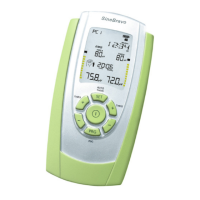
For setting time and date, please select any program and press the SET-button for at least 3
seconds. You’ll reach the conguration-mode. Now press SET once again for 10 seconds. On
screen HOUR is indicated and you can set the hour with the +button of channel B (00-23).
By pressing the +button of channel A you conrm this choice and step forward to the setting of
MINUTE. This is indicated on the screen as well, giving the opportunity to select the minutes
via +button of channel B in the same way as before.
This way you are able to set one after the other:
- HOUR
- MINUTE
- DAY
- MONTH and
- YEAR
If all settings are nished, please press the ESC-button on the frontside of the device. All values
will be automatically stored and the clock starts working.
Setup Language
SineBravo is able to show 6 dierent languages. If you are in the setting-mode of the RTC (see
above), please press the SET-button for 10 seconds once again. Now you can select German-,
English-, French-, Spanish-, Italian- or Polish-language with the B-buttons. Finally you store
your choice with the ESC-button.


 To Next Page