SineBravo Operators Manual
19
Options for Conguration of SineBravo
Additionally to the use of pre-set programs as described in the previous chapter, SineBravo
oers a great variety of possibilities to adapt the therapy-parameters according to individual
needs.
This concerns the pre-set programs that can vary in regard of the basic adjustments as well
as the 3 customizable programs, in which the experienced therapist or user is able to create
completely new programs.
Conguration of Custom Programs
Creating a new program is not dicult, because the programming always follows the same easy
scheme. The device leads in a loop to each parameter that can be chosen - indicated by ashing
bars.
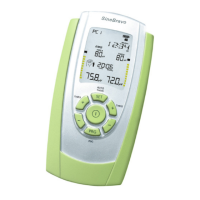
1. Switch on SineBravo with the ON/OFF-button
2. Select PC1, PC2 or PC3 with the PRG-button.
3. Hold the SET-button in the battery-compartment pressed for 3-5 seconds. Then SineBravo
changes to programming mode and the bars beside the rst parameter that can be set will ash.
4. In the following the right “+/-”buttons (channel B) are responsible for changing the
ashing parameter, while the left “+” button (channel A) is used to store the choice and
step forward to the next parameter. With the left “-”button it is possible to go one step back.
With the described scheme “right side changing / left side storing and step forward” all
necessary settings can be adjusted. If the rst parameter is shown a second time, the
conguration is complete. Now the program can be stored by pressing ESC. This conguration
will stay memorized until a new program is congured in it’s place or the device is reset to it’s
default state.
Programs
Program Nr. No. of Trials Work Time Rest Time
EMG Urology P01 40 8 sec. 8 sec.
EMG Neurology P02 30 8 sec. 12 sec.
Custom EMG PC1 2-99 2-99 sec. 2-99 sec.
Custom EMG PC2 2-99 2-99 sec. 2-99 sec.
Custom EMG PC3 2-99 2-99 sec. 2-99 sec.


 To Next Page