SineBravo Operators Manual
22
Therapy-Control
SineBravo displays statistics after each program has been completed. All values of
this completed session, which are described on page 51 will be indicated on the screen
automatically. With A+ you can scroll through the statistics. SineBravo saves these statistics to
its memory for download to the optional software.
Up to 200 days of treatment data is stored in the SineBravo memory. When 201 days of data
are reached, consecutive days will overwrite the earliest days. For this reason the statistics will
always show the actual data of the last 200 treatment days. To access the statistics, press the
LOCK button in the battery compartment once if the device was locked in a program - or twice
if it was not. The SineBravo displays the number of treatment days saved, the total usage time
and the most used program.
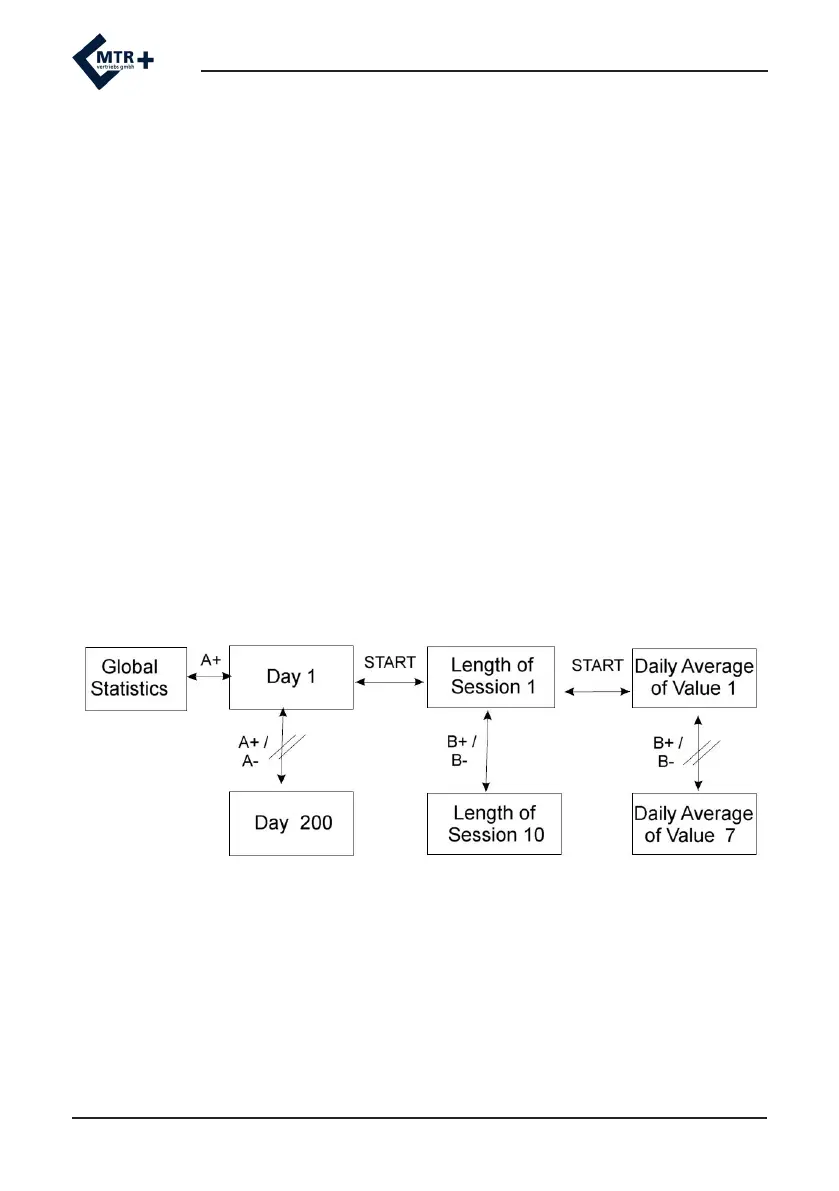
Press the A+ button to access the individual treatment days (1 to 200) with the respective
number of sessions displayed. Press the START button to check the session data for the
selected day. The duration of the session and start time will be displayed. Press B+ to view the
start time for up to 10 consecutive sessions for that day. Press the START button again to view
the accumulated daily data. Press B+ to scroll through the average daily data for EMG, ETS and
STIM. Up to 7 values can be viewed as described on page 51.
Pressing A+ will select the next day


 To Next Page