Only connect the Dolphin CPAP to a three-wire, grounded, hospital-grade
receptacle. The three-conductor plug must be inserted into a properly wired
electrician must install one in accordance with the governing electrical code.
Do not under any circumstances remove the grounding conductor from the
power plug.
Do not use extension cords or adapters of any type. The power cord and plug
must be intact and undamaged.
To ensure patient electrical isolation, connect only to other equipment with
electronically isolated circuits.
Do not connect the Dolphin CPAP to an electrical outlet controlled by a wall
switch or dimmer.
The gas sources must provide pressure within the range of 10 to 60 psi
(0.7 to 4.1 bar). If the gas sources are outside of this range, the device may not
2
.
Setup (CPAP)
Attaching the compressed oxygen will not waste any oxygen. The machine will
not use any compressed oxygen until you increase the FiO
2
value in step 3 in
the
Operation (CPAP)
section.
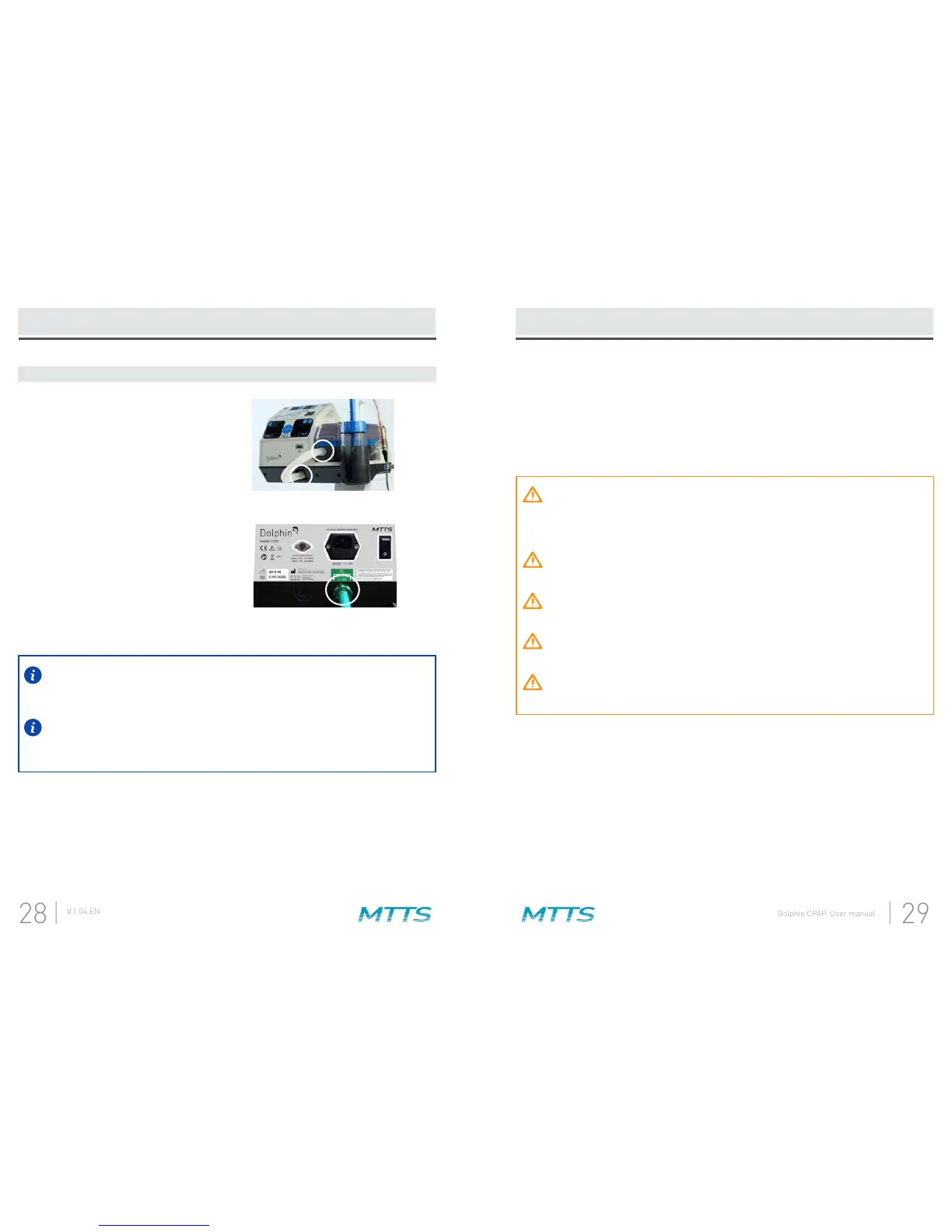
gas output on the control box.
A.
Attach the power cord to the AC power inlet on the back of the Dolphin CPAP.
Locate an AC power source with adequate power rating for the Dolphin CPAP. The
power requirements for the device are listed on the back panel and in the
section.
Connect the power cord to the appropriate AC power source.
C.
D.
E.
Attach the compressed oxygen source
to the CGA 1240 oxygen inlet.
B.


 To Next Page