7.24.2 LOP – Visual inspection
Preconditions
☑ Engine is stopped and starting disabled.
Preparatory steps
1. If READY FOR OPERATION pushbutton is illuminated brightly, press switch briefly.
Result: READY FOR OPERATION pushbutton returns to basic brightness.
2. Switch master power switch to OFF.
3. Disconnect battery in accordance with battery manufacturer's instructions.
Checking housing and internal
assemblies for secure seating
1. Open LOP front door.
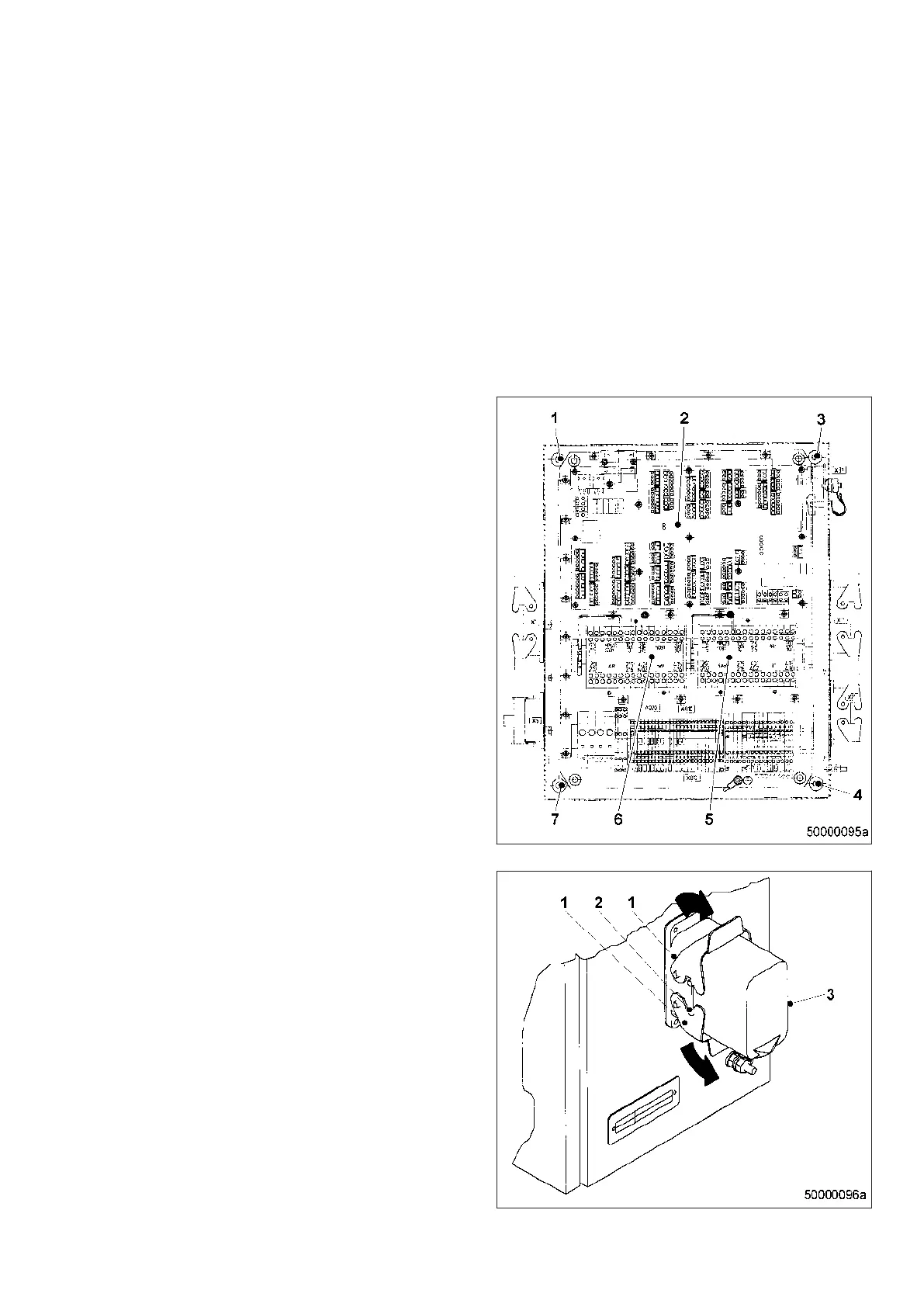
2. Check securing screws (1, 3, 4, 7) for firm
seating. Tighten loose threaded connec‐
tions.
3. Check internal assemblies for firm seating,
this applies in particular to printed circuit
board (2) and PIMs (5, 6). Tighten loose
threaded connections.
4. Close LOP front door.
Checking plug connections
1. Check all connected cables to verify that
the two securing elements (1) are engaged
on the lugs (2) so that the respective male
connector (3) is held firmly in place in the
socket.
2. If this is not the case, press the securing el‐
ements (1) concerned in the direction of the
arrow until they engage noticeably.
MW15407/14E 2012-02 | Task Description | 153
TIM-ID: 0000008868 - 004



 To Next Page