1. Packing List
-----------------------------------------
2. Product Appearance
---------------------------------
3. Download App
--------------------------------------
4. Account Registration
------------------------------
5. Add Camera to App
---------------------------------
5.1 Connect Camera to App -
------------------------
5.2 Camera connect to WiFi -------------------------
6. Camera Installation----------------------------------
7. Battery Management--------------------------------
8. Siren + Light Alarm-----------------------------------
9. Two-Way Audio-------------------------------------
10. Alarm Notification---------------------------------
11. Multi Device Management --------------------------
11.1 Device Share
------------------------------------
12. Storage and encryption-----------------------------P10
13. FAQ------------------------------------------------- P11
4.
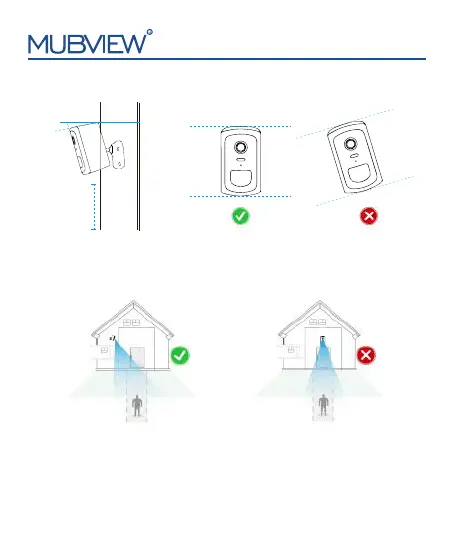
Not suggested installing the camera vertically towards moving objects,
otherwise, it may not detect motion events or cause delay.
1
. The camera should be placed 7-10 ft (2-3m) off the ground.
2. Tilt the camera down at about a 15° angle.
3. Keep the PIR lens level for best results.
6.Camera Installation
support@mubview.com
15°
7-10ft
(2-3m)
6


 To Next Page