HARDWARE INFORMATION
MultiConnect
®
Cell MTC-MNG6 User Guide 11
Descriptions of LEDs
The top panel contains the following LEDs:
Power and Terminal Ready LEDs—The Power LED indicates that DC power is present and the TR LED
indicates when the unit is ready to receive data.
Modem LEDs—Two modem LEDs indicate carrier detection and link status.
Signal LEDs—Three signal LEDs display the signal strength level of the wireless connection.
LED Indicators
POWER Indicates presence of DC power when lit.
TR Serial models only. Terminal Ready. When lit, indicates connection to terminal emulation.
When not lit, indicates no terminal is present.
CD Serial models only.Carrier Detect. Indicates established data connection when lit.
LS Link Status.
OFF — No power to the cellular radio
Continuously lit — SIM is not installed, or no signal is present
Slow blink — Registered
PROG. SIGNAL To use these LEDS, you can control them through the Appzone program which is loaded on
the device at the factory.
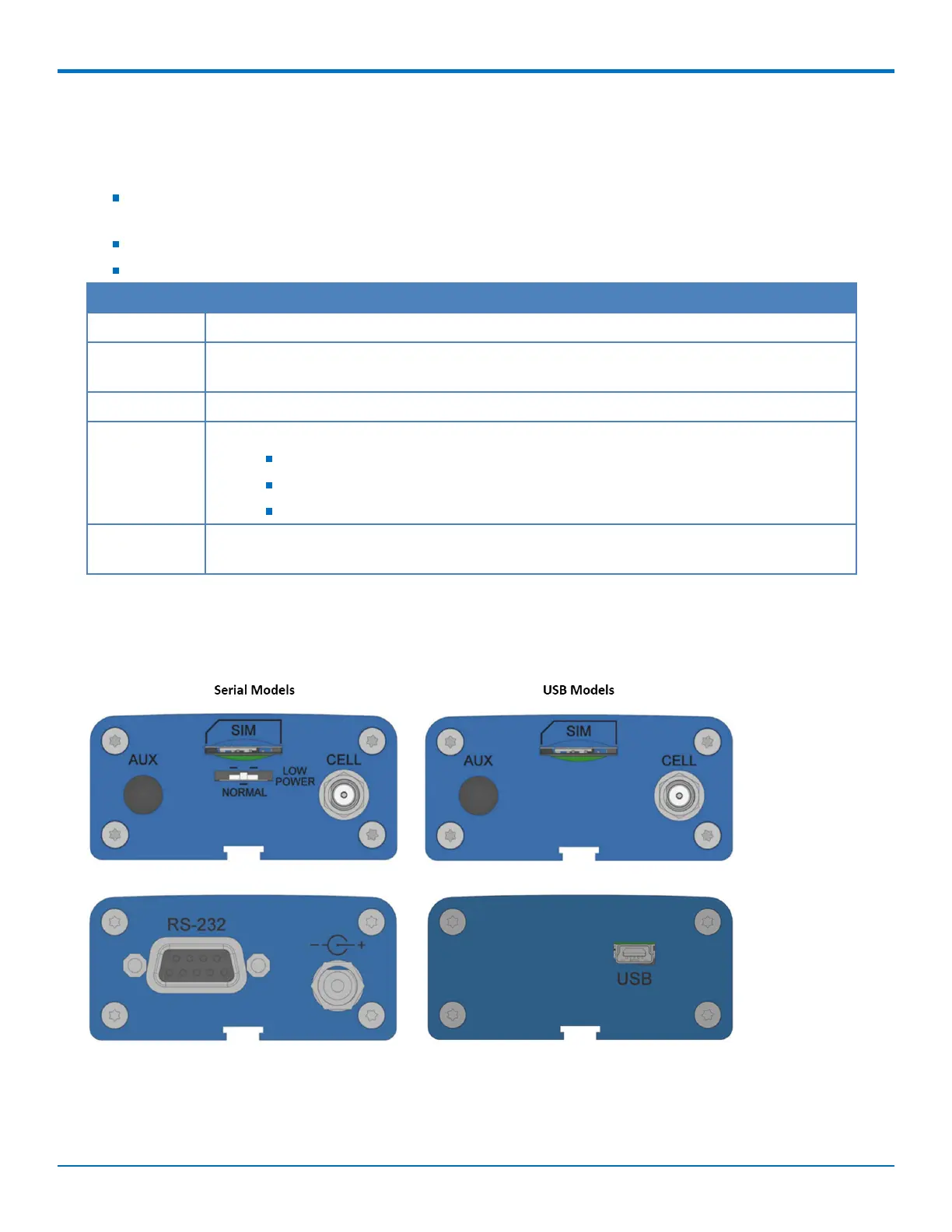
Side Panels
The device has connectors on either side. The figures that follow show the side panels.














 To Next Page