VJ-1324 OPERATION MANUAL 5 Panel setup menu
5-39
NOTE
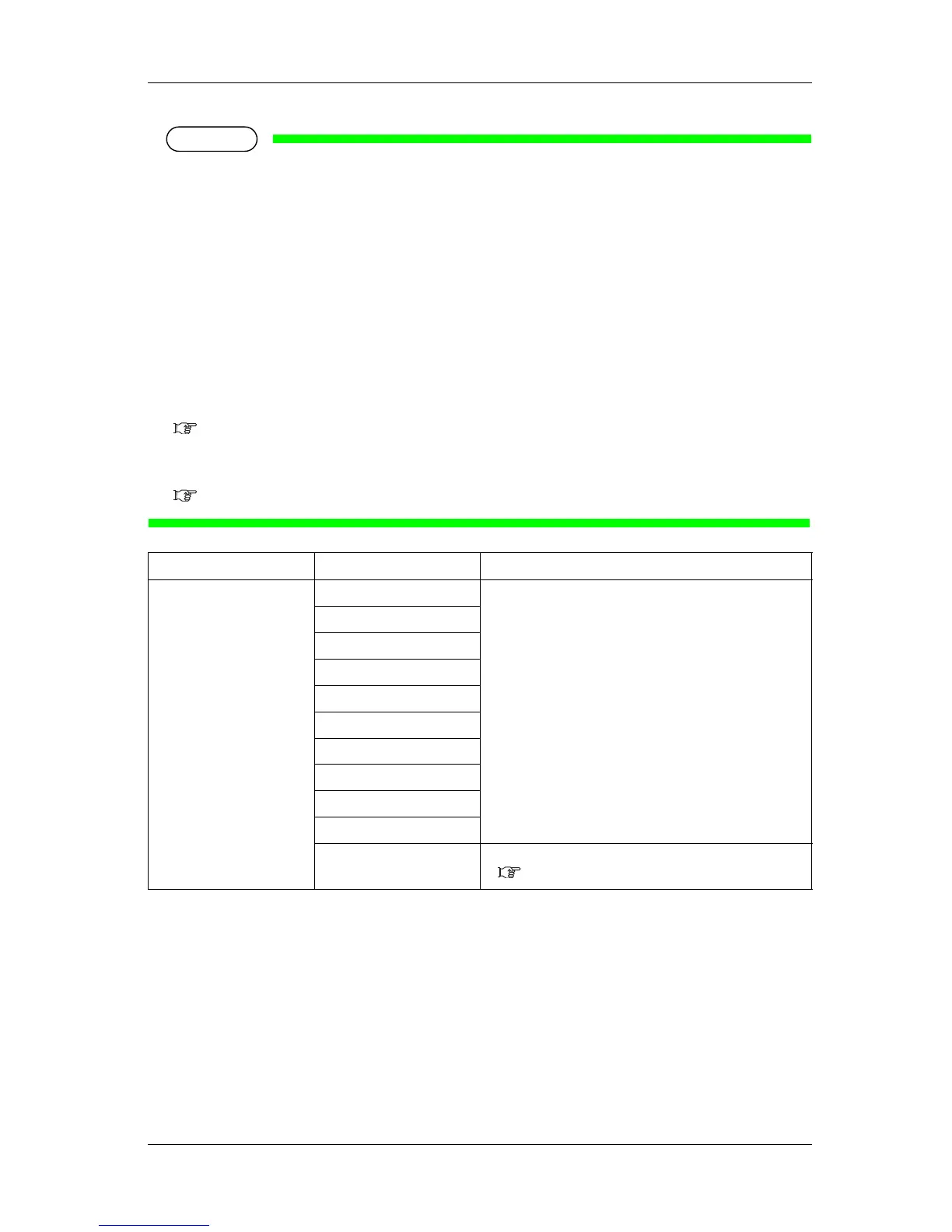
• During Sleep Mode, even if the set amount of time has passed, print-head cleaning is not performed
under the following circumstances.
• The front cover is open.
• Maintenance cover is open.
• The media loading lever is raised.
• The waste fluid tank is full.
• The ink cartridge is empty.
• The ink cartridge has been removed.
• An object other than an appropriate ink cartridge is inserted in the cartridge slot, etc.
When the printer returns to a normal state, head cleaning is restarted, and Sleep Mode continues.
7.2 Error messages
• If one of the above conditions occurs during head cleaning, cleaning is stopped.
When the printer returns to a normal state, head cleaning is restarted.
7.2 Error messages
5.6.2 Sleep Mode Start menu
Activate Sleep Mode
During Sleep Mode, "Restart –> Enter" will be displayed in the operation panel.
During Sleep Mode, pressing [Enter] key will return the printer to normal operation.
Setup item Setting Description
Set Timer 1 hour When the set time has elapsed, the head cleaning starts.
2 hours
3 hours
4 hours
5 hours
<6 hours>
9 hours
12 hours
18 hours
24 hours
— • [Cancel] key: shifts to the previous menu.
5.6 Sleep Mode menu






 To Next Page