VJ-1324 OPERATION MANUAL 4 Handling the printer
4-11
c. After the Initial Print, the media is cut.
4.4.3 Cutting media
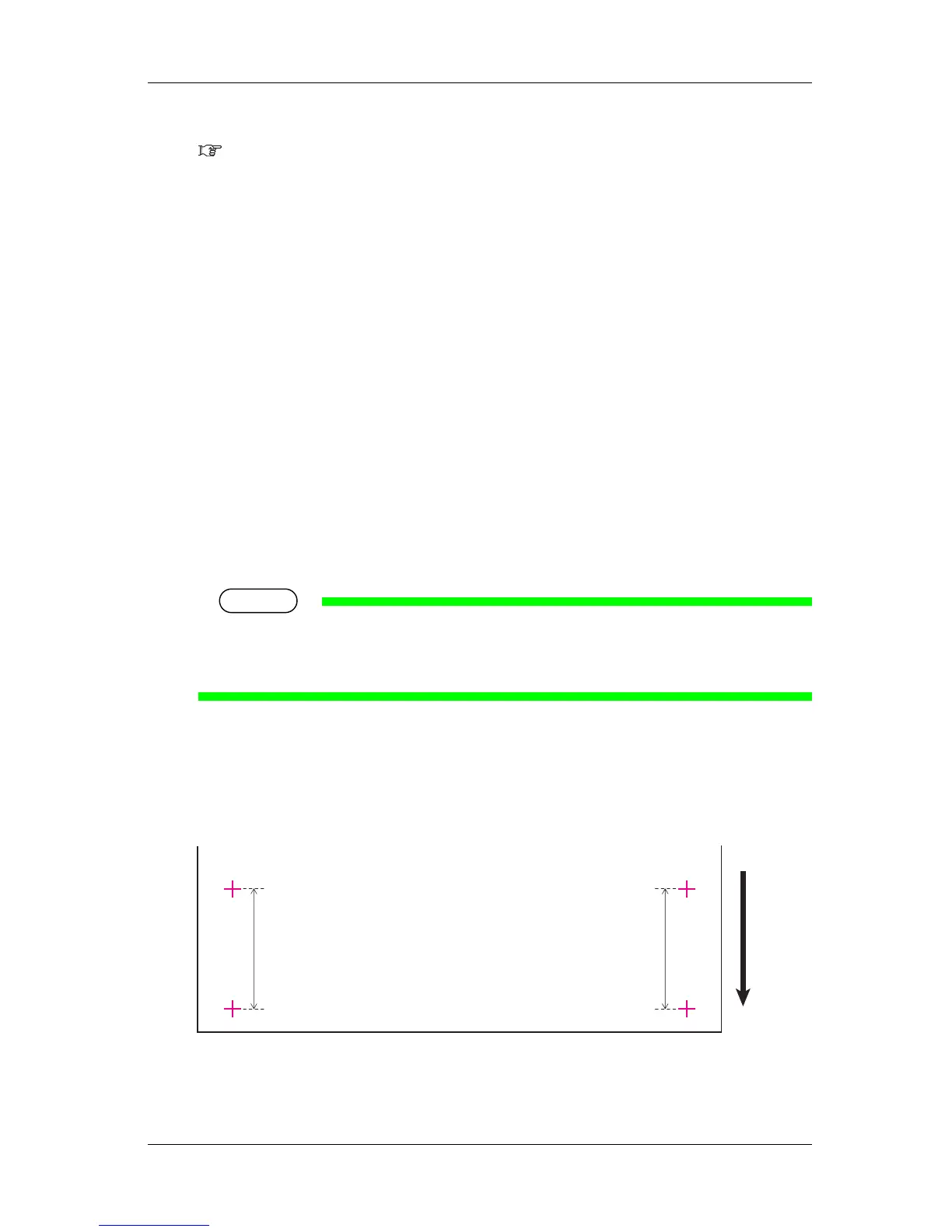
3. Measure the distance between the two pluses in the Initial Print using a ruler.
4. Sets up Initial Adjust Change.
a. Press the [+] key or [–] key on the operation panel to select "PF2: Initial Change".
b. Press the [Enter] key on the operation panel.
• "Init.: 250.0/250 mm" is displayed on the operation panel.
c. Press the [+] key or [-] key on the operation panel and enter the measured value in step 3.
d. Press the [Enter] key on the operation panel.
• The initial adjustment value is saved.
• "PF2: Initial Change" is displayed on the operation panel.
5. Performs Confirm Print.
a. Press the [+] key or [–] key on the operation panel to select "PF3: Confirm Print".
b. Press the [Enter] key on the operation panel.
• "Feed Length: 250 mm" is displayed on the operation panel.
TIP
• The length of media that is fed (feeding length) for Confirm Print is normally set at 250 mm.
• If you increase the feeding length, the accuracy of the Media feed compensation improves.
To change the feeding length, press the [+] key or [-] key on the operation panel and change the set value.
c. Press the [Enter] key on the operation panel.
• "Printing" is displayed on the operation panel.
• Starts Confirm Print.
2
1
1










 To Next Page