16 / 21
BETA series
BETA-user manual-EN-
Obrázek n ejde
zobrazit.
Obrá
zek
nejd
Obrá
zek
nejde
Obrá
zek
nejd
Obrá
zek
nejde
Obrá
zek
nejde
Obrá
zek
nejde
Obrázek n ejde
zobrazit.
Obrázek n ejde
zobrazit.
8.3. H
EATING
M
ODE
The heating function allows the air conditioner to heat the room.
•
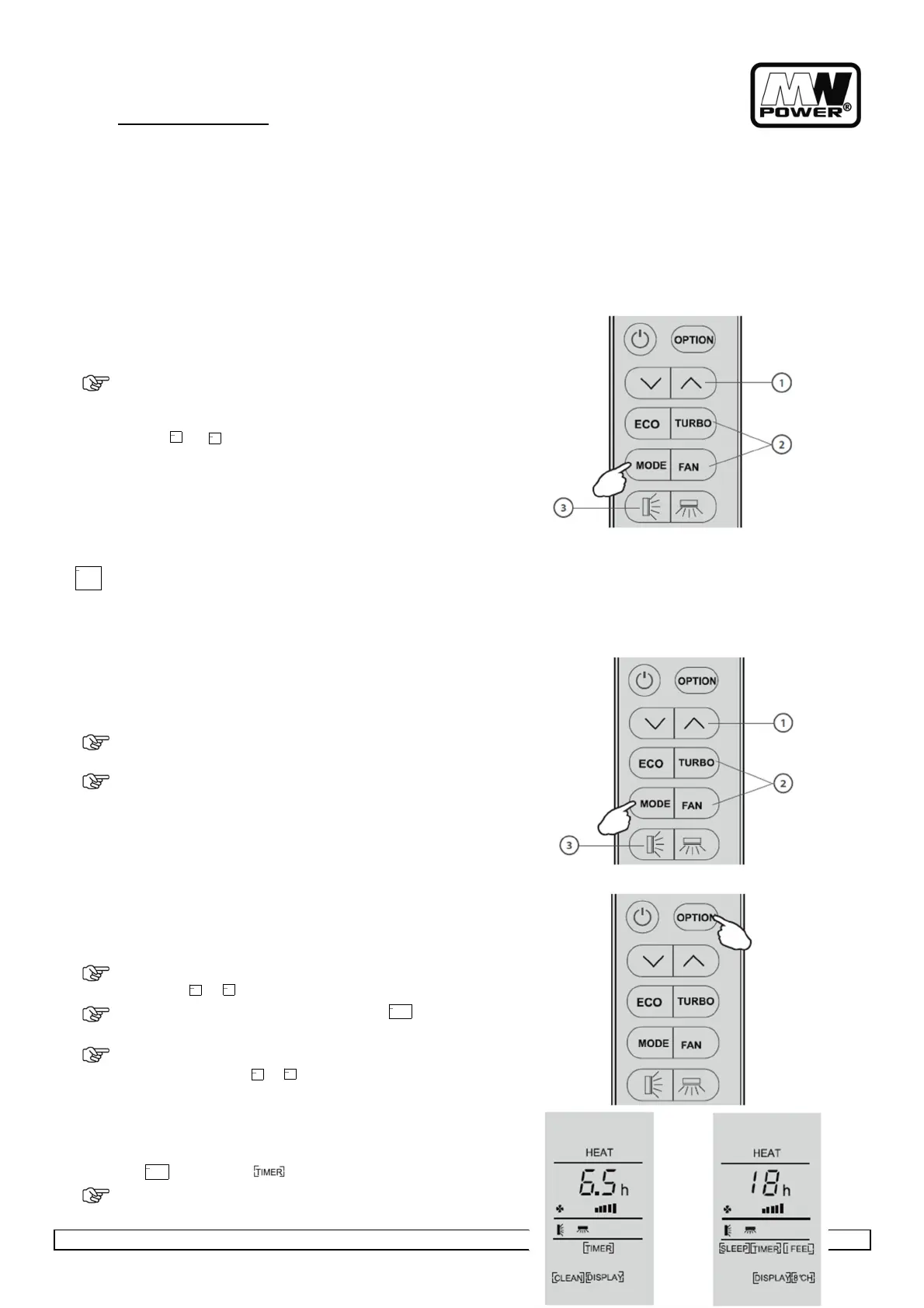
To activate the heating function HEAT, press the (MODE)
button until the symbol HEAT appears on the display.
With the button or set a temperature higher than that of the
room.
To optimize the function of the Air conditioner adjust the
temperature (1), the speed (2) and the direction of the air flow (3),
by pressing the button indicated.
•
In heating operation, the appliance can automatically activate a defrost cycle, which is essential to clean the
frost on the condenser so as to recover its heat exchange function. This procedure usually lasts for 2-10 minutes
during defrosting,infoor unit fan stop operation. After defrosting, it resumes to heating mode automatically.
8.4. F
AN
M
ODE
(
NOT FAN BUTTON
)
The air conditioner works in only ventilation.
•
To set the FAN mod, press (MODE) until FAN appears on the display.
•
To optimize the function of the air conditioner, adjust the
speed (2) and the direction of the air flow (3) by pressing the
buttons indicated.
8.5. T
IMER
F
UNCTION
To set the automatic switch-on /off of the air conditioner.
Timer setting/change/cancel:
•
Press (OPTION) at the first time, select the TIMER by pressing
the button or until symbol TIMER is flashing.
•
Press (OPTION) again, the data symbol like and TIMER will
be flashing.
•
To set the timer or change the timer:
◦
Press the button or to set the expected timer
(Increase or decrease at half-hour intervals) the symbols h
and TIMER both are flashing.
◦
Press (OPTION) or waiting for 5 seconds without any
operation to confirm the timer, the pre-
ffff and symbol will be on the display.
To cancel the timer (if TIMER is on)


 To Next Page