20
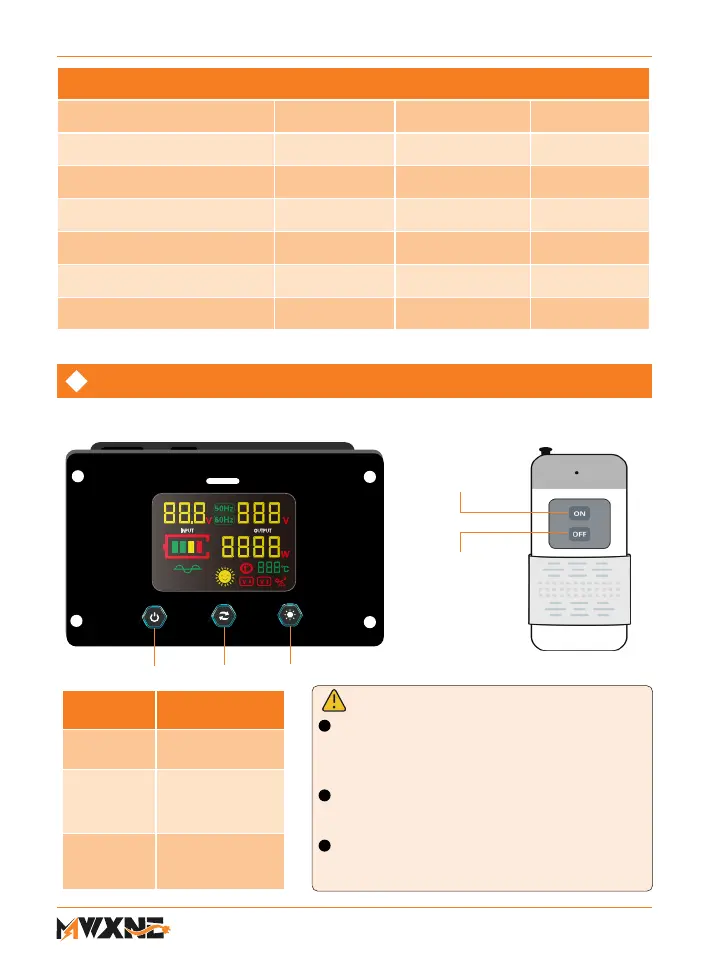
Before using the remote control panel, ensure to
turn on the power switch on the inverter control
panel. Failure to do so will result in the inability to
start the inverter via the wired remote control.
When using the remote switch, the power switch
on the inverter cannot function, but only the remote
switch can turn ON/OFF the inverter.
The wireless remote control unit does not come with
a battery included. Please purchase a 23A battery
separately to enable the remote control to use.
①
②
③
Turn on the
inverter
Turn o the
inverter
RCU
DISPLAY
ON/OFF 110V/120V BACK LIGHT
Remote Control Function
Serial
Number
Function
① Power
switch
turn ON/OFF the
inverter
② AC Switch
AC Output voltage
can be switched
according to demand
(110V or 120V)
③ Back light
Switch
turn ON/OFF
the back light of
remote display
NOTE:
Protection Mechanism Current & Voltage Range Table
Input Voltage
12VDC 24VDC 48VDC
Input Voltage Range
9.5V-15.5V 20V-31.5V 39.5V-60V
Undervoltage Alarm Value
10±0.3V 21±0.3V 40.5±0.5V
Undervoltage Protection Value
9.5±0.3V 20±0.3V 39.5±0.5V
Undervoltage Recovery Value
12±0.3V 24±0.3V 48±0.5V
Overvoltage Protection Value
15.5±0.3V 31.5±0.3V 60±0.5V
Overvoltage Recovery Value 15±0.3V 30±0.3V 58±0.5V
Wired remote control Wireless remote control



 To Next Page