19
4. Drag the icon named MXL Studio Control to your Applications folder
5. Follow the instructions on the screen
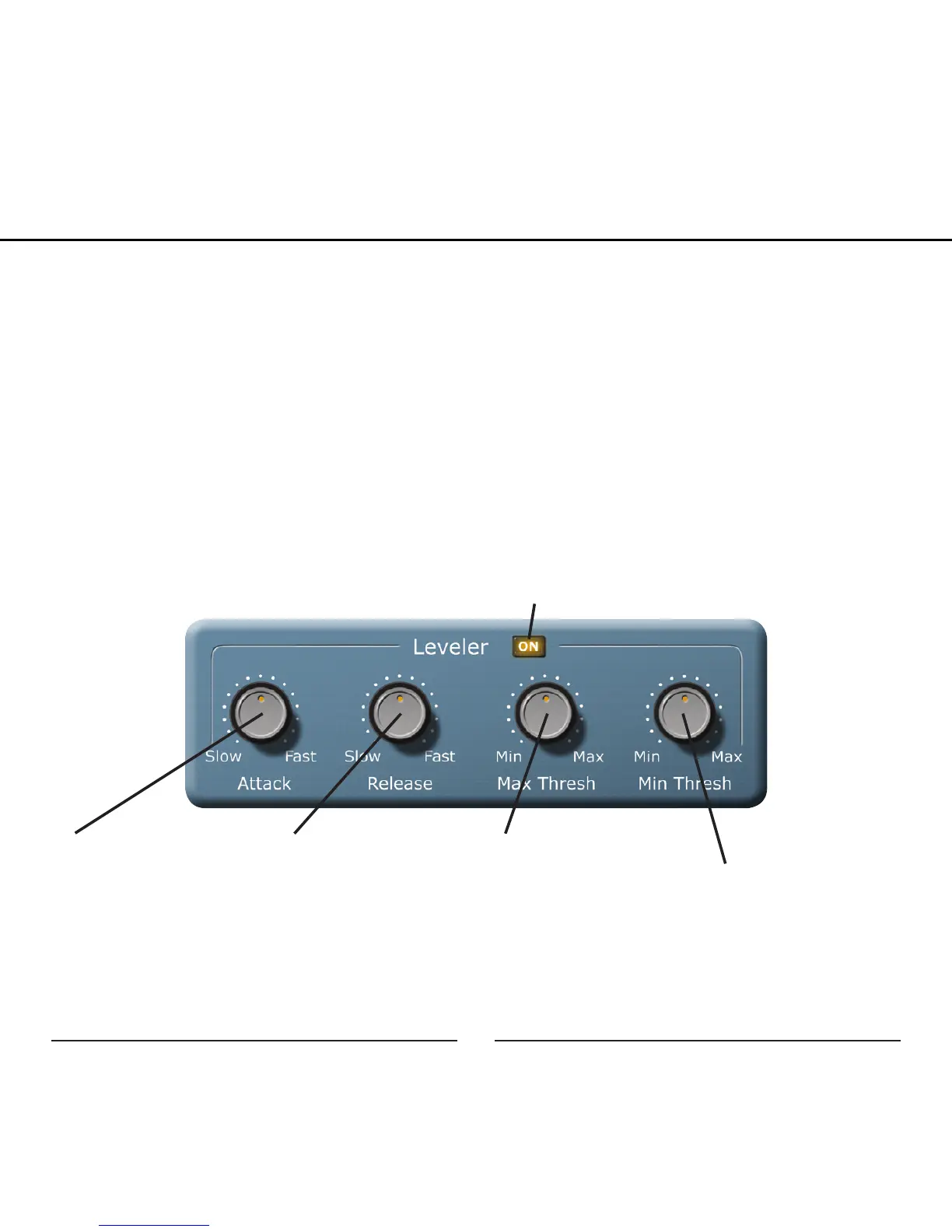
Leveler:
The Leveler automatically adjusts the microphone input gain to limit the dy-
namic range and to prevent clipping. This is accomplished by increasing the
gain when the input level drops below a set Min Threshold and decreasing
the gain when the input level goes over a set Max Threshold. The effects of
the leveler will be heard in the headphone monitoring and will be recorded
on the computer.
Attack: Adjusts the
length of time it takes
for the input signal to
be reduced to the target
level after the signal level
goes above the Max
Threshold.
Release: Adjusts the
length of time it takes
for the input signal to be
increased to the target
level when the signal
level goes below the Min
Threshold.
Max Threshold: When
the input signal is
louder than the set Max
Threshold, the gain will
be reduced.
Min Threshold: When
the input signal is
quieter than the set Min
Threshold, the gain will
be increased.
On/Off: Turns the Leveler on and off
Graphic User Interface


 To Next Page